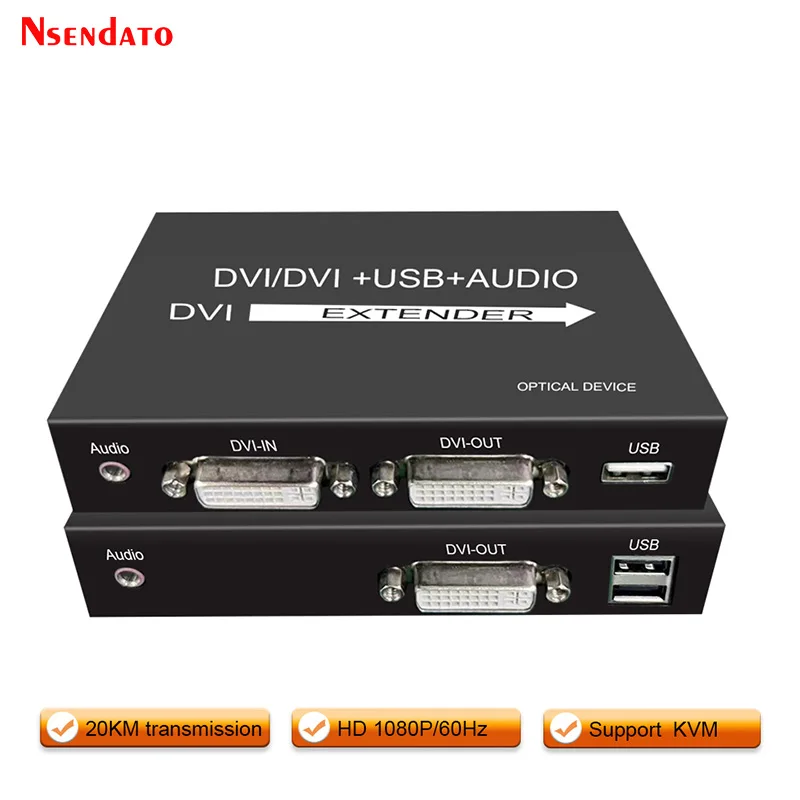
20km DVI Optical USB KVM Extender Over Fiber Optic By SC DVI To USB KVM Optical Monitor Extender Support Keyboard Mouse TV PC
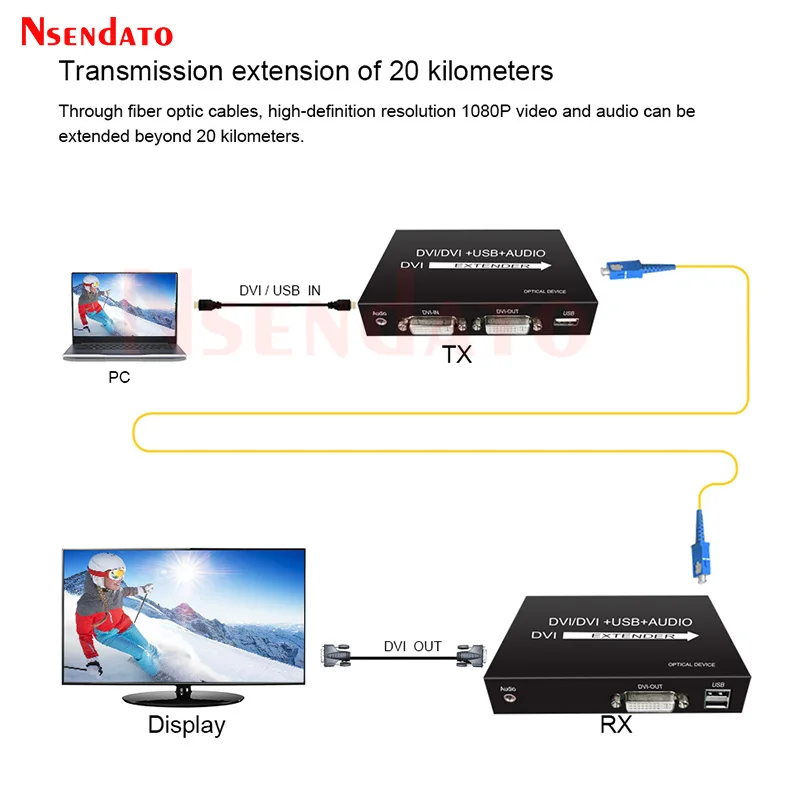
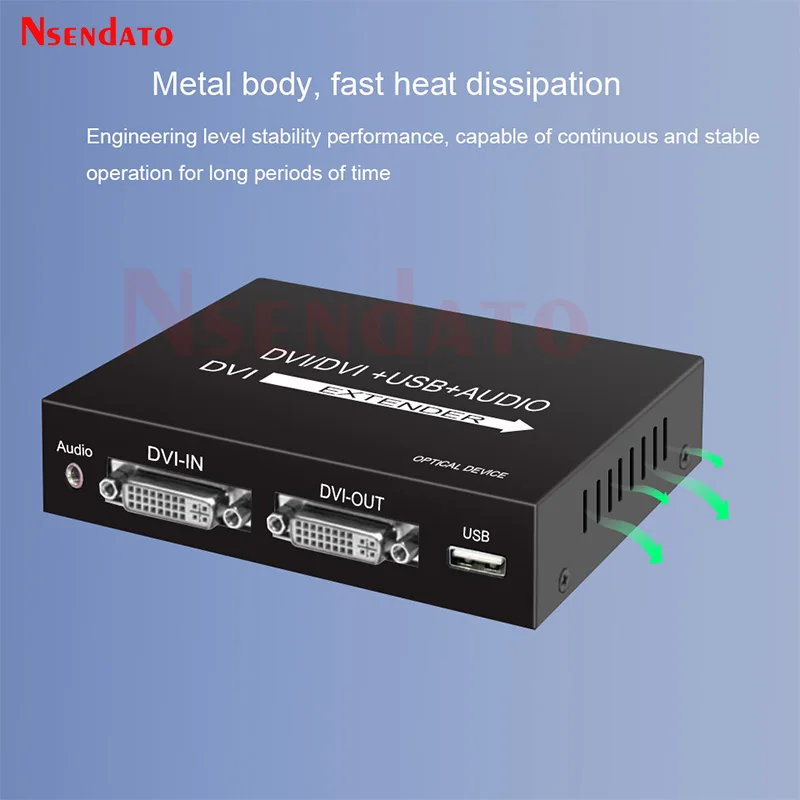
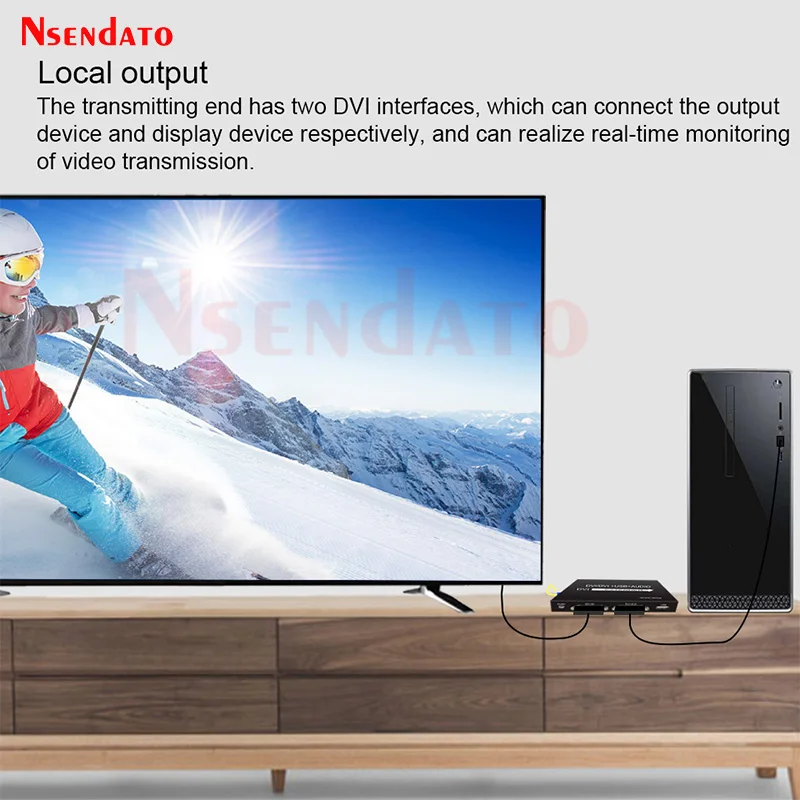
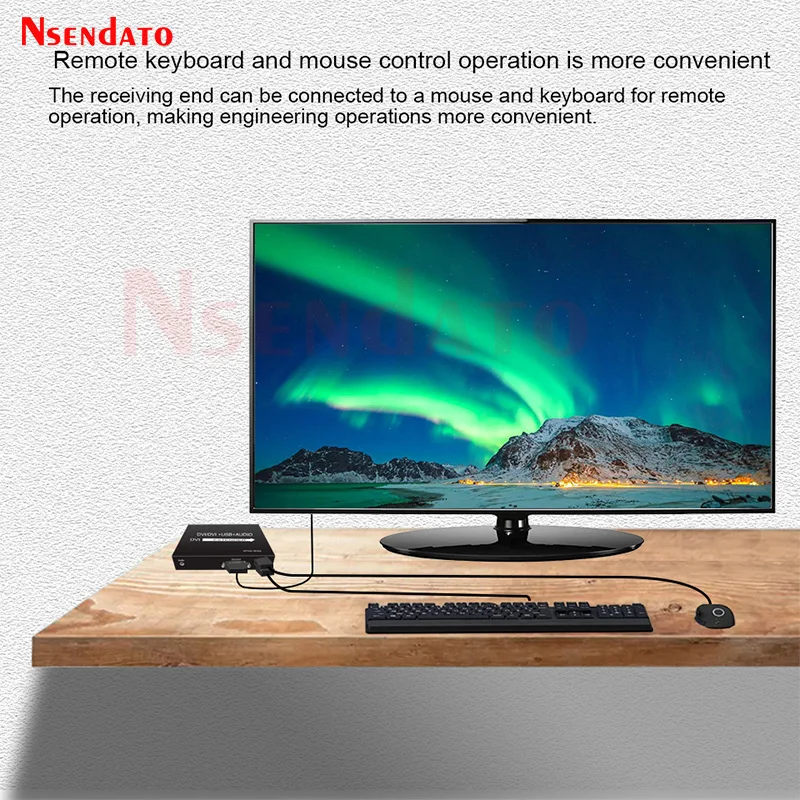
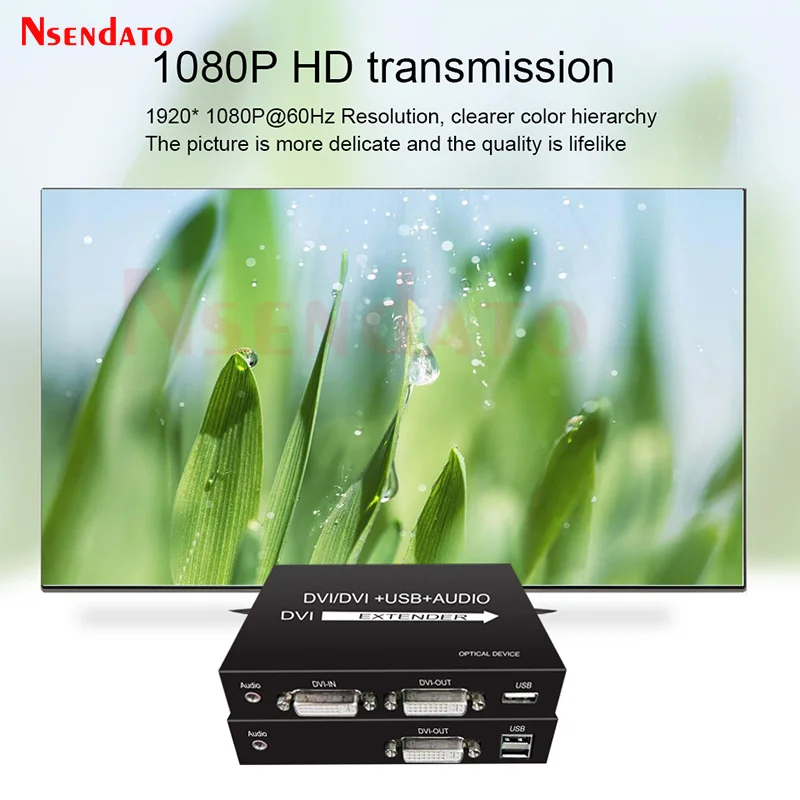
<p><br/><br/></p><br/><p><div class="detailmodule_media"><div class="video-container-1100202129052"><div class="detail-video" id="1100202129052" data-previewurl="https://ae01.alicdn.com/kf/S6e8cc18999544cbf915d701bca5835cao.jpg"></div></div></div><kse:widget data-widget-type="customText" id="22569421" type="custom"></kse:widget></p><br/><p><br/></p><p><span style="font-size:16px;font-family:arial, helvetica, sans-serif">20km DVI Optical USB KVM Extender Over Fiber Optic By SC DVI To USB KVM Optical Monitor Extender Support Keyboard Mouse TV PC</span></p><p></p><div class="detailmodule_html"><div class="detail-desc-decorate-richtext"><div class="detailmodule_html"><div class="detail-desc-decorate-richtext"><div class="detailmodule_html"><div><span style="color:rgb(244, 78, 59);font-size:16px;font-family:arial, helvetica, sans-serif"><strong>Noted:the link have two version ,one with kvm version ,one without kvm version ,but the description is only for kvm version,so please kindly select it according to your request!!!!</strong></span></div><div> </div><div><span style="font-size:16px;font-family:arial, helvetica, sans-serif">Introduction:</span></div><div><span style="font-size:16px;font-family:arial, helvetica, sans-serif">The Nsendato of DVI Fiber optic extender provides extension of DVI signal long distances over one SC/SC simplex fiber optic cable,it supports high resolution up to 1920×1080@60Hz,keyboard and mouse KVM function.The extender can use for a wide range of applications requiring long distance transmission of high resolution with high quality by its good stability and powerful security.</span></div><div> </div><div> </div><div><span style="font-size:16px;font-family:arial, helvetica, sans-serif">Features:</span></div><div><span style="font-size:16px;font-family:arial, helvetica, sans-serif">Simple to install, plug and play</span></div><div><span style="font-size:16px;font-family:arial, helvetica, sans-serif">Uncompressed, no delay transmits DVI video signals over up to 20km single mode fiber optic cable and up to 500m over multimode fiber optic cable,</span></div><div><span style="font-size:16px;font-family:arial, helvetica, sans-serif">Support video resolution up to 1920*1080P@60Hz</span></div><div><span style="font-size:16px;font-family:arial, helvetica, sans-serif">Support keyboard and mouse signal transmissio</span></div><div><span style="font-size:16px;font-family:arial, helvetica, sans-serif">High compatibility,can auto-match source and display device;</span></div><div><span style="font-size:16px;font-family:arial, helvetica, sans-serif">Built-in automatic adjustment system,make the image smooth,clear and stable;</span></div><div><span style="font-size:16px;font-family:arial, helvetica, sans-serif">Built-in ESD protection system.</span></div><div> </div><div> </div><div><span style="font-size:16px;font-family:arial, helvetica, sans-serif">Specification:</span></div><div><span style="font-size:16px;font-family:arial, helvetica, sans-serif">Resolution range:Up to 1920X1080@60Hz</span></div><div><span style="font-size:16px;font-family:arial, helvetica, sans-serif">Connector:Female DVI type</span></div><div><span style="font-size:16px;font-family:arial, helvetica, sans-serif">Optical fiber Interface:Simplex SC connector</span></div><div><span style="font-size:16px;font-family:arial, helvetica, sans-serif">Fiber type:Single-mode</span></div><div><span style="font-size:16px;font-family:arial, helvetica, sans-serif">Wavelength:Single-mode 1310nm/1550nm</span></div><div><span style="font-size:16px;font-family:arial, helvetica, sans-serif">Transmission distance:Single mode fiber:0-20KM, Multimode fiber 0~500meters</span></div><div> </div><div> </div><div> </div><div><span style="font-size:16px;font-family:arial, helvetica, sans-serif">Installation:</span></div><div><span style="font-size:16px;font-family:arial, helvetica, sans-serif">1.Connect the provided DC power supplies to the power socket of the transmitter and the receiver,</span></div><div><span style="font-size:16px;font-family:arial, helvetica, sans-serif">2.Connect an DVI cable between the DVI input port of transmitter and the DVI output port of the video source,</span></div><div><span style="font-size:16px;font-family:arial, helvetica, sans-serif">3.Connect the DVI output port of receiver to the display device with DVI cable,</span></div><div><span style="font-size:16px;font-family:arial, helvetica, sans-serif">4.Connect the transmitter optical port to the receiver optical port using one fiber optic cable.</span></div><div> </div><div> </div><div><span style="font-size:16px;font-family:arial, helvetica, sans-serif">Package List(for KVM Version):</span></div><div><span style="font-size:16px;font-family:arial, helvetica, sans-serif">DVI transmitter</span></div><div><span style="font-size:16px;font-family:arial, helvetica, sans-serif">DVI receiver</span></div><div><span style="font-size:16px;font-family:arial, helvetica, sans-serif">SC/SC singlemode fiber patch cord</span></div><div><span style="font-size:16px;font-family:arial, helvetica, sans-serif">DC Aadapter</span></div><div><span style="font-size:16px;font-family:arial, helvetica, sans-serif">User manual</span></div><div></div><div class="detailmodule_html"><div class="detail-desc-decorate-richtext"><div style="font-size:13px;margin:0px;margin-bottom:0px;margin-top:0px;margin-left:0px;margin-right:0px;padding:0px 0px 0px 0em;padding-bottom:0px;padding-top:0px;padding-right:0px"><div></div><div></div><div></div><div></div><div></div><div></div><div></div><div></div><div></div><div></div><div></div><div></div><div></div><div><br/></div></div></div></div></div></div></div><div><kse:widget data-widget-type="customText" id="1005000001165679" type="custom"></kse:widget></div></div></div><p><br/></p><p><br/></p><br/>
$208.385
$165.05
- Category : Consumer Electronics
- Brand : nsendato_office_store_store Nsendato Office Store Store
Colors
Sizes
-
+

<p><br/><br/></p><br/><p><div class="detailmodule_media"><div class="video-container-1100202129052"><div class="detail-video" id="1100202129052" data-previewurl="https://ae01.alicdn.com/kf/S6e8cc18999544cbf915d701bca5835cao.jpg"></div></div></div><kse:widget data-widget-type="customText" id="22569421" type="custom"></kse:widget></p><br/><p><br/></p><p><span style="font-size:16px;font-family:arial, helvetica, sans-serif">20km DVI Optical USB KVM Extender Over Fiber Optic By SC DVI To USB KVM Optical Monitor Extender Support Keyboard Mouse TV PC</span></p><p></p><div class="detailmodule_html"><div class="detail-desc-decorate-richtext"><div class="detailmodule_html"><div class="detail-desc-decorate-richtext"><div class="detailmodule_html"><div><span style="color:rgb(244, 78, 59);font-size:16px;font-family:arial, helvetica, sans-serif"><strong>Noted:the link have two version ,one with kvm version ,one without kvm version ,but the description is only for kvm version,so please kindly select it according to your request!!!!</strong></span></div><div> </div><div><span style="font-size:16px;font-family:arial, helvetica, sans-serif">Introduction:</span></div><div><span style="font-size:16px;font-family:arial, helvetica, sans-serif">The Nsendato of DVI Fiber optic extender provides extension of DVI signal long distances over one SC/SC simplex fiber optic cable,it supports high resolution up to 1920×1080@60Hz,keyboard and mouse KVM function.The extender can use for a wide range of applications requiring long distance transmission of high resolution with high quality by its good stability and powerful security.</span></div><div> </div><div> </div><div><span style="font-size:16px;font-family:arial, helvetica, sans-serif">Features:</span></div><div><span style="font-size:16px;font-family:arial, helvetica, sans-serif">Simple to install, plug and play</span></div><div><span style="font-size:16px;font-family:arial, helvetica, sans-serif">Uncompressed, no delay transmits DVI video signals over up to 20km single mode fiber optic cable and up to 500m over multimode fiber optic cable,</span></div><div><span style="font-size:16px;font-family:arial, helvetica, sans-serif">Support video resolution up to 1920*1080P@60Hz</span></div><div><span style="font-size:16px;font-family:arial, helvetica, sans-serif">Support keyboard and mouse signal transmissio</span></div><div><span style="font-size:16px;font-family:arial, helvetica, sans-serif">High compatibility,can auto-match source and display device;</span></div><div><span style="font-size:16px;font-family:arial, helvetica, sans-serif">Built-in automatic adjustment system,make the image smooth,clear and stable;</span></div><div><span style="font-size:16px;font-family:arial, helvetica, sans-serif">Built-in ESD protection system.</span></div><div> </div><div> </div><div><span style="font-size:16px;font-family:arial, helvetica, sans-serif">Specification:</span></div><div><span style="font-size:16px;font-family:arial, helvetica, sans-serif">Resolution range:Up to 1920X1080@60Hz</span></div><div><span style="font-size:16px;font-family:arial, helvetica, sans-serif">Connector:Female DVI type</span></div><div><span style="font-size:16px;font-family:arial, helvetica, sans-serif">Optical fiber Interface:Simplex SC connector</span></div><div><span style="font-size:16px;font-family:arial, helvetica, sans-serif">Fiber type:Single-mode</span></div><div><span style="font-size:16px;font-family:arial, helvetica, sans-serif">Wavelength:Single-mode 1310nm/1550nm</span></div><div><span style="font-size:16px;font-family:arial, helvetica, sans-serif">Transmission distance:Single mode fiber:0-20KM, Multimode fiber 0~500meters</span></div><div> </div><div> </div><div> </div><div><span style="font-size:16px;font-family:arial, helvetica, sans-serif">Installation:</span></div><div><span style="font-size:16px;font-family:arial, helvetica, sans-serif">1.Connect the provided DC power supplies to the power socket of the transmitter and the receiver,</span></div><div><span style="font-size:16px;font-family:arial, helvetica, sans-serif">2.Connect an DVI cable between the DVI input port of transmitter and the DVI output port of the video source,</span></div><div><span style="font-size:16px;font-family:arial, helvetica, sans-serif">3.Connect the DVI output port of receiver to the display device with DVI cable,</span></div><div><span style="font-size:16px;font-family:arial, helvetica, sans-serif">4.Connect the transmitter optical port to the receiver optical port using one fiber optic cable.</span></div><div> </div><div> </div><div><span style="font-size:16px;font-family:arial, helvetica, sans-serif">Package List(for KVM Version):</span></div><div><span style="font-size:16px;font-family:arial, helvetica, sans-serif">DVI transmitter</span></div><div><span style="font-size:16px;font-family:arial, helvetica, sans-serif">DVI receiver</span></div><div><span style="font-size:16px;font-family:arial, helvetica, sans-serif">SC/SC singlemode fiber patch cord</span></div><div><span style="font-size:16px;font-family:arial, helvetica, sans-serif">DC Aadapter</span></div><div><span style="font-size:16px;font-family:arial, helvetica, sans-serif">User manual</span></div><div></div><div class="detailmodule_html"><div class="detail-desc-decorate-richtext"><div style="font-size:13px;margin:0px;margin-bottom:0px;margin-top:0px;margin-left:0px;margin-right:0px;padding:0px 0px 0px 0em;padding-bottom:0px;padding-top:0px;padding-right:0px"><div></div><div></div><div></div><div></div><div></div><div></div><div></div><div></div><div></div><div></div><div></div><div></div><div></div><div><br/></div></div></div></div></div></div></div><div><kse:widget data-widget-type="customText" id="1005000001165679" type="custom"></kse:widget></div></div></div><p><br/></p><p><br/></p><br/>
Related Product
Browse The Collection of Top Products.