


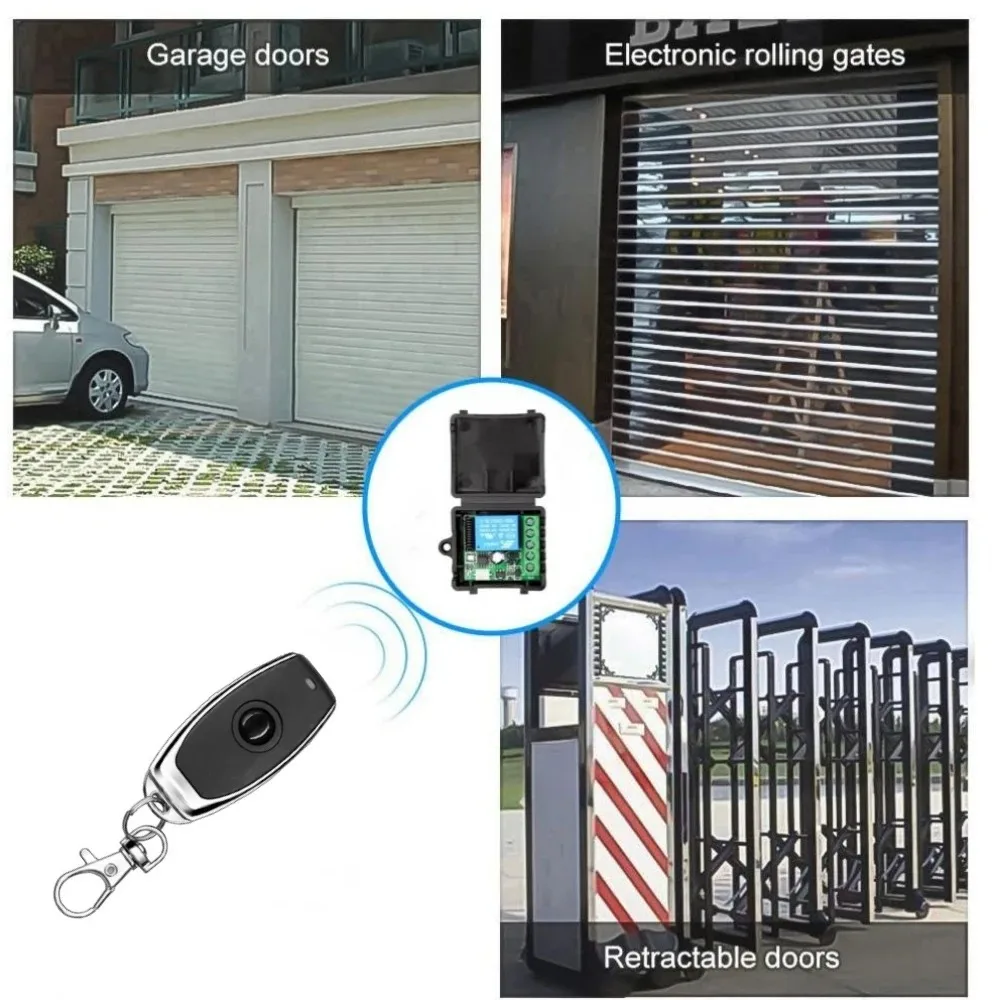
433 Mhz Universal Gate Remote Control Switch DC 12V 10A Relay Receiver Module RF Transmitter Control for Gate LED Garage Door
<div class="detailmodule_html"><div class="detail-desc-decorate-richtext"><h3 style="text-align:left" align="left"><span style="font-size:16px">Input Voltage: 12 V, RF working mode: Superheterodyne</span></h3></div></div><h3><span style="font-size:16px">• Receiver sensitivity: > 97 dbm</span></h3><h3><span style="font-size:16px">• Transmitting distance:> 100 m ( open space)</span></h3><h3><span style="font-size:16px">• Decoding mode: MCU software decoding</span></h3><h3><span style="font-size:16px">• Remote storage: 20</span></h3><h3><span style="font-size:16px">• Support remote type: EV1527 learning code</span></h3><h3><span style="font-size:16px">• Working mode: Momentary, toggle, latching time delay (5s ,10s ,15s )</span></h3><h3><span style="font-size:16px">• Output terminal: NO , NC , COM</span></h3><h3><span style="font-size:16px">• Remote control battery: 2 x 3 V CR2016 button batteries</span></h3><h3><span style="font-size:16px">Note: Maximum input power is 250 V</span></h3><br/><h2 style="font-weight:400;letter-spacing:normal;text-align:start;white-space:normal;color:rgb(34, 34, 34);margin:0px;margin-bottom:0px;margin-top:0px;margin-left:0px;margin-right:0px;padding:0px;padding-bottom:0px;padding-top:0px;padding-left:0px;padding-right:0px;box-sizing:border-box" align="start"><span style="color:rgb(34, 34, 34);font-size:18px"><strong>Operating Function Description</strong></span><br/><span style="color:rgb(34, 34, 34);font-size:18px">(1) Code learning operation<br/>Inching learning code: After the controller is connected to the power, briefly press the learning code button (the light flashes once), and then long press the remote control button for 3 seconds. The controller indicator light flashes to indicate successful learning code, and the working mode is inching mode.<br/>Self locking code learning: After the controller is connected to the power, briefly press the code learning button twice (once the light flashes), and then long press the remote control button for 3 seconds. The controller indicator light flashes to indicate successful code learning, and the working mode is automatic mode.<br/>Interlocking code learning: After the controller is connected to the power, briefly press the code learning button three times (press once to flash the light once), and then long press and hold one button on the remote control for 3 seconds (such as key A). The controller indicator light flashes and remains on, and then press another button on the remote control (such as key B). The controller indicator light flashes to indicate successful code learning, and the working mode is interlocking mode (such as AB interlocking).<br/>Delay for 5 seconds to learn code: After the controller is connected to the power, briefly press the learn code button four times (once the light flashes), and then long press the remote control button for 3 seconds. The controller indicator light flashes to indicate successful code learning, and the working mode is automatic shutdown mode with a delay of 5 seconds.<br/>Delay of 10 seconds for learning code: After the controller is connected to the power, briefly press the learn code button five times (once the light flashes), and then long press the remote control button for 3 seconds. The controller indicator light flashes to indicate successful learning code, and the working mode is automatic shutdown mode with a delay of 10 seconds.<br/>Delay for 15 seconds to learn code: After the controller is connected to the power, briefly press the learn code button six times (once the light flashes), and then long press the remote control button for 3 seconds. The controller indicator light flashes to indicate successful code learning, and the working mode is automatic shutdown mode with a delay of 15 seconds.<br/>Delayed code learning by 20 seconds: After the controller is connected to the power, briefly press the code learning button seven times (once the light flashes), and then long press the remote control button for 3 seconds. The controller indicator light flashes to indicate successful code learning, and the working mode is automatic shutdown mode with a delay of 20 seconds.<br/>(2) Clear code operation<br/>Press and hold the learn code button on the controller for 5 seconds until the indicator light flashes, indicating successful code clearing.<br/>(3) Clear code operation<br/>Jog mode: After learning the code for a single button on the remote control, press the button relay to engage, and release the button relay to disconnect.<br/>Self locking mode: After learning the code for a single button on the remote control, press the button relay once to engage and then press the button relay again to disconnect.<br/>Interlock mode: After learning the codes for the two buttons on the remote control, press the A key to activate the relay, and press the B key to deactivate the relay.<br/>Delay mode: After learning the code for a single button on the remote control, press the button relay to engage, and after the delay, it will automatically disconnect.</span></h2><p style="font-weight:400;letter-spacing:normal;text-align:start;white-space:normal;color:rgb(34, 34, 34);margin:0px;margin-bottom:0px;margin-top:0px;margin-left:0px;margin-right:0px;padding:0px;padding-bottom:0px;padding-top:0px;padding-left:0px;padding-right:0px;box-sizing:border-box" align="start"><br/><br/><br/><br/><br/><br/><br/></p>
$5.63
$4.1
- Category : Consumer Electronics
- Brand : wt_global_online_store WT Global Online Store
Colors
-
+

<div class="detailmodule_html"><div class="detail-desc-decorate-richtext"><h3 style="text-align:left" align="left"><span style="font-size:16px">Input Voltage: 12 V, RF working mode: Superheterodyne</span></h3></div></div><h3><span style="font-size:16px">• Receiver sensitivity: > 97 dbm</span></h3><h3><span style="font-size:16px">• Transmitting distance:> 100 m ( open space)</span></h3><h3><span style="font-size:16px">• Decoding mode: MCU software decoding</span></h3><h3><span style="font-size:16px">• Remote storage: 20</span></h3><h3><span style="font-size:16px">• Support remote type: EV1527 learning code</span></h3><h3><span style="font-size:16px">• Working mode: Momentary, toggle, latching time delay (5s ,10s ,15s )</span></h3><h3><span style="font-size:16px">• Output terminal: NO , NC , COM</span></h3><h3><span style="font-size:16px">• Remote control battery: 2 x 3 V CR2016 button batteries</span></h3><h3><span style="font-size:16px">Note: Maximum input power is 250 V</span></h3><br/><h2 style="font-weight:400;letter-spacing:normal;text-align:start;white-space:normal;color:rgb(34, 34, 34);margin:0px;margin-bottom:0px;margin-top:0px;margin-left:0px;margin-right:0px;padding:0px;padding-bottom:0px;padding-top:0px;padding-left:0px;padding-right:0px;box-sizing:border-box" align="start"><span style="color:rgb(34, 34, 34);font-size:18px"><strong>Operating Function Description</strong></span><br/><span style="color:rgb(34, 34, 34);font-size:18px">(1) Code learning operation<br/>Inching learning code: After the controller is connected to the power, briefly press the learning code button (the light flashes once), and then long press the remote control button for 3 seconds. The controller indicator light flashes to indicate successful learning code, and the working mode is inching mode.<br/>Self locking code learning: After the controller is connected to the power, briefly press the code learning button twice (once the light flashes), and then long press the remote control button for 3 seconds. The controller indicator light flashes to indicate successful code learning, and the working mode is automatic mode.<br/>Interlocking code learning: After the controller is connected to the power, briefly press the code learning button three times (press once to flash the light once), and then long press and hold one button on the remote control for 3 seconds (such as key A). The controller indicator light flashes and remains on, and then press another button on the remote control (such as key B). The controller indicator light flashes to indicate successful code learning, and the working mode is interlocking mode (such as AB interlocking).<br/>Delay for 5 seconds to learn code: After the controller is connected to the power, briefly press the learn code button four times (once the light flashes), and then long press the remote control button for 3 seconds. The controller indicator light flashes to indicate successful code learning, and the working mode is automatic shutdown mode with a delay of 5 seconds.<br/>Delay of 10 seconds for learning code: After the controller is connected to the power, briefly press the learn code button five times (once the light flashes), and then long press the remote control button for 3 seconds. The controller indicator light flashes to indicate successful learning code, and the working mode is automatic shutdown mode with a delay of 10 seconds.<br/>Delay for 15 seconds to learn code: After the controller is connected to the power, briefly press the learn code button six times (once the light flashes), and then long press the remote control button for 3 seconds. The controller indicator light flashes to indicate successful code learning, and the working mode is automatic shutdown mode with a delay of 15 seconds.<br/>Delayed code learning by 20 seconds: After the controller is connected to the power, briefly press the code learning button seven times (once the light flashes), and then long press the remote control button for 3 seconds. The controller indicator light flashes to indicate successful code learning, and the working mode is automatic shutdown mode with a delay of 20 seconds.<br/>(2) Clear code operation<br/>Press and hold the learn code button on the controller for 5 seconds until the indicator light flashes, indicating successful code clearing.<br/>(3) Clear code operation<br/>Jog mode: After learning the code for a single button on the remote control, press the button relay to engage, and release the button relay to disconnect.<br/>Self locking mode: After learning the code for a single button on the remote control, press the button relay once to engage and then press the button relay again to disconnect.<br/>Interlock mode: After learning the codes for the two buttons on the remote control, press the A key to activate the relay, and press the B key to deactivate the relay.<br/>Delay mode: After learning the code for a single button on the remote control, press the button relay to engage, and after the delay, it will automatically disconnect.</span></h2><p style="font-weight:400;letter-spacing:normal;text-align:start;white-space:normal;color:rgb(34, 34, 34);margin:0px;margin-bottom:0px;margin-top:0px;margin-left:0px;margin-right:0px;padding:0px;padding-bottom:0px;padding-top:0px;padding-left:0px;padding-right:0px;box-sizing:border-box" align="start"><br/><br/><br/><br/><br/><br/><br/></p>
Related Product
Browse The Collection of Top Products.


Leather Dual Camera Strap Adjustable Shoulder Harness
$47.84
$95.56


Black Multi Microphone Rack for Wired and Wireless Mics
$29.09
$57.28


Waterproof Solar Panel Charger for Video Doorbell
$22.58
$29.44


Silicone Camera Cover with Lanyard for Digital Cameras
$14.72
$19.42


HDMI to Displayport Converter Cable 4K 30Hz for TV
$11.29
$14.72


Wireless Game Controller for Nintendo Wii U Console
$21.74
$29.03


