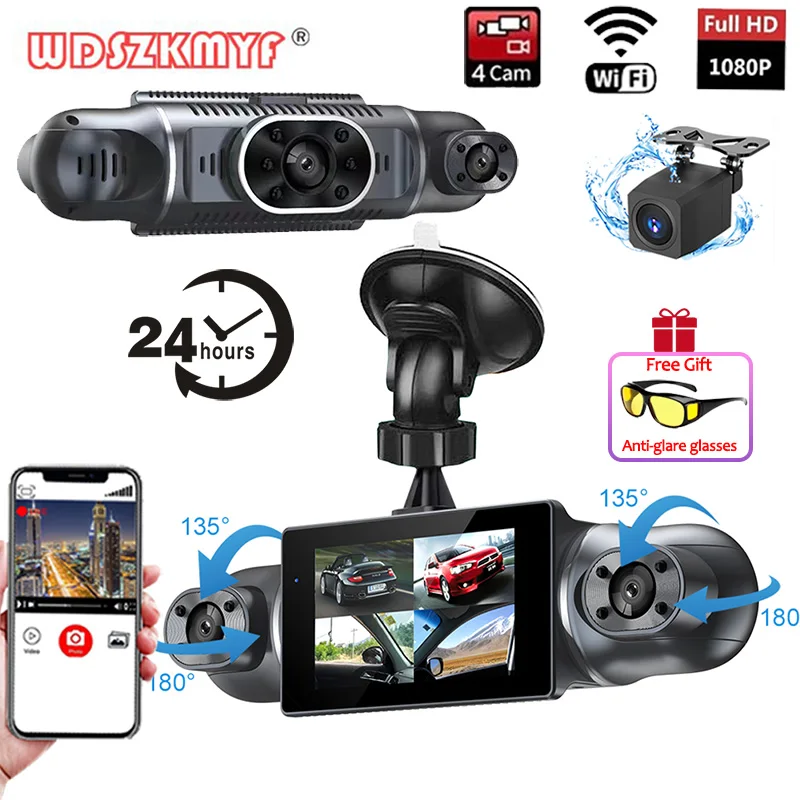
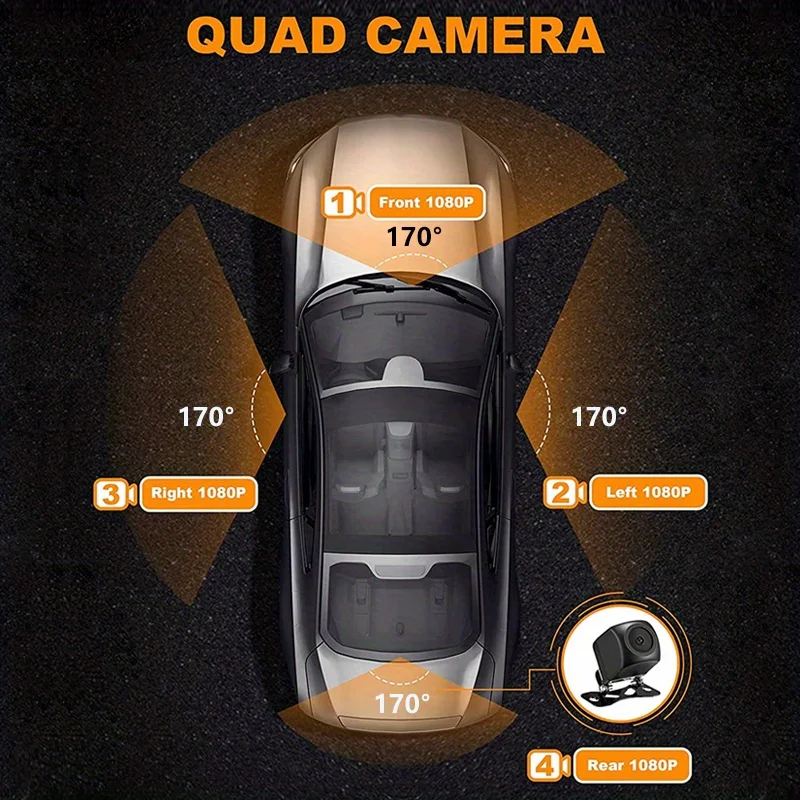

4Channel Dash Cam 4*1080P Car DVR 4 Lens WiFi APP dashcam 24h Parking Monitor Night Vision Rotatable Len camera car recorder
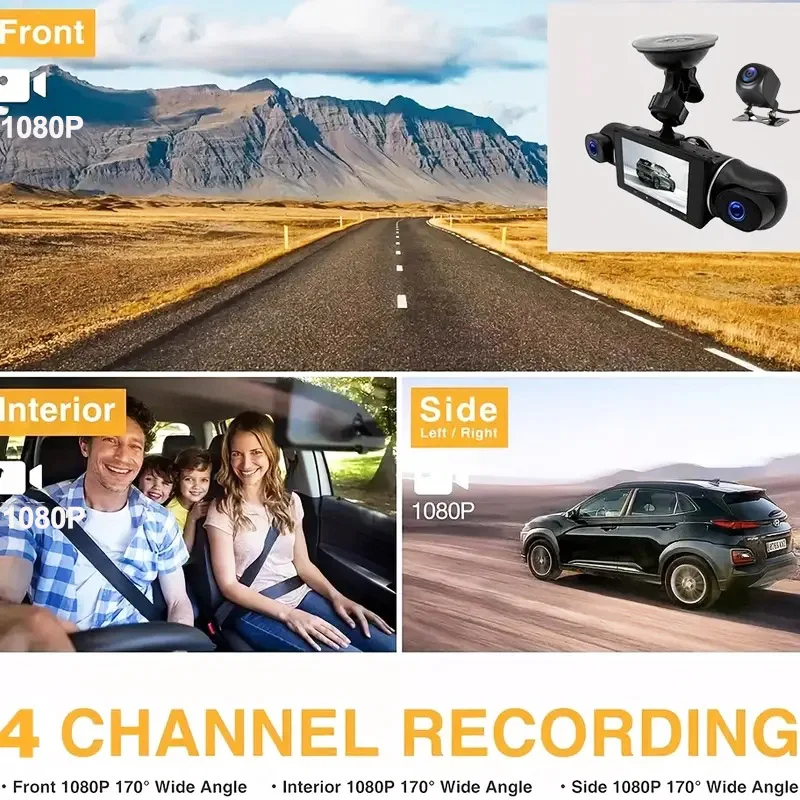
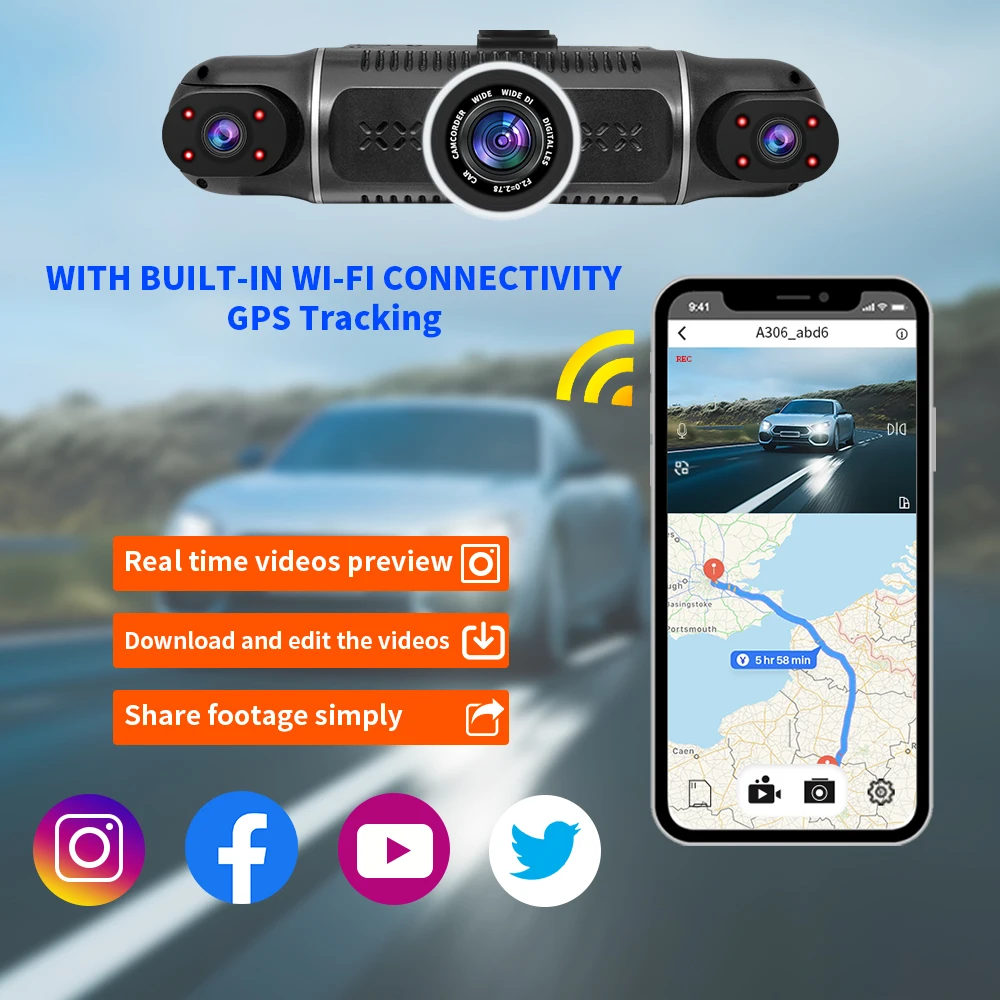
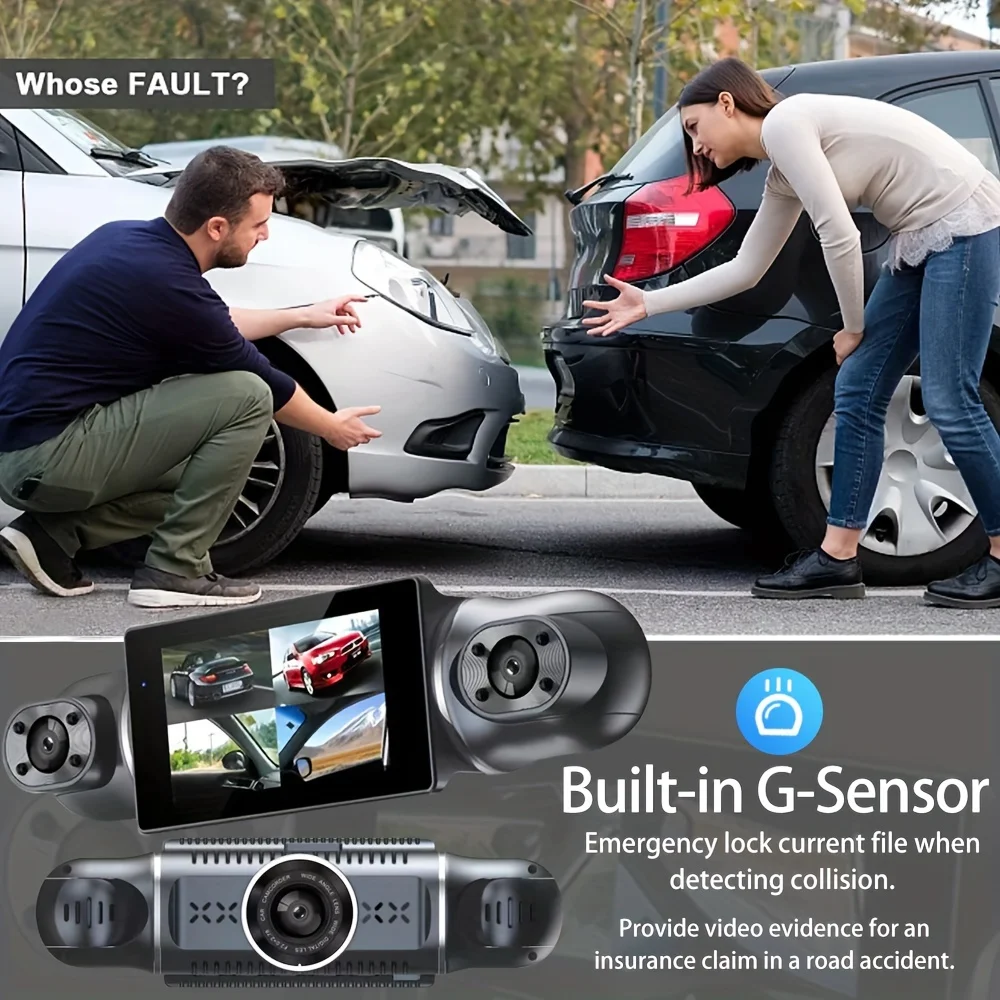
<div class="detailmodule_text-image"><p style="font-size:24px;font-weight:bold">Dear customers, we have an option to purchase 24 hours Hardware kit cable, if you need 24H parking guard function you can add the purchase.</p><p style="font-size:24px">⭐Good news, now you can get a free gift one with your order when you buy the car recorder, it is anti-glare glasses, which can make you not to be affected by the glare or reflective light to your vision when driving, hurry up and place your order!</p><div></div></div><div class="detailmodule_text"><p style="font-size:24px;font-weight:bold">4 Channels 1080P Front & Rear & Inside Camera</p></div><div class="detailmodule_text"><p style="font-size:24px">Camera:1080P+1080P+1080P+1080P</p></div><div class="detailmodule_image"></div><div class="detailmodule_text"><p style="font-size:24px;font-weight:bold">Super Night Vision</p></div><div class="detailmodule_image"></div><div class="detailmodule_text"><p style="font-size:24px;font-weight:bold">Built-in Wi-Fi</p></div><div class="detailmodule_text"><p style="font-size:24px">Allows you to control,view and download video on your smartphone APP<br/><br/><br/>Connect WIFI:<br/>1. Scan the manual to download APP.<br/>2. Long press button " ▶ " to send WIFI signal.<br/>3.Connect wifi password 12345678.<br/>4. Finished, you can APP control this device, you can set up the device on your phone, download the video or share the video to social software.</p></div><div class="detailmodule_image"></div><div class="detailmodule_text"><p style="font-size:24px;font-weight:bold">360 ° LENS ROTATION</p></div><div class="detailmodule_text"><p style="font-size:24px">3Inch Camera 360° interior rotatable lens, with no dead angles inside and outside the car, providing panoramic view.</p></div><div class="detailmodule_image"></div><div class="detailmodule_text"><p style="font-size:24px;font-weight:bold">Reverse image</p></div><div class="detailmodule_text"><p style="font-size:24px">When hanging in the "R" gear, the screen will automatically switch Reverse image, and the accurate inverted auxiliary line provides you with better parking prediction.</p></div><div class="detailmodule_image"></div><div class="detailmodule_text"><p style="font-size:24px;font-weight:bold">24-Hour Parking Monitoring</p></div><div class="detailmodule_text"><p style="font-size:24px">Built-in G-sensor activates automatic recording when a sudden shake or collision is detected. When emergency video is recorded, a voice will alert you when you return to the car. In addition,supports time-lapse recording, which maximizes storage usage and ensures that no moments of evidence are missed.</p></div><div class="detailmodule_text"><p style="font-size:24px;color:rgb(255, 0, 0)">Friendly reminder: parking monitoring needs to be configured with a special buck cable for use, otherwise 24-hour monitoring is not possible</p></div><div class="detailmodule_image"></div><div class="detailmodule_text"><p style="font-size:24px;font-weight:bold">Built-in G-sensor</p></div><div class="detailmodule_text"><p style="font-size:24px">When your car is subjected to an impact or other emergency,the G sensor is triggered, so that the recorder immediately records and locks the video.</p></div><div class="detailmodule_image"></div><div class="detailmodule_text"><p style="font-size:24px;font-weight:bold">Loop- Cycle Recording</p></div><div class="detailmodule_text"><p style="font-size:24px">When the TF card is full,it will automatically delete former video and keep recording all the time</p></div><div class="detailmodule_image"></div><div class="detailmodule_text"><p style="font-size:24px;font-weight:bold">Product details</p></div><div class="detailmodule_image"></div><div class="detailmodule_text"><p style="font-size:24px;font-weight:bold">Installation Diagram</p></div><div class="detailmodule_text"><p style="font-size:24px">1.Secure the recorder to the windshield of the vehicle , recommended near the rearview mirror area</p></div><div class="detailmodule_text"><p style="font-size:24px">2.Hide the power cord in the window gap along the red line in the figure above 3.Insert the car charge wire into the cigarette lighter, connect the power supply, and complete the installation</p></div><div class="detailmodule_image"></div><div class="detailmodule_text-image"><p style="font-size:24px;font-weight:bold">How to install 24 hours guard Hardware kit cable (optional):</p><div></div></div><div class="detailmodule_text"><p style="font-size:24px;font-weight:bold;color:rgb(255, 0, 0)">To protect your privacy, the TF card needs to be formatted for the first time. There are two solutions:</p></div><div class="detailmodule_text"><p style="font-size:24px">1. Insert the TF card correctly into the dash cam, open the camera settings, find the storage card format, confirm that the formatting is complete, and then restart the camera to use.</p></div><div class="detailmodule_text"><p style="font-size:24px">2.Connect to the mobile application, search for settings in the mobile application, format the memory card, confirm formatting is complete, and then restart the camera to use it. Sincere wishes to you and your family.</p></div><div class="detailmodule_image"></div><p><br/></p>
$24.275
$13.145
- Category : Automobiles, Parts & Accessories
- Brand : global_car_accessories_factory_store Global Car Accessories Factory Store
Colors
Sizes
-
+

<div class="detailmodule_text-image"><p style="font-size:24px;font-weight:bold">Dear customers, we have an option to purchase 24 hours Hardware kit cable, if you need 24H parking guard function you can add the purchase.</p><p style="font-size:24px">⭐Good news, now you can get a free gift one with your order when you buy the car recorder, it is anti-glare glasses, which can make you not to be affected by the glare or reflective light to your vision when driving, hurry up and place your order!</p><div></div></div><div class="detailmodule_text"><p style="font-size:24px;font-weight:bold">4 Channels 1080P Front & Rear & Inside Camera</p></div><div class="detailmodule_text"><p style="font-size:24px">Camera:1080P+1080P+1080P+1080P</p></div><div class="detailmodule_image"></div><div class="detailmodule_text"><p style="font-size:24px;font-weight:bold">Super Night Vision</p></div><div class="detailmodule_image"></div><div class="detailmodule_text"><p style="font-size:24px;font-weight:bold">Built-in Wi-Fi</p></div><div class="detailmodule_text"><p style="font-size:24px">Allows you to control,view and download video on your smartphone APP<br/><br/><br/>Connect WIFI:<br/>1. Scan the manual to download APP.<br/>2. Long press button " ▶ " to send WIFI signal.<br/>3.Connect wifi password 12345678.<br/>4. Finished, you can APP control this device, you can set up the device on your phone, download the video or share the video to social software.</p></div><div class="detailmodule_image"></div><div class="detailmodule_text"><p style="font-size:24px;font-weight:bold">360 ° LENS ROTATION</p></div><div class="detailmodule_text"><p style="font-size:24px">3Inch Camera 360° interior rotatable lens, with no dead angles inside and outside the car, providing panoramic view.</p></div><div class="detailmodule_image"></div><div class="detailmodule_text"><p style="font-size:24px;font-weight:bold">Reverse image</p></div><div class="detailmodule_text"><p style="font-size:24px">When hanging in the "R" gear, the screen will automatically switch Reverse image, and the accurate inverted auxiliary line provides you with better parking prediction.</p></div><div class="detailmodule_image"></div><div class="detailmodule_text"><p style="font-size:24px;font-weight:bold">24-Hour Parking Monitoring</p></div><div class="detailmodule_text"><p style="font-size:24px">Built-in G-sensor activates automatic recording when a sudden shake or collision is detected. When emergency video is recorded, a voice will alert you when you return to the car. In addition,supports time-lapse recording, which maximizes storage usage and ensures that no moments of evidence are missed.</p></div><div class="detailmodule_text"><p style="font-size:24px;color:rgb(255, 0, 0)">Friendly reminder: parking monitoring needs to be configured with a special buck cable for use, otherwise 24-hour monitoring is not possible</p></div><div class="detailmodule_image"></div><div class="detailmodule_text"><p style="font-size:24px;font-weight:bold">Built-in G-sensor</p></div><div class="detailmodule_text"><p style="font-size:24px">When your car is subjected to an impact or other emergency,the G sensor is triggered, so that the recorder immediately records and locks the video.</p></div><div class="detailmodule_image"></div><div class="detailmodule_text"><p style="font-size:24px;font-weight:bold">Loop- Cycle Recording</p></div><div class="detailmodule_text"><p style="font-size:24px">When the TF card is full,it will automatically delete former video and keep recording all the time</p></div><div class="detailmodule_image"></div><div class="detailmodule_text"><p style="font-size:24px;font-weight:bold">Product details</p></div><div class="detailmodule_image"></div><div class="detailmodule_text"><p style="font-size:24px;font-weight:bold">Installation Diagram</p></div><div class="detailmodule_text"><p style="font-size:24px">1.Secure the recorder to the windshield of the vehicle , recommended near the rearview mirror area</p></div><div class="detailmodule_text"><p style="font-size:24px">2.Hide the power cord in the window gap along the red line in the figure above 3.Insert the car charge wire into the cigarette lighter, connect the power supply, and complete the installation</p></div><div class="detailmodule_image"></div><div class="detailmodule_text-image"><p style="font-size:24px;font-weight:bold">How to install 24 hours guard Hardware kit cable (optional):</p><div></div></div><div class="detailmodule_text"><p style="font-size:24px;font-weight:bold;color:rgb(255, 0, 0)">To protect your privacy, the TF card needs to be formatted for the first time. There are two solutions:</p></div><div class="detailmodule_text"><p style="font-size:24px">1. Insert the TF card correctly into the dash cam, open the camera settings, find the storage card format, confirm that the formatting is complete, and then restart the camera to use.</p></div><div class="detailmodule_text"><p style="font-size:24px">2.Connect to the mobile application, search for settings in the mobile application, format the memory card, confirm formatting is complete, and then restart the camera to use it. Sincere wishes to you and your family.</p></div><div class="detailmodule_image"></div><p><br/></p>
Related Product
Browse The Collection of Top Products.