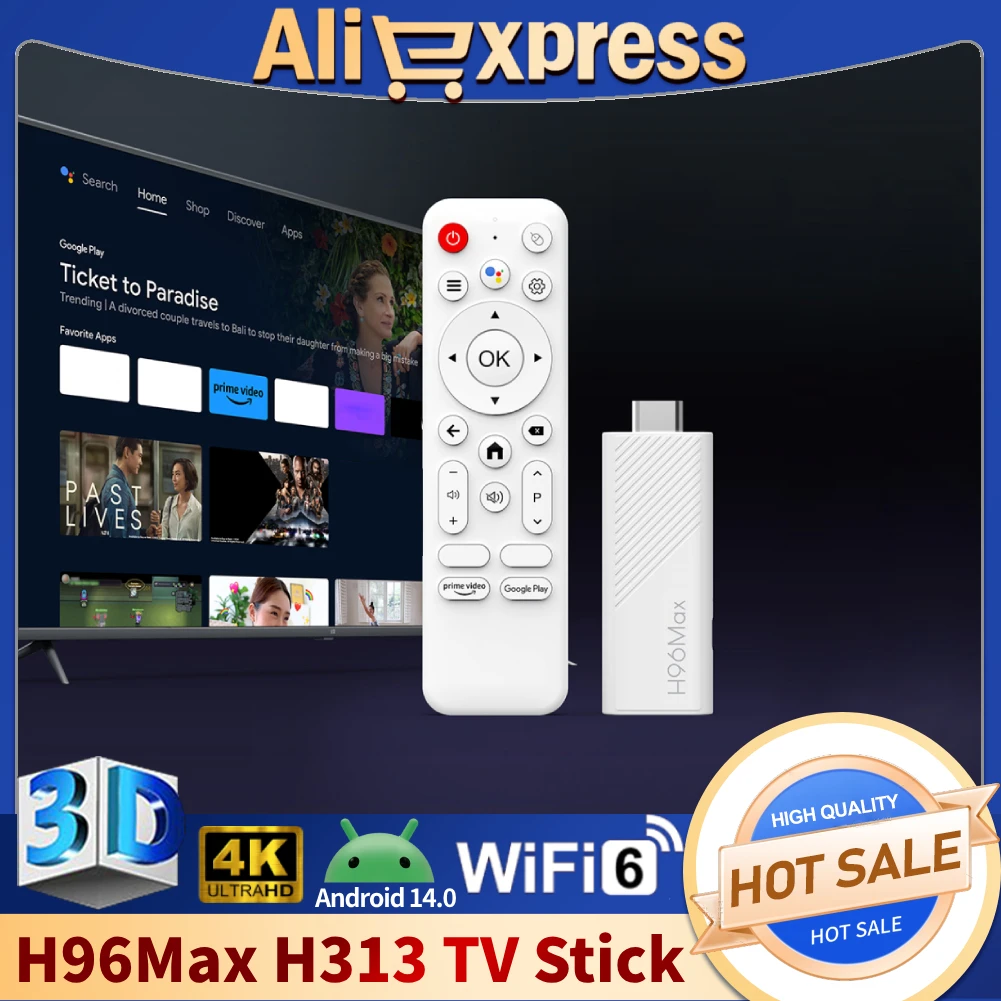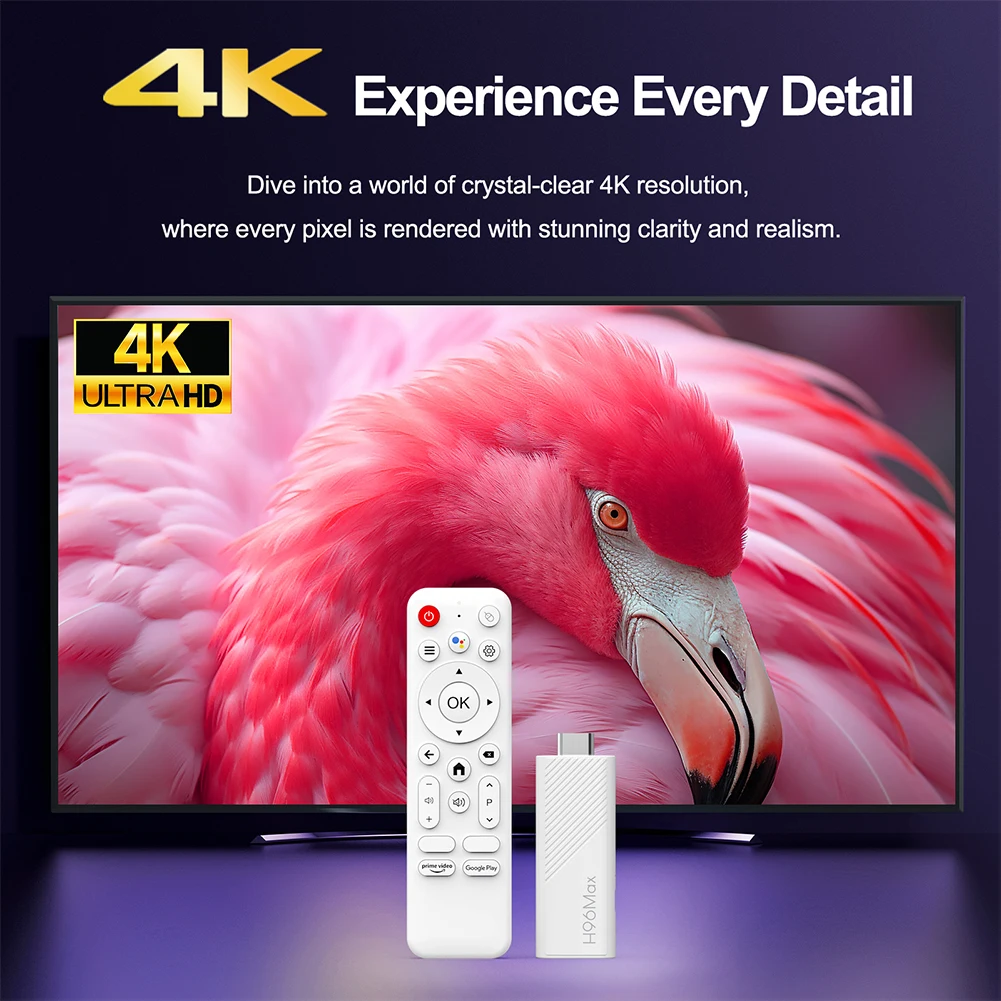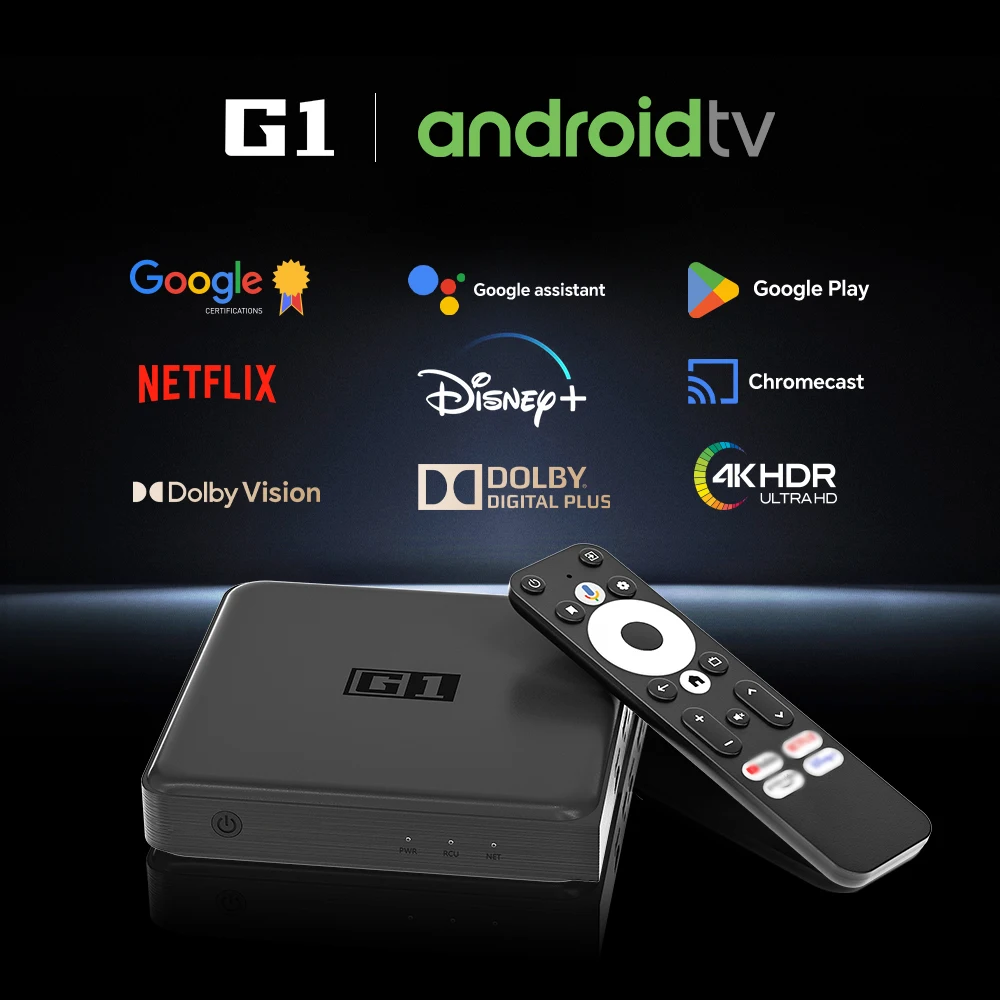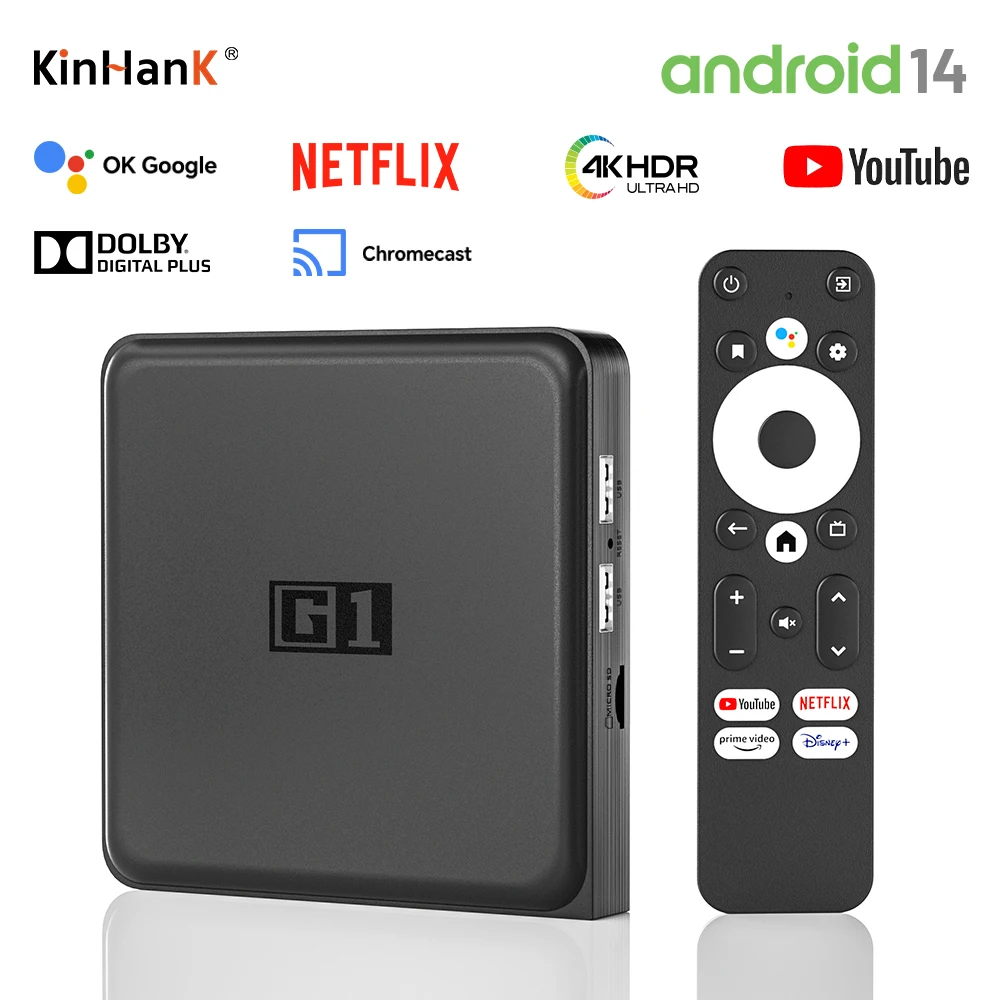
4K Ultra HDMI-Compatible Car Media multimedia Player For TV Car USB VGA HDD U Disk MultiMedia Media Player Box With SD MKV H.265
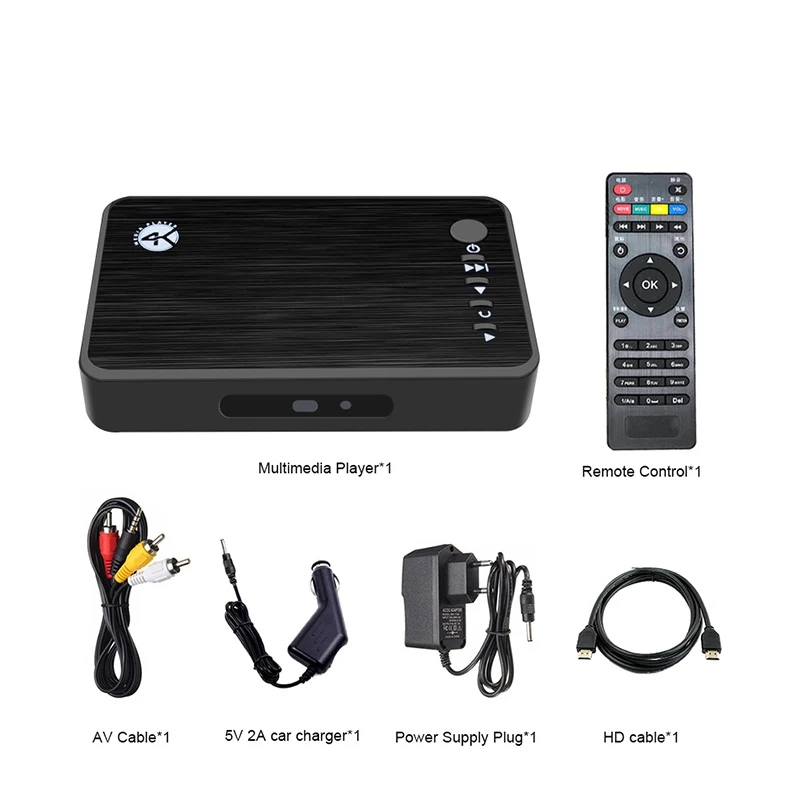
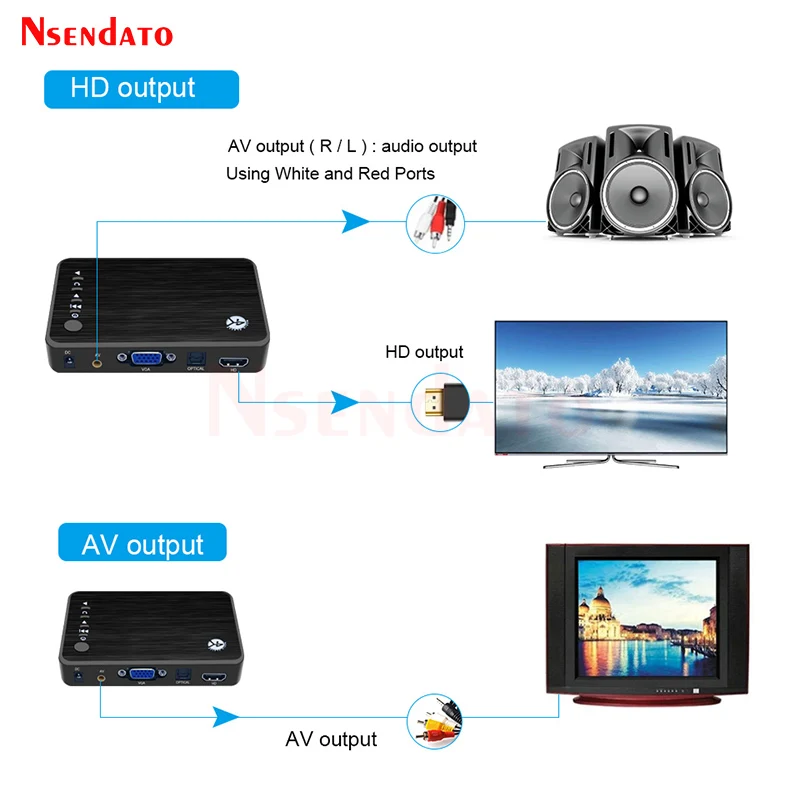
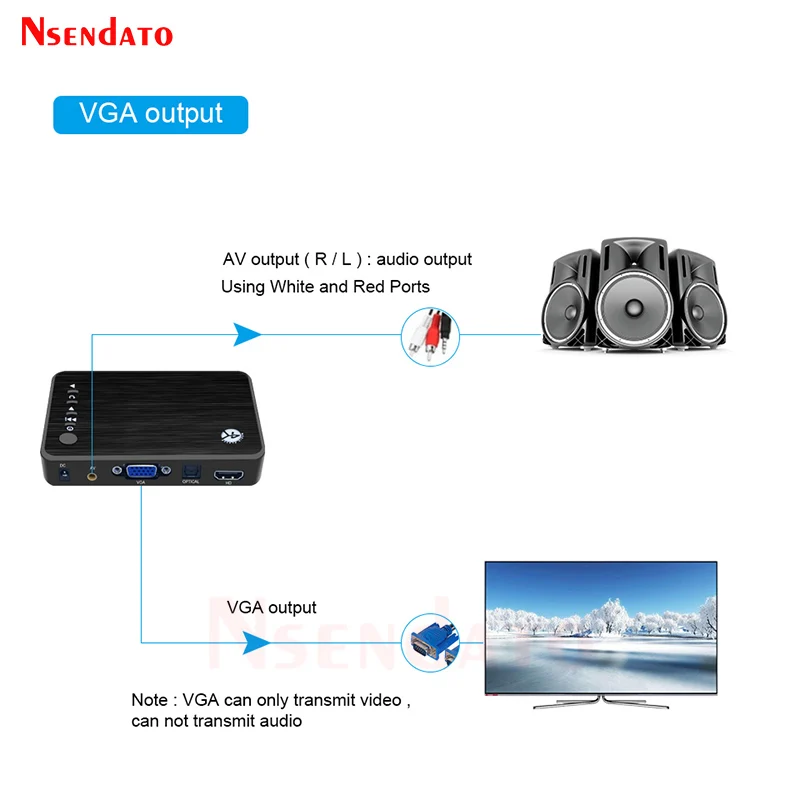
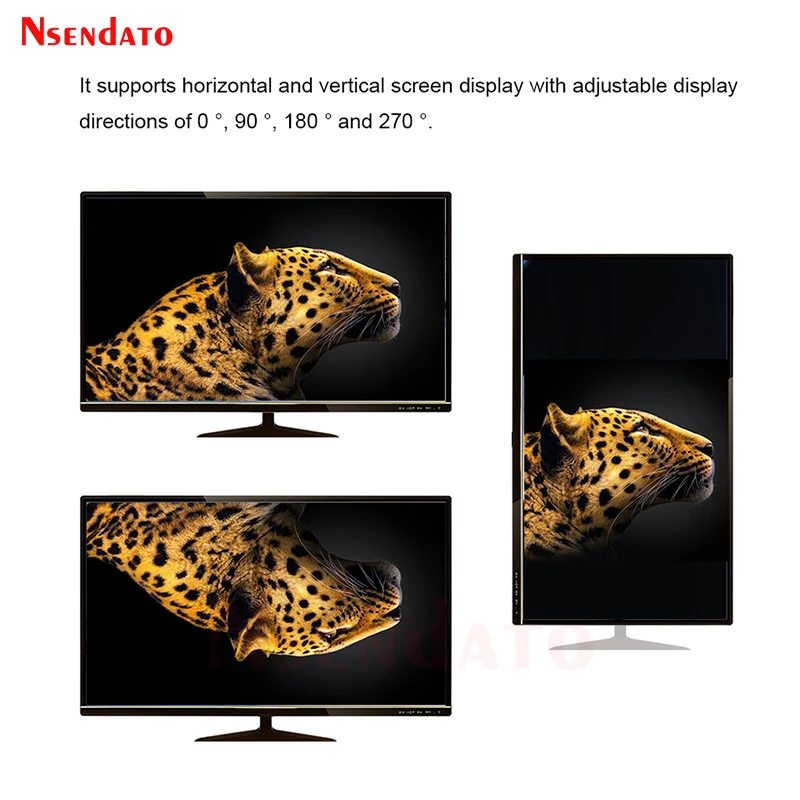
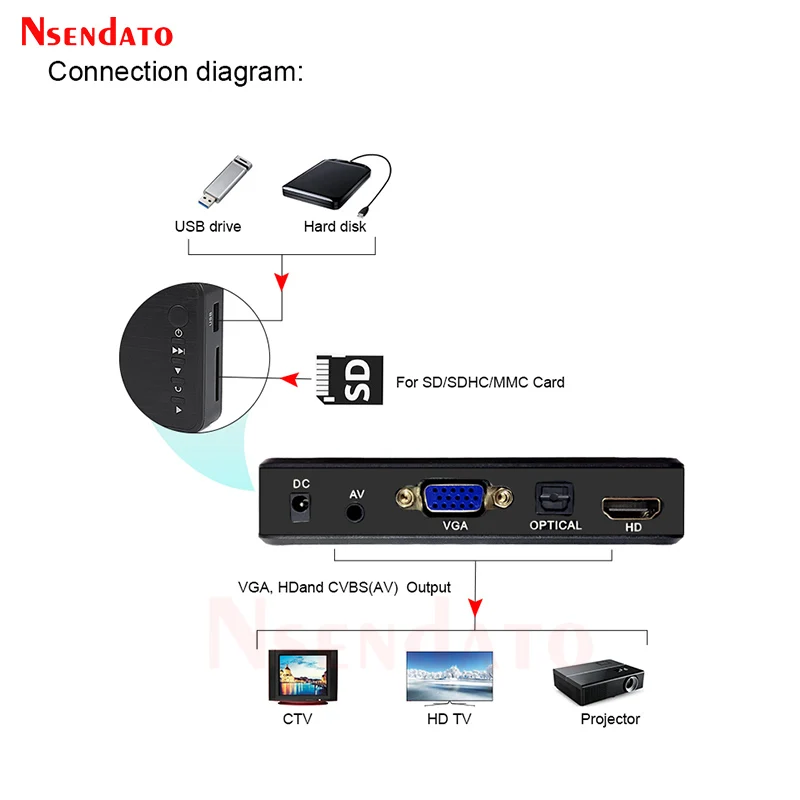
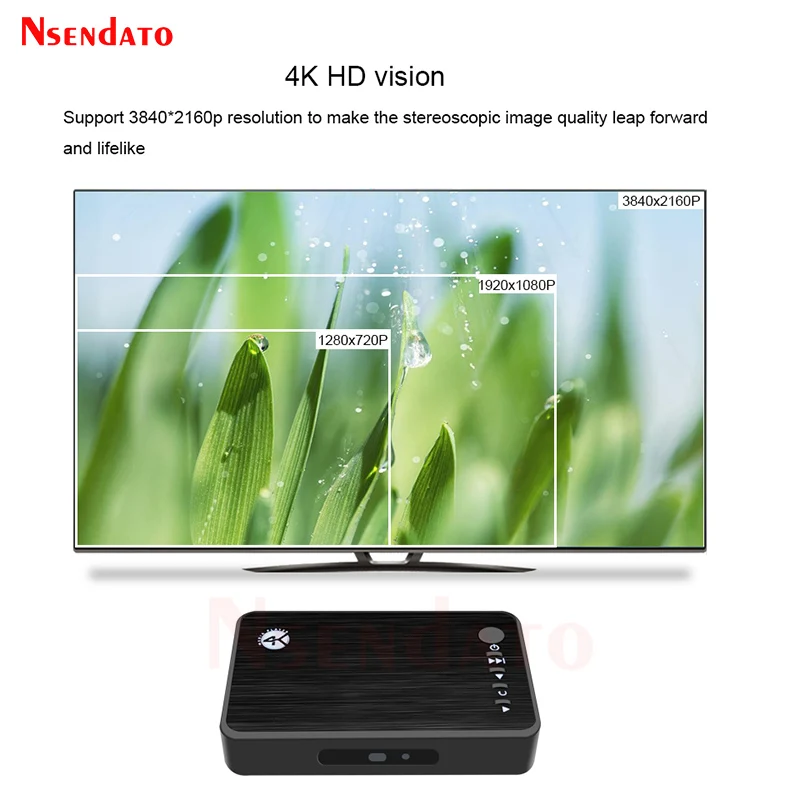
<br/><div class="detailmodule_html"><div class="detail-desc-decorate-richtext"><p><br/></p><div class="detailmodule_dynamic"><div class="detailmodule_media"><div class="video-container-1100113353843"><div class="detail-video" id="1100113353843" data-previewurl="https://ae01.alicdn.com/kf/S7dcf269008eb4d74a52ab235a4bc96ee0.jpg"></div></div></div><kse:widget data-widget-type="customText" id="22569421" type="custom"></kse:widget></div><p><span style="font-family:"arial, helvetica, sans-serif""><span style="font-size:16px">4K Ultra HDMI-Compatible Car Media multimedia Player For TV Car USB VGA HDD U Disk MultiMedia Media Player Box With SD MKV H.265</span></span></p><p></p><div><div><span style="color:rgb(244, 78, 59);font-family:arial, helvetica, sans-serif"><span style="color:rgb(244, 78, 59);font-size:16px"><strong>Noted:the link have 3 version ,one is normal version ,one is hdmi-compatible cable version ,other is car charge version ,Please take car charge version if you were connect car</strong></span></span></div><div> </div><div><span style="font-family:arial, helvetica, sans-serif"><span style="font-size:16px"><strong>Description:</strong></span></span></div><div><span style="font-family:arial, helvetica, sans-serif"><span style="font-size:16px">You have thousands of video, music, and photo stored in your USB hard drive. Instead of watching it on your computer monitor, now you can simply take your USB hard drive to connect with HDD Multi-Media Player and enjoy your multimedia contents on your HDTV.</span></span></div><div> </div><div><span style="font-family:arial, helvetica, sans-serif"><span style="font-size:16px"><strong>Specification :</strong></span></span></div><div><span style="font-family:arial, helvetica, sans-serif"><span style="font-size:16px">SD Card Interface:Support </span></span></div><div><span style="font-family:arial, helvetica, sans-serif"><span style="font-size:16px">USB Interface:USB 2.0 port, connect another U disk or sd.</span></span></div><div><span style="font-family:arial, helvetica, sans-serif"><span style="font-size:16px">HDD Type:FAT32,NTFS</span></span></div><div><span style="font-family:arial, helvetica, sans-serif"><span style="font-size:16px">Video Formats:AVI, MXF, MP4、FLV、MKV, ASF、DAT, RM、RMVB, AMV, F4V, M4V, H.265.MP4、VOB、ISO、M2TS、 3Gp 3G2, M2V, MOV, MPG、WMV、MTV、OGV, TS、WEBM、 DV、SWF……</span></span></div><div><span style="font-family:arial, helvetica, sans-serif"><span style="font-size:16px">Audio Formats:Compatible-MP3, FLAC、APE、WAV、WMA, DTS, AAC、M4R、MKA、MP2、AMR, WV、M4A, AC3、AU、AIFF、 M4B.</span></span></div><div><span style="font-family:arial, helvetica, sans-serif"><span style="font-size:16px">Photo Formats:PG, BMP、JPEG、GIF</span></span></div><div><span style="font-family:arial, helvetica, sans-serif"><span style="font-size:16px">Language:Supports simple Chinese/traditional Chinese, English, Russian, Portuguese, Spanish, Hungarian </span></span></div><div class="detailmodule_html"><div class="detail-desc-decorate-richtext"><div><div><span style="font-family:arial, helvetica, sans-serif"><span style="font-size:16px">and Korean.</span></span></div></div></div></div><div><span style="font-family:arial, helvetica, sans-serif"><span style="font-size:16px">The highest Video output:up to 4K(3840</span></span>*2160 30hz)</div><div> </div><div><span style="font-family:arial, helvetica, sans-serif"><span style="font-size:16px"><strong>Accessories</strong></span></span></div><div style="font-size:11.81px"><span style="font-family:arial, helvetica, sans-serif"><span style="font-size:16px">1XMedia Player</span></span></div><div style="font-size:11.81px"><span style="font-family:arial, helvetica, sans-serif"><span style="font-size:16px">1x Remote Control(Without battery)</span></span></div><div style="font-size:11.81px"><span style="font-family:arial, helvetica, sans-serif"><span style="font-size:16px">1x User Manual</span></span></div><div style="font-size:11.81px"><span style="font-family:arial, helvetica, sans-serif"><span style="font-size:16px">1xPower Adapter</span></span></div><div><span style="font-family:arial, helvetica, sans-serif"><span style="font-size:16px">1xAV Cable</span></span></div><div> </div><div><strong><span style="font-family:arial, helvetica, sans-serif"><span style="font-size:16px">Display resolution setting</span></span></strong></div><div><span style="font-family:arial, helvetica, sans-serif"><span style="font-size:16px">This machine supports 4K TV (as shown in the figure below). When the connected TV is 2K, the 4K option will not appear in the display resolution option・ At the same time, 4K TV usually has only one 4K interface・ If the connected HD port is not 4K interface, there is also no 4K resolution option</span></span></div><div> </div><div><strong><span style="font-family:arial, helvetica, sans-serif"><span style="font-size:16px">Autoplay settings</span></span></strong></div><div><span style="font-family:arial, helvetica, sans-serif"><span style="font-size:16px">(Files that need to be played automatically must be stored in the root directory of the USB flash disk, not in the folder of the USB flash disk)</span></span></div><div><span style="font-family:arial, helvetica, sans-serif"><span style="font-size:16px">The automatic playback of this machine is turned off by default. The automatic player setting steps: main interface - setting - automatic playback pop-up, as shown in the following figure. If you need to automatically play video, you can select movie, if you need to automatically play music, you can select music, and the same is true for pictures.</span></span></div><div><span style="font-family:arial, helvetica, sans-serif"><span style="font-size:16px">If you need to play the video, then play the picture and cycle, please set to the movice and picture</span></span></div><div><span style="font-family:arial, helvetica, sans-serif"><span style="font-size:16px">If you need to automatically play background music when playing pictures, set it to the picture / music option</span></span></div><div> </div><div><strong><span style="font-family:arial, helvetica, sans-serif"><span style="font-size:16px">Screen rotation</span></span></strong></div><div><span style="font-family:arial, helvetica, sans-serif"><span style="font-size:16px">The machine supports horizontal and vertical screen display, with adjustable display directions of 0 90 180 and 270 degree The display</span></span></div><div><span style="font-family:arial, helvetica, sans-serif"><span style="font-size:16px">directions of different angles are different. When the direction is sett the machine will restart automatically and take effect.</span></span></div><div><span style="font-family:arial, helvetica, sans-serif"><span style="font-size:16px">Setting method: main interface setting - screen direction - option direction, take 270 an example</span></span></div><div> </div><div><strong><span style="font-family:arial, helvetica, sans-serif"><span style="font-size:16px">Frequently asked question</span></span></strong></div><div><span style="font-family:arial, helvetica, sans-serif"><span style="font-size:16px">1,There is no 4K resolution option for connecting the TV or splicing screen: because the machine automatically detects and adapts to the TV resolution, if your TV is not 4K, the 4K option will not appear in the resolution option of the player.</span></span></div><div><span style="font-family:arial, helvetica, sans-serif"><span style="font-size:16px">2,The TV or splicing screen is 4K. Why is there no 4K resolution option? Pay attention to whether the TV is connected to the 4K interface of the TV. Usually, only one 4K interface is 4K interface, and the other several HD interfaces are 2K. At the same time, 4K option will not be detected when using 2K distributor or ordinary 2K HD line. When connecting 4K TV, we recommend using 4K distributor and 4K 2.0 pure copper HD line.</span></span></div><div><span style="font-family:arial, helvetica, sans-serif"><span style="font-size:16px">3,Why are there no subtitles and audio tracks when playing a movie: when playing a video with multiple audio tracks and subtitles, you can press the menu key on the remote control, and the audio tracks and subtitles can be set in the pop-up menu options.</span></span></div><div><span style="font-family:arial, helvetica, sans-serif"><span style="font-size:16px">4,When connecting HD cable, can audio be connected to audio alone? The answer is yes. Because the AV interface is a standard 3.5 interface, the 3.5 audio connector can be connected to the AV interface, and the HD interface is used for video.</span></span></div><div><span style="font-family:arial, helvetica, sans-serif"><span style="font-size:16px">5,The machine does not read the USB flash disk. Please check whether the USB flash disk can be used normally on the computer. If so, it is recommended to reformat the USB flash disk and test it again. The machine supports USB flash disks formatted by FAT32, NTFS and exFAT. (USB flash disk shall be purchased on the brand's official website as far as possible).</span></span></div><div><span style="font-family:arial, helvetica, sans-serif"><span style="font-size:16px">6,Whether this machine can be upgraded: This machine supports subsequent system optimization and upgrading.</span></span></div><div><span style="font-family:arial, helvetica, sans-serif"><span style="font-size:16px">7,The machine is powered by 5V. If it exceeds 5V, it will cause burning of the machine and USB flash disk. Please pay strict attention to power supply.</span></span></div><div><span style="font-family:arial, helvetica, sans-serif"><span style="font-size:16px">8,Why the 20 meter long HD cable is not displayed: we need to pay attention to the length and quality of the HD cable. We suggest that customers use 2.0 pure copper HD cable, and the length should be controlled within 10 meters. If the actual situation is longer, please take the actual situation as the standard.</span></span></div><div><span style="font-family:arial, helvetica, sans-serif"><span style="font-size:16px">9,The heat dissipation space of the machine shall not be less than twice the machine space. It is strictly prohibited for the machine to be directly close to the boxes or shells of other electronic equipment</span></span></div><div> </div><div><span style="font-family:arial, helvetica, sans-serif"><span style="font-size:16px">For more questions, please consult the customer service personnel.</span></span></div></div><p></p><p style="font-family:"Open Sans", sans-serif;font-size:13.3333px;font-weight:400;letter-spacing:normal;line-height:inherit;text-align:start;white-space:normal;color:rgb(0, 0, 0);background-color:rgb(255, 255, 255);margin:0px;margin-bottom:0px;margin-top:0px;margin-left:0px;margin-right:0px;padding:0px;padding-bottom:0px;padding-top:0px;padding-left:0px;padding-right:0px;box-sizing:border-box" align="start"></p><div style="font-family:"Open Sans", sans-serif;font-size:13.3333px;font-weight:400;letter-spacing:normal;text-align:start;white-space:normal;color:rgb(0, 0, 0);background-color:rgb(255, 255, 255);margin:0px;margin-bottom:0px;margin-top:0px;margin-left:0px;margin-right:0px;padding:0px 0px 0px 0em;padding-bottom:0px;padding-top:0px;padding-right:0px;box-sizing:content-box" align="start"><div style="margin:0px;margin-bottom:0px;margin-top:0px;margin-left:0px;margin-right:0px;padding:0px;padding-bottom:0px;padding-top:0px;padding-left:0px;padding-right:0px;box-sizing:content-box"></div><div style="margin:0px;margin-bottom:0px;margin-top:0px;margin-left:0px;margin-right:0px;padding:0px;padding-bottom:0px;padding-top:0px;padding-left:0px;padding-right:0px;box-sizing:content-box"></div><div style="margin:0px;margin-bottom:0px;margin-top:0px;margin-left:0px;margin-right:0px;padding:0px;padding-bottom:0px;padding-top:0px;padding-left:0px;padding-right:0px;box-sizing:content-box"></div><div style="margin:0px;margin-bottom:0px;margin-top:0px;margin-left:0px;margin-right:0px;padding:0px;padding-bottom:0px;padding-top:0px;padding-left:0px;padding-right:0px;box-sizing:content-box"></div><div style="margin:0px;margin-bottom:0px;margin-top:0px;margin-left:0px;margin-right:0px;padding:0px;padding-bottom:0px;padding-top:0px;padding-left:0px;padding-right:0px;box-sizing:content-box"></div><div style="margin:0px;margin-bottom:0px;margin-top:0px;margin-left:0px;margin-right:0px;padding:0px;padding-bottom:0px;padding-top:0px;padding-left:0px;padding-right:0px;box-sizing:content-box"></div><div style="margin:0px;margin-bottom:0px;margin-top:0px;margin-left:0px;margin-right:0px;padding:0px;padding-bottom:0px;padding-top:0px;padding-left:0px;padding-right:0px;box-sizing:content-box"></div><div style="margin:0px;margin-bottom:0px;margin-top:0px;margin-left:0px;margin-right:0px;padding:0px;padding-bottom:0px;padding-top:0px;padding-left:0px;padding-right:0px;box-sizing:content-box"></div><div style="margin:0px;margin-bottom:0px;margin-top:0px;margin-left:0px;margin-right:0px;padding:0px;padding-bottom:0px;padding-top:0px;padding-left:0px;padding-right:0px;box-sizing:content-box"></div><div style="margin:0px;margin-bottom:0px;margin-top:0px;margin-left:0px;margin-right:0px;padding:0px;padding-bottom:0px;padding-top:0px;padding-left:0px;padding-right:0px;box-sizing:content-box"></div><div style="margin:0px;margin-bottom:0px;margin-top:0px;margin-left:0px;margin-right:0px;padding:0px;padding-bottom:0px;padding-top:0px;padding-left:0px;padding-right:0px;box-sizing:content-box"></div><div style="margin:0px;margin-bottom:0px;margin-top:0px;margin-left:0px;margin-right:0px;padding:0px;padding-bottom:0px;padding-top:0px;padding-left:0px;padding-right:0px;box-sizing:content-box"></div><div style="margin:0px;margin-bottom:0px;margin-top:0px;margin-left:0px;margin-right:0px;padding:0px;padding-bottom:0px;padding-top:0px;padding-left:0px;padding-right:0px;box-sizing:content-box"></div><div style="margin:0px;margin-bottom:0px;margin-top:0px;margin-left:0px;margin-right:0px;padding:0px;padding-bottom:0px;padding-top:0px;padding-left:0px;padding-right:0px;box-sizing:content-box"></div></div><p><kse:widget data-widget-type="customText" id="1005000001165679" type="custom"></kse:widget></p><p><br/></p><p><br/></p><div><br/></div></div></div><br/>
$88.175
$69.215
- Category : Consumer Electronics
- Brand : nsendato_office_store_store Nsendato Office Store Store
Colors
Sizes
-
+

<br/><div class="detailmodule_html"><div class="detail-desc-decorate-richtext"><p><br/></p><div class="detailmodule_dynamic"><div class="detailmodule_media"><div class="video-container-1100113353843"><div class="detail-video" id="1100113353843" data-previewurl="https://ae01.alicdn.com/kf/S7dcf269008eb4d74a52ab235a4bc96ee0.jpg"></div></div></div><kse:widget data-widget-type="customText" id="22569421" type="custom"></kse:widget></div><p><span style="font-family:"arial, helvetica, sans-serif""><span style="font-size:16px">4K Ultra HDMI-Compatible Car Media multimedia Player For TV Car USB VGA HDD U Disk MultiMedia Media Player Box With SD MKV H.265</span></span></p><p></p><div><div><span style="color:rgb(244, 78, 59);font-family:arial, helvetica, sans-serif"><span style="color:rgb(244, 78, 59);font-size:16px"><strong>Noted:the link have 3 version ,one is normal version ,one is hdmi-compatible cable version ,other is car charge version ,Please take car charge version if you were connect car</strong></span></span></div><div> </div><div><span style="font-family:arial, helvetica, sans-serif"><span style="font-size:16px"><strong>Description:</strong></span></span></div><div><span style="font-family:arial, helvetica, sans-serif"><span style="font-size:16px">You have thousands of video, music, and photo stored in your USB hard drive. Instead of watching it on your computer monitor, now you can simply take your USB hard drive to connect with HDD Multi-Media Player and enjoy your multimedia contents on your HDTV.</span></span></div><div> </div><div><span style="font-family:arial, helvetica, sans-serif"><span style="font-size:16px"><strong>Specification :</strong></span></span></div><div><span style="font-family:arial, helvetica, sans-serif"><span style="font-size:16px">SD Card Interface:Support </span></span></div><div><span style="font-family:arial, helvetica, sans-serif"><span style="font-size:16px">USB Interface:USB 2.0 port, connect another U disk or sd.</span></span></div><div><span style="font-family:arial, helvetica, sans-serif"><span style="font-size:16px">HDD Type:FAT32,NTFS</span></span></div><div><span style="font-family:arial, helvetica, sans-serif"><span style="font-size:16px">Video Formats:AVI, MXF, MP4、FLV、MKV, ASF、DAT, RM、RMVB, AMV, F4V, M4V, H.265.MP4、VOB、ISO、M2TS、 3Gp 3G2, M2V, MOV, MPG、WMV、MTV、OGV, TS、WEBM、 DV、SWF……</span></span></div><div><span style="font-family:arial, helvetica, sans-serif"><span style="font-size:16px">Audio Formats:Compatible-MP3, FLAC、APE、WAV、WMA, DTS, AAC、M4R、MKA、MP2、AMR, WV、M4A, AC3、AU、AIFF、 M4B.</span></span></div><div><span style="font-family:arial, helvetica, sans-serif"><span style="font-size:16px">Photo Formats:PG, BMP、JPEG、GIF</span></span></div><div><span style="font-family:arial, helvetica, sans-serif"><span style="font-size:16px">Language:Supports simple Chinese/traditional Chinese, English, Russian, Portuguese, Spanish, Hungarian </span></span></div><div class="detailmodule_html"><div class="detail-desc-decorate-richtext"><div><div><span style="font-family:arial, helvetica, sans-serif"><span style="font-size:16px">and Korean.</span></span></div></div></div></div><div><span style="font-family:arial, helvetica, sans-serif"><span style="font-size:16px">The highest Video output:up to 4K(3840</span></span>*2160 30hz)</div><div> </div><div><span style="font-family:arial, helvetica, sans-serif"><span style="font-size:16px"><strong>Accessories</strong></span></span></div><div style="font-size:11.81px"><span style="font-family:arial, helvetica, sans-serif"><span style="font-size:16px">1XMedia Player</span></span></div><div style="font-size:11.81px"><span style="font-family:arial, helvetica, sans-serif"><span style="font-size:16px">1x Remote Control(Without battery)</span></span></div><div style="font-size:11.81px"><span style="font-family:arial, helvetica, sans-serif"><span style="font-size:16px">1x User Manual</span></span></div><div style="font-size:11.81px"><span style="font-family:arial, helvetica, sans-serif"><span style="font-size:16px">1xPower Adapter</span></span></div><div><span style="font-family:arial, helvetica, sans-serif"><span style="font-size:16px">1xAV Cable</span></span></div><div> </div><div><strong><span style="font-family:arial, helvetica, sans-serif"><span style="font-size:16px">Display resolution setting</span></span></strong></div><div><span style="font-family:arial, helvetica, sans-serif"><span style="font-size:16px">This machine supports 4K TV (as shown in the figure below). When the connected TV is 2K, the 4K option will not appear in the display resolution option・ At the same time, 4K TV usually has only one 4K interface・ If the connected HD port is not 4K interface, there is also no 4K resolution option</span></span></div><div> </div><div><strong><span style="font-family:arial, helvetica, sans-serif"><span style="font-size:16px">Autoplay settings</span></span></strong></div><div><span style="font-family:arial, helvetica, sans-serif"><span style="font-size:16px">(Files that need to be played automatically must be stored in the root directory of the USB flash disk, not in the folder of the USB flash disk)</span></span></div><div><span style="font-family:arial, helvetica, sans-serif"><span style="font-size:16px">The automatic playback of this machine is turned off by default. The automatic player setting steps: main interface - setting - automatic playback pop-up, as shown in the following figure. If you need to automatically play video, you can select movie, if you need to automatically play music, you can select music, and the same is true for pictures.</span></span></div><div><span style="font-family:arial, helvetica, sans-serif"><span style="font-size:16px">If you need to play the video, then play the picture and cycle, please set to the movice and picture</span></span></div><div><span style="font-family:arial, helvetica, sans-serif"><span style="font-size:16px">If you need to automatically play background music when playing pictures, set it to the picture / music option</span></span></div><div> </div><div><strong><span style="font-family:arial, helvetica, sans-serif"><span style="font-size:16px">Screen rotation</span></span></strong></div><div><span style="font-family:arial, helvetica, sans-serif"><span style="font-size:16px">The machine supports horizontal and vertical screen display, with adjustable display directions of 0 90 180 and 270 degree The display</span></span></div><div><span style="font-family:arial, helvetica, sans-serif"><span style="font-size:16px">directions of different angles are different. When the direction is sett the machine will restart automatically and take effect.</span></span></div><div><span style="font-family:arial, helvetica, sans-serif"><span style="font-size:16px">Setting method: main interface setting - screen direction - option direction, take 270 an example</span></span></div><div> </div><div><strong><span style="font-family:arial, helvetica, sans-serif"><span style="font-size:16px">Frequently asked question</span></span></strong></div><div><span style="font-family:arial, helvetica, sans-serif"><span style="font-size:16px">1,There is no 4K resolution option for connecting the TV or splicing screen: because the machine automatically detects and adapts to the TV resolution, if your TV is not 4K, the 4K option will not appear in the resolution option of the player.</span></span></div><div><span style="font-family:arial, helvetica, sans-serif"><span style="font-size:16px">2,The TV or splicing screen is 4K. Why is there no 4K resolution option? Pay attention to whether the TV is connected to the 4K interface of the TV. Usually, only one 4K interface is 4K interface, and the other several HD interfaces are 2K. At the same time, 4K option will not be detected when using 2K distributor or ordinary 2K HD line. When connecting 4K TV, we recommend using 4K distributor and 4K 2.0 pure copper HD line.</span></span></div><div><span style="font-family:arial, helvetica, sans-serif"><span style="font-size:16px">3,Why are there no subtitles and audio tracks when playing a movie: when playing a video with multiple audio tracks and subtitles, you can press the menu key on the remote control, and the audio tracks and subtitles can be set in the pop-up menu options.</span></span></div><div><span style="font-family:arial, helvetica, sans-serif"><span style="font-size:16px">4,When connecting HD cable, can audio be connected to audio alone? The answer is yes. Because the AV interface is a standard 3.5 interface, the 3.5 audio connector can be connected to the AV interface, and the HD interface is used for video.</span></span></div><div><span style="font-family:arial, helvetica, sans-serif"><span style="font-size:16px">5,The machine does not read the USB flash disk. Please check whether the USB flash disk can be used normally on the computer. If so, it is recommended to reformat the USB flash disk and test it again. The machine supports USB flash disks formatted by FAT32, NTFS and exFAT. (USB flash disk shall be purchased on the brand's official website as far as possible).</span></span></div><div><span style="font-family:arial, helvetica, sans-serif"><span style="font-size:16px">6,Whether this machine can be upgraded: This machine supports subsequent system optimization and upgrading.</span></span></div><div><span style="font-family:arial, helvetica, sans-serif"><span style="font-size:16px">7,The machine is powered by 5V. If it exceeds 5V, it will cause burning of the machine and USB flash disk. Please pay strict attention to power supply.</span></span></div><div><span style="font-family:arial, helvetica, sans-serif"><span style="font-size:16px">8,Why the 20 meter long HD cable is not displayed: we need to pay attention to the length and quality of the HD cable. We suggest that customers use 2.0 pure copper HD cable, and the length should be controlled within 10 meters. If the actual situation is longer, please take the actual situation as the standard.</span></span></div><div><span style="font-family:arial, helvetica, sans-serif"><span style="font-size:16px">9,The heat dissipation space of the machine shall not be less than twice the machine space. It is strictly prohibited for the machine to be directly close to the boxes or shells of other electronic equipment</span></span></div><div> </div><div><span style="font-family:arial, helvetica, sans-serif"><span style="font-size:16px">For more questions, please consult the customer service personnel.</span></span></div></div><p></p><p style="font-family:"Open Sans", sans-serif;font-size:13.3333px;font-weight:400;letter-spacing:normal;line-height:inherit;text-align:start;white-space:normal;color:rgb(0, 0, 0);background-color:rgb(255, 255, 255);margin:0px;margin-bottom:0px;margin-top:0px;margin-left:0px;margin-right:0px;padding:0px;padding-bottom:0px;padding-top:0px;padding-left:0px;padding-right:0px;box-sizing:border-box" align="start"></p><div style="font-family:"Open Sans", sans-serif;font-size:13.3333px;font-weight:400;letter-spacing:normal;text-align:start;white-space:normal;color:rgb(0, 0, 0);background-color:rgb(255, 255, 255);margin:0px;margin-bottom:0px;margin-top:0px;margin-left:0px;margin-right:0px;padding:0px 0px 0px 0em;padding-bottom:0px;padding-top:0px;padding-right:0px;box-sizing:content-box" align="start"><div style="margin:0px;margin-bottom:0px;margin-top:0px;margin-left:0px;margin-right:0px;padding:0px;padding-bottom:0px;padding-top:0px;padding-left:0px;padding-right:0px;box-sizing:content-box"></div><div style="margin:0px;margin-bottom:0px;margin-top:0px;margin-left:0px;margin-right:0px;padding:0px;padding-bottom:0px;padding-top:0px;padding-left:0px;padding-right:0px;box-sizing:content-box"></div><div style="margin:0px;margin-bottom:0px;margin-top:0px;margin-left:0px;margin-right:0px;padding:0px;padding-bottom:0px;padding-top:0px;padding-left:0px;padding-right:0px;box-sizing:content-box"></div><div style="margin:0px;margin-bottom:0px;margin-top:0px;margin-left:0px;margin-right:0px;padding:0px;padding-bottom:0px;padding-top:0px;padding-left:0px;padding-right:0px;box-sizing:content-box"></div><div style="margin:0px;margin-bottom:0px;margin-top:0px;margin-left:0px;margin-right:0px;padding:0px;padding-bottom:0px;padding-top:0px;padding-left:0px;padding-right:0px;box-sizing:content-box"></div><div style="margin:0px;margin-bottom:0px;margin-top:0px;margin-left:0px;margin-right:0px;padding:0px;padding-bottom:0px;padding-top:0px;padding-left:0px;padding-right:0px;box-sizing:content-box"></div><div style="margin:0px;margin-bottom:0px;margin-top:0px;margin-left:0px;margin-right:0px;padding:0px;padding-bottom:0px;padding-top:0px;padding-left:0px;padding-right:0px;box-sizing:content-box"></div><div style="margin:0px;margin-bottom:0px;margin-top:0px;margin-left:0px;margin-right:0px;padding:0px;padding-bottom:0px;padding-top:0px;padding-left:0px;padding-right:0px;box-sizing:content-box"></div><div style="margin:0px;margin-bottom:0px;margin-top:0px;margin-left:0px;margin-right:0px;padding:0px;padding-bottom:0px;padding-top:0px;padding-left:0px;padding-right:0px;box-sizing:content-box"></div><div style="margin:0px;margin-bottom:0px;margin-top:0px;margin-left:0px;margin-right:0px;padding:0px;padding-bottom:0px;padding-top:0px;padding-left:0px;padding-right:0px;box-sizing:content-box"></div><div style="margin:0px;margin-bottom:0px;margin-top:0px;margin-left:0px;margin-right:0px;padding:0px;padding-bottom:0px;padding-top:0px;padding-left:0px;padding-right:0px;box-sizing:content-box"></div><div style="margin:0px;margin-bottom:0px;margin-top:0px;margin-left:0px;margin-right:0px;padding:0px;padding-bottom:0px;padding-top:0px;padding-left:0px;padding-right:0px;box-sizing:content-box"></div><div style="margin:0px;margin-bottom:0px;margin-top:0px;margin-left:0px;margin-right:0px;padding:0px;padding-bottom:0px;padding-top:0px;padding-left:0px;padding-right:0px;box-sizing:content-box"></div><div style="margin:0px;margin-bottom:0px;margin-top:0px;margin-left:0px;margin-right:0px;padding:0px;padding-bottom:0px;padding-top:0px;padding-left:0px;padding-right:0px;box-sizing:content-box"></div></div><p><kse:widget data-widget-type="customText" id="1005000001165679" type="custom"></kse:widget></p><p><br/></p><p><br/></p><div><br/></div></div></div><br/>
Related Product
Browse The Collection of Top Products.