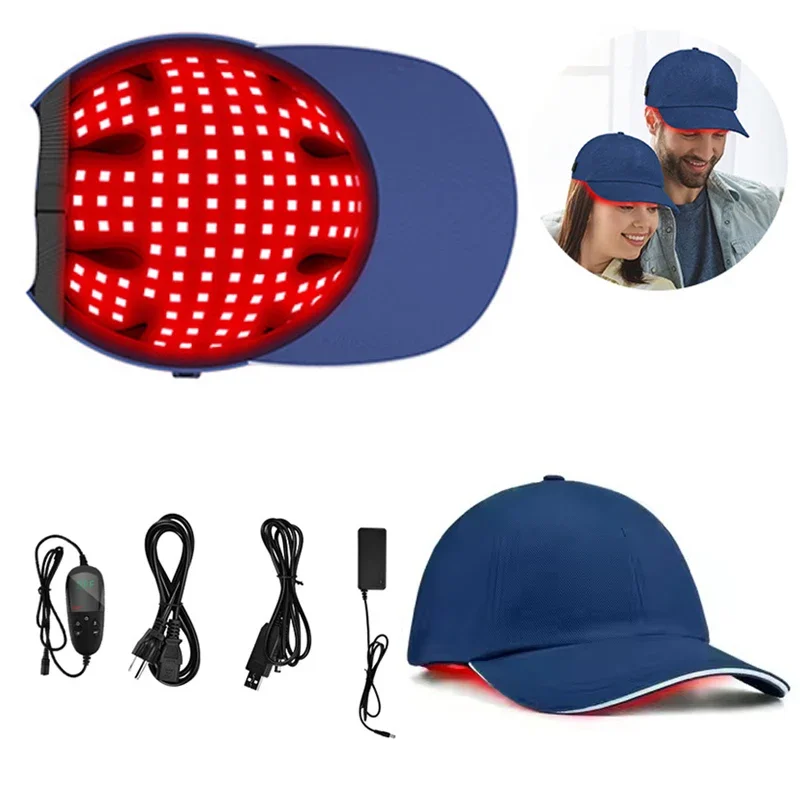
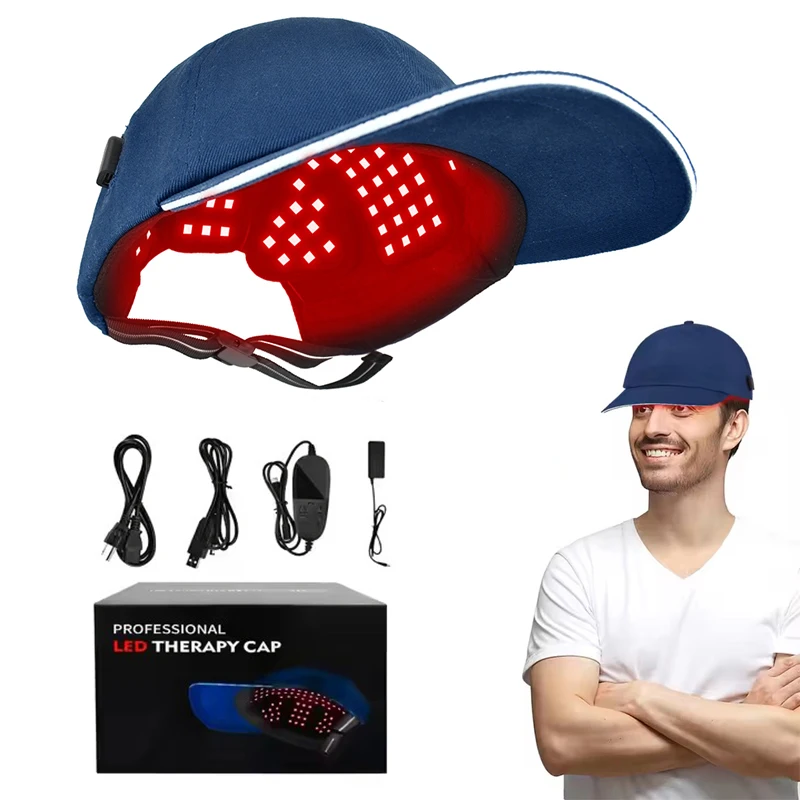
Infrared Hat 630nm 850nm 940nm Led Red Light Therapy Device Laser Treatment Machine Cap for Hair Loss Hair Regrowth Instrument
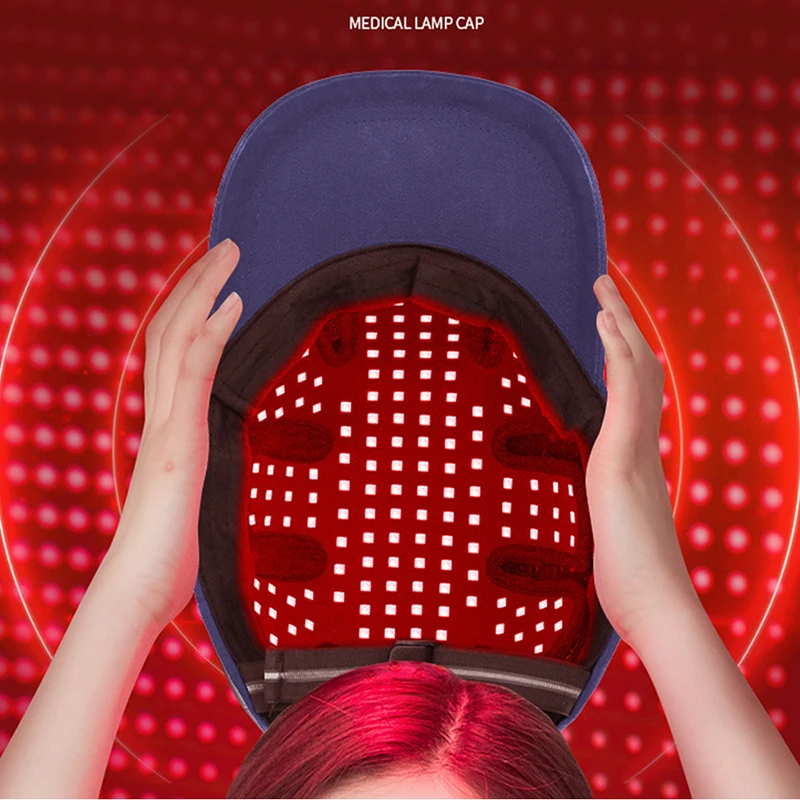
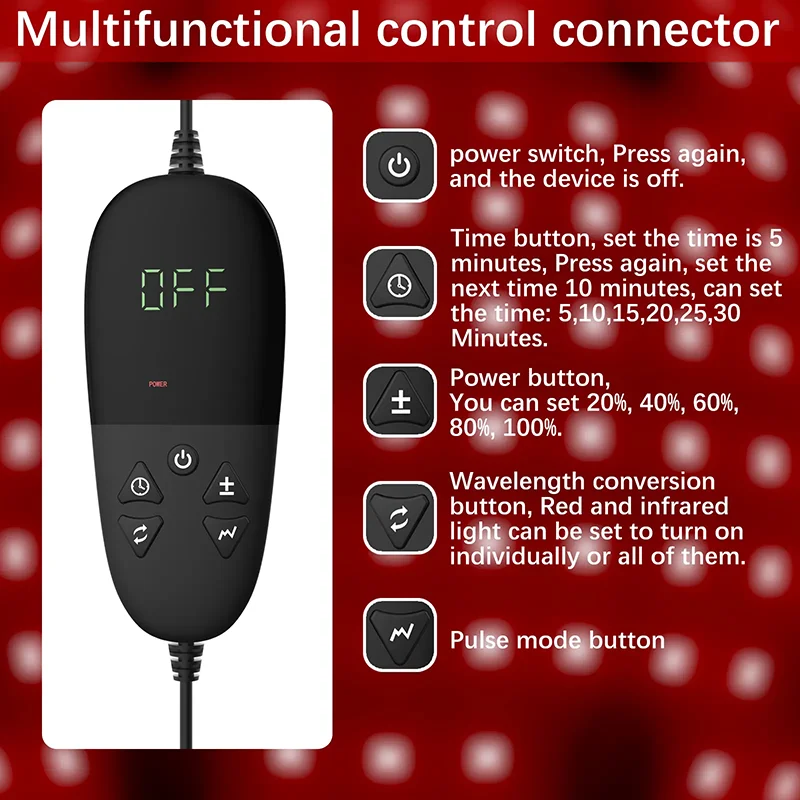
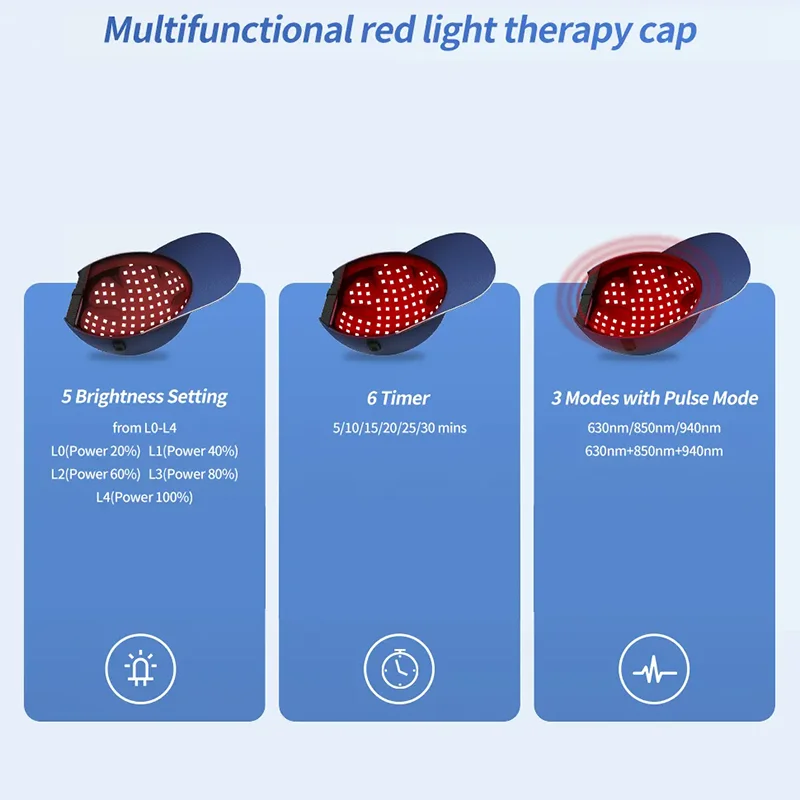
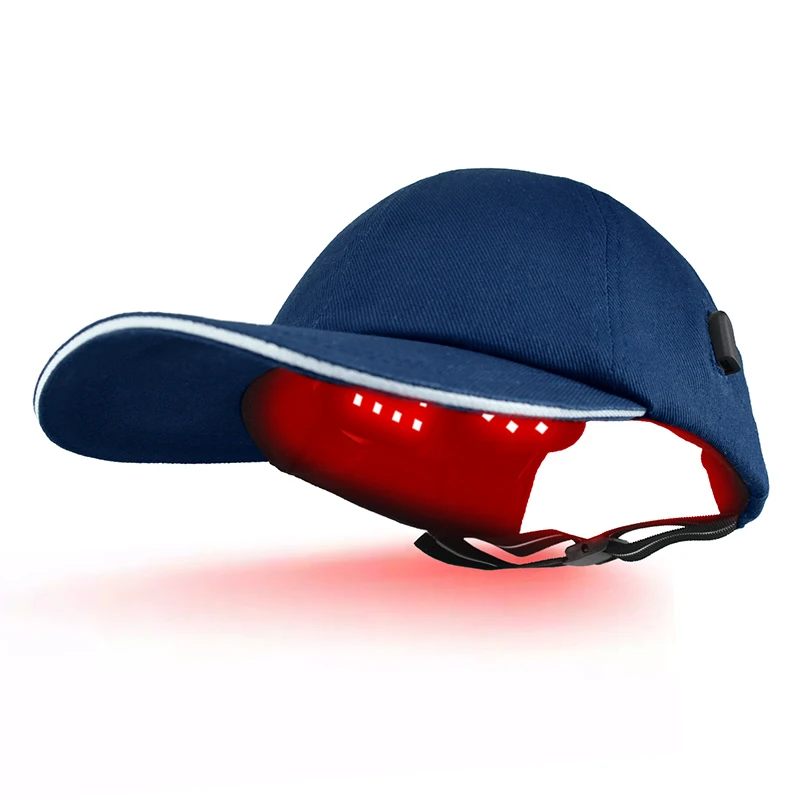
<div class="detailmodule_html"><div class="detail-desc-decorate-richtext"><p style="text-align:center" align="center"><span style="font-size:24px;font-family:"comic sans ms", cursive"><strong>Infrared Hat 630nm 850nm 940nm Led Red Light Therapy Device Laser Treatment Machine Cap for Hair Loss Hair Regrowth Instrument</strong></span></p><br/><p><span style="color:rgb(0, 156, 224);font-size:18px;font-family:"comic sans ms", cursive"><strong>SPECIFICATIONS </strong></span></p><p style="text-align:left" class="MsoNormal" align="left"><span style="color:rgb(35, 25, 22);font-size:14px;font-family:"comic sans ms", cursive">Power Adapter Input :100-240VAC 50/60Hz 0.8A </span></p><p style="text-align:left" class="MsoNormal" align="left"><span style="color:rgb(35, 25, 22);font-size:14px;font-family:"comic sans ms", cursive">Power Adapter Output :DC12V/2.5A </span></p><p style="text-align:left" class="MsoNormal" align="left"><span style="color:rgb(35, 25, 22);font-size:14px;font-family:"comic sans ms", cursive">Red Light :630nm, 180 LEDs </span></p><p style="text-align:left" class="MsoNormal" align="left"><span style="color:rgb(35, 25, 22);font-size:14px;font-family:"comic sans ms", cursive">Near-infrared Light :850nm, 180 LEDs / 940nm, 180 LEDs </span></p><p style="text-align:left" class="MsoNormal" align="left"><span style="color:rgb(35, 25, 22);font-size:14px;font-family:"comic sans ms", cursive">Operational Modes :Continuous, Nogier Frequencies Pulsed </span></p><p style="text-align:left" class="MsoNormal" align="left"><span style="color:rgb(35, 25, 22);font-size:14px;font-family:"comic sans ms", cursive">Power Consumption :28W </span></p><p style="text-align:left" class="MsoNormal" align="left"><span style="color:rgb(35, 25, 22);font-size:14px;font-family:"comic sans ms", cursive">Time Setting :5-30minutes (each press increases or decreases by 5 minutes) </span></p><p style="text-align:left" class="MsoNormal" align="left"><span style="color:rgb(35, 25, 22);font-size:14px;font-family:"comic sans ms", cursive">Display :LED screen </span></p><p style="text-align:left" class="MsoNormal" align="left"><span style="color:rgb(35, 25, 22);font-size:14px;font-family:"comic sans ms", cursive">Case Material :Fabnric </span></p><p style="text-align:left" class="MsoNormal" align="left"><span style="color:rgb(35, 25, 22);font-size:14px;font-family:"comic sans ms", cursive">Function Buttons :</span></p><p style="text-align:left" class="MsoNormal" align="left"><span style="color:rgb(26, 26, 26);font-size:14px;font-family:"comic sans ms", cursive">1. Controls the Start/Shutdown/Standby operations separately; </span></p><p style="text-align:left" class="MsoNormal" align="left"><span style="color:rgb(26, 26, 26);font-size:14px;font-family:"comic sans ms", cursive">2. Time selection (5 to 30 minutes) </span></p><p style="text-align:left" class="MsoNormal" align="left"><span style="color:rgb(26, 26, 26);font-size:14px;font-family:"comic sans ms", cursive">3. Energy selection (P1 / P2 / P3 / P4 / P5) </span></p><p style="text-align:left" class="MsoNormal" align="left"><span style="color:rgb(26, 26, 26);font-size:14px;font-family:"comic sans ms", cursive">4. Mode selection (630nm red light &630nm+850nm+940nm) </span></p><p style="text-align:left" class="MsoNormal" align="left"><span style="color:rgb(26, 26, 26);font-size:14px;font-family:"comic sans ms", cursive">5. Frequency selection (10Hz / 40Hz / H modes) </span></p><p style="text-align:left" class="MsoNormal" align="left"><span style="color:rgb(35, 25, 22);font-size:14px;font-family:"comic sans ms", cursive">Dimension :260*200*125mm / 10.24x7.87x4.72 in</span></p><br/><p style="text-align:left" class="MsoNormal" align="left"><span style="color:rgb(0, 156, 224);font-size:18px;font-family:"comic sans ms", cursive"><strong>HOW TO USE</strong></span></p><p style="text-align:left" class="MsoNormal" align="left"><span style="color:rgb(35, 25, 22);font-size:14px;font-family:"comic sans ms", cursive">Step 1. Plug the DC end of the 100-240VAC power adapter into the </span></p><p style="text-align:left" class="MsoNormal" align="left"><span style="color:rgb(35, 25, 22);font-size:14px;font-family:"comic sans ms", cursive">controller.</span></p><br/><p style="text-align:left" class="MsoNormal" align="left"><span style="color:rgb(35, 25, 22);font-size:14px;font-family:"comic sans ms", cursive">Step 2. Insert the controller into the red light cap. </span></p><br/><p style="text-align:left" class="MsoNormal" align="left"><span style="color:rgb(35, 25, 22);font-size:14px;font-family:"comic sans ms", cursive">Step 3. Plug the power adapter into an electrical </span></p><p style="text-align:left" class="MsoNormal" align="left"><span style="color:rgb(35, 25, 22);font-size:14px;font-family:"comic sans ms", cursive">outlet. Or plug the USB data cable into a mobile </span></p><p style="text-align:left" class="MsoNormal" align="left"><span style="color:rgb(35, 25, 22);font-size:14px;font-family:"comic sans ms", cursive">power bank with an output voltage of DC5V.</span></p><br/><p style="text-align:left" class="MsoNormal" align="left"><span style="color:rgb(35, 25, 22);font-size:14px;font-family:"comic sans ms", cursive">Step 4. Sit down and place the red light cap device comfortably above your head. </span></p><p style="text-align:left" class="MsoNormal" align="left"><span style="color:rgb(35, 25, 22);font-size:14px;font-family:"comic sans ms", cursive">Press power to turn on the red ligth cap device</span></p><br/><p style="text-align:left" class="MsoNormal" align="left"><span style="color:rgb(35, 25, 22);font-size:16px;font-family:"comic sans ms", cursive"><strong>Note:</strong></span></p><p style="text-align:left" class="MsoNormal" align="left"><span style="color:rgb(35, 25, 22);font-size:14px;font-family:"comic sans ms", cursive">You can inquire about the electronic version of the manual for detailed usage steps.</span></p><br/><p style="text-align:left" class="MsoNormal" align="left"><span style="color:rgb(234, 85, 6);font-size:18px;font-family:"comic sans ms", cursive"><span style="color:rgb(0, 156, 224);font-size:18px;font-family:"comic sans ms", cursive"><strong>CONTRAINDICATIONS </strong></span></span></p><p style="text-align:left" class="MsoNormal" align="left"><span style="color:rgb(35, 25, 22);font-size:14px;font-family:"comic sans ms", cursive">Disabled under the following circumstances: </span></p><p style="text-align:left" class="MsoNormal" align="left"><span style="color:rgb(35, 25, 22);font-size:14px;font-family:"comic sans ms", cursive">1. Do not use the red light cap device if you are taking medications or if you have any </span></p><p style="text-align:left" class="MsoNormal" align="left"><span style="color:rgb(35, 25, 22);font-size:14px;font-family:"comic sans ms", cursive">medical condition which makes your skin sensitive to sun or light. </span></p><p style="text-align:left" class="MsoNormal" align="left"><span style="color:rgb(35, 25, 22);font-size:14px;font-family:"comic sans ms", cursive">2. Do not use the red light cap device if you have cancer on your scalp. </span></p><p style="text-align:left" class="MsoNormal" align="left"><span style="color:rgb(35, 25, 22);font-size:14px;font-family:"comic sans ms", cursive">3. Do not use the red light cap device if you have sensitive skin or if you are allergic to </span></p><p style="text-align:left" class="MsoNormal" align="left"><span style="color:rgb(35, 25, 22);font-size:14px;font-family:"comic sans ms", cursive">this specific wavelength of light (640-665nm). Sensitive skin or an allergic reaction </span></p><p style="text-align:left" class="MsoNormal" align="left"><span style="color:rgb(35, 25, 22);font-size:14px;font-family:"comic sans ms", cursive">can result in an itchy sensation of the scalp or sunburn like redness. If these occur, </span></p><p style="text-align:left" class="MsoNormal" align="left"><span style="color:rgb(35, 25, 22);font-size:14px;font-family:"comic sans ms", cursive">seek medical care from a physician. </span></p><p style="text-align:left" class="MsoNormal" align="left"><span style="color:rgb(35, 25, 22);font-size:14px;font-family:"comic sans ms", cursive">4. The red light cap device should not be used by or on children under 18 years of age.</span></p><br/><p style="text-align:left" class="MsoNormal" align="left"><span style="color:rgb(0, 156, 224);font-size:18px;font-family:"comic sans ms", cursive"><strong>Package Includes (accessories list): </strong></span></p><p style="text-align:left" class="MsoNormal" align="left"><span style="color:rgb(35, 25, 22);font-size:14px;font-family:"comic sans ms", cursive">1* Red Light Cap Device </span></p><p style="text-align:left" class="MsoNormal" align="left"><span style="color:rgb(35, 25, 22);font-size:14px;font-family:"comic sans ms", cursive">1* Power Adapter</span></p><p style="text-align:left" class="MsoNormal" align="left"><span style="color:rgb(35, 25, 22);font-size:14px;font-family:"comic sans ms", cursive">1* Controller</span></p><p style="text-align:left" class="MsoNormal" align="left"><span style="color:rgb(35, 25, 22);font-size:14px;font-family:"comic sans ms", cursive">1* USB Cable </span></p><p class="MsoNormal"><span style="color:rgb(35, 25, 22);font-size:14px;font-family:"comic sans ms", cursive">1* User Manual</span></p><p class="MsoNormal"></p></div></div><br/>
$423.095
$212.54
- Category : Beauty & Health
- Brand : dh_beauty_health_store DH Beauty Health Store
Colors
Sizes
-
+

<div class="detailmodule_html"><div class="detail-desc-decorate-richtext"><p style="text-align:center" align="center"><span style="font-size:24px;font-family:"comic sans ms", cursive"><strong>Infrared Hat 630nm 850nm 940nm Led Red Light Therapy Device Laser Treatment Machine Cap for Hair Loss Hair Regrowth Instrument</strong></span></p><br/><p><span style="color:rgb(0, 156, 224);font-size:18px;font-family:"comic sans ms", cursive"><strong>SPECIFICATIONS </strong></span></p><p style="text-align:left" class="MsoNormal" align="left"><span style="color:rgb(35, 25, 22);font-size:14px;font-family:"comic sans ms", cursive">Power Adapter Input :100-240VAC 50/60Hz 0.8A </span></p><p style="text-align:left" class="MsoNormal" align="left"><span style="color:rgb(35, 25, 22);font-size:14px;font-family:"comic sans ms", cursive">Power Adapter Output :DC12V/2.5A </span></p><p style="text-align:left" class="MsoNormal" align="left"><span style="color:rgb(35, 25, 22);font-size:14px;font-family:"comic sans ms", cursive">Red Light :630nm, 180 LEDs </span></p><p style="text-align:left" class="MsoNormal" align="left"><span style="color:rgb(35, 25, 22);font-size:14px;font-family:"comic sans ms", cursive">Near-infrared Light :850nm, 180 LEDs / 940nm, 180 LEDs </span></p><p style="text-align:left" class="MsoNormal" align="left"><span style="color:rgb(35, 25, 22);font-size:14px;font-family:"comic sans ms", cursive">Operational Modes :Continuous, Nogier Frequencies Pulsed </span></p><p style="text-align:left" class="MsoNormal" align="left"><span style="color:rgb(35, 25, 22);font-size:14px;font-family:"comic sans ms", cursive">Power Consumption :28W </span></p><p style="text-align:left" class="MsoNormal" align="left"><span style="color:rgb(35, 25, 22);font-size:14px;font-family:"comic sans ms", cursive">Time Setting :5-30minutes (each press increases or decreases by 5 minutes) </span></p><p style="text-align:left" class="MsoNormal" align="left"><span style="color:rgb(35, 25, 22);font-size:14px;font-family:"comic sans ms", cursive">Display :LED screen </span></p><p style="text-align:left" class="MsoNormal" align="left"><span style="color:rgb(35, 25, 22);font-size:14px;font-family:"comic sans ms", cursive">Case Material :Fabnric </span></p><p style="text-align:left" class="MsoNormal" align="left"><span style="color:rgb(35, 25, 22);font-size:14px;font-family:"comic sans ms", cursive">Function Buttons :</span></p><p style="text-align:left" class="MsoNormal" align="left"><span style="color:rgb(26, 26, 26);font-size:14px;font-family:"comic sans ms", cursive">1. Controls the Start/Shutdown/Standby operations separately; </span></p><p style="text-align:left" class="MsoNormal" align="left"><span style="color:rgb(26, 26, 26);font-size:14px;font-family:"comic sans ms", cursive">2. Time selection (5 to 30 minutes) </span></p><p style="text-align:left" class="MsoNormal" align="left"><span style="color:rgb(26, 26, 26);font-size:14px;font-family:"comic sans ms", cursive">3. Energy selection (P1 / P2 / P3 / P4 / P5) </span></p><p style="text-align:left" class="MsoNormal" align="left"><span style="color:rgb(26, 26, 26);font-size:14px;font-family:"comic sans ms", cursive">4. Mode selection (630nm red light &630nm+850nm+940nm) </span></p><p style="text-align:left" class="MsoNormal" align="left"><span style="color:rgb(26, 26, 26);font-size:14px;font-family:"comic sans ms", cursive">5. Frequency selection (10Hz / 40Hz / H modes) </span></p><p style="text-align:left" class="MsoNormal" align="left"><span style="color:rgb(35, 25, 22);font-size:14px;font-family:"comic sans ms", cursive">Dimension :260*200*125mm / 10.24x7.87x4.72 in</span></p><br/><p style="text-align:left" class="MsoNormal" align="left"><span style="color:rgb(0, 156, 224);font-size:18px;font-family:"comic sans ms", cursive"><strong>HOW TO USE</strong></span></p><p style="text-align:left" class="MsoNormal" align="left"><span style="color:rgb(35, 25, 22);font-size:14px;font-family:"comic sans ms", cursive">Step 1. Plug the DC end of the 100-240VAC power adapter into the </span></p><p style="text-align:left" class="MsoNormal" align="left"><span style="color:rgb(35, 25, 22);font-size:14px;font-family:"comic sans ms", cursive">controller.</span></p><br/><p style="text-align:left" class="MsoNormal" align="left"><span style="color:rgb(35, 25, 22);font-size:14px;font-family:"comic sans ms", cursive">Step 2. Insert the controller into the red light cap. </span></p><br/><p style="text-align:left" class="MsoNormal" align="left"><span style="color:rgb(35, 25, 22);font-size:14px;font-family:"comic sans ms", cursive">Step 3. Plug the power adapter into an electrical </span></p><p style="text-align:left" class="MsoNormal" align="left"><span style="color:rgb(35, 25, 22);font-size:14px;font-family:"comic sans ms", cursive">outlet. Or plug the USB data cable into a mobile </span></p><p style="text-align:left" class="MsoNormal" align="left"><span style="color:rgb(35, 25, 22);font-size:14px;font-family:"comic sans ms", cursive">power bank with an output voltage of DC5V.</span></p><br/><p style="text-align:left" class="MsoNormal" align="left"><span style="color:rgb(35, 25, 22);font-size:14px;font-family:"comic sans ms", cursive">Step 4. Sit down and place the red light cap device comfortably above your head. </span></p><p style="text-align:left" class="MsoNormal" align="left"><span style="color:rgb(35, 25, 22);font-size:14px;font-family:"comic sans ms", cursive">Press power to turn on the red ligth cap device</span></p><br/><p style="text-align:left" class="MsoNormal" align="left"><span style="color:rgb(35, 25, 22);font-size:16px;font-family:"comic sans ms", cursive"><strong>Note:</strong></span></p><p style="text-align:left" class="MsoNormal" align="left"><span style="color:rgb(35, 25, 22);font-size:14px;font-family:"comic sans ms", cursive">You can inquire about the electronic version of the manual for detailed usage steps.</span></p><br/><p style="text-align:left" class="MsoNormal" align="left"><span style="color:rgb(234, 85, 6);font-size:18px;font-family:"comic sans ms", cursive"><span style="color:rgb(0, 156, 224);font-size:18px;font-family:"comic sans ms", cursive"><strong>CONTRAINDICATIONS </strong></span></span></p><p style="text-align:left" class="MsoNormal" align="left"><span style="color:rgb(35, 25, 22);font-size:14px;font-family:"comic sans ms", cursive">Disabled under the following circumstances: </span></p><p style="text-align:left" class="MsoNormal" align="left"><span style="color:rgb(35, 25, 22);font-size:14px;font-family:"comic sans ms", cursive">1. Do not use the red light cap device if you are taking medications or if you have any </span></p><p style="text-align:left" class="MsoNormal" align="left"><span style="color:rgb(35, 25, 22);font-size:14px;font-family:"comic sans ms", cursive">medical condition which makes your skin sensitive to sun or light. </span></p><p style="text-align:left" class="MsoNormal" align="left"><span style="color:rgb(35, 25, 22);font-size:14px;font-family:"comic sans ms", cursive">2. Do not use the red light cap device if you have cancer on your scalp. </span></p><p style="text-align:left" class="MsoNormal" align="left"><span style="color:rgb(35, 25, 22);font-size:14px;font-family:"comic sans ms", cursive">3. Do not use the red light cap device if you have sensitive skin or if you are allergic to </span></p><p style="text-align:left" class="MsoNormal" align="left"><span style="color:rgb(35, 25, 22);font-size:14px;font-family:"comic sans ms", cursive">this specific wavelength of light (640-665nm). Sensitive skin or an allergic reaction </span></p><p style="text-align:left" class="MsoNormal" align="left"><span style="color:rgb(35, 25, 22);font-size:14px;font-family:"comic sans ms", cursive">can result in an itchy sensation of the scalp or sunburn like redness. If these occur, </span></p><p style="text-align:left" class="MsoNormal" align="left"><span style="color:rgb(35, 25, 22);font-size:14px;font-family:"comic sans ms", cursive">seek medical care from a physician. </span></p><p style="text-align:left" class="MsoNormal" align="left"><span style="color:rgb(35, 25, 22);font-size:14px;font-family:"comic sans ms", cursive">4. The red light cap device should not be used by or on children under 18 years of age.</span></p><br/><p style="text-align:left" class="MsoNormal" align="left"><span style="color:rgb(0, 156, 224);font-size:18px;font-family:"comic sans ms", cursive"><strong>Package Includes (accessories list): </strong></span></p><p style="text-align:left" class="MsoNormal" align="left"><span style="color:rgb(35, 25, 22);font-size:14px;font-family:"comic sans ms", cursive">1* Red Light Cap Device </span></p><p style="text-align:left" class="MsoNormal" align="left"><span style="color:rgb(35, 25, 22);font-size:14px;font-family:"comic sans ms", cursive">1* Power Adapter</span></p><p style="text-align:left" class="MsoNormal" align="left"><span style="color:rgb(35, 25, 22);font-size:14px;font-family:"comic sans ms", cursive">1* Controller</span></p><p style="text-align:left" class="MsoNormal" align="left"><span style="color:rgb(35, 25, 22);font-size:14px;font-family:"comic sans ms", cursive">1* USB Cable </span></p><p class="MsoNormal"><span style="color:rgb(35, 25, 22);font-size:14px;font-family:"comic sans ms", cursive">1* User Manual</span></p><p class="MsoNormal"></p></div></div><br/>
Related Product
Browse The Collection of Top Products.