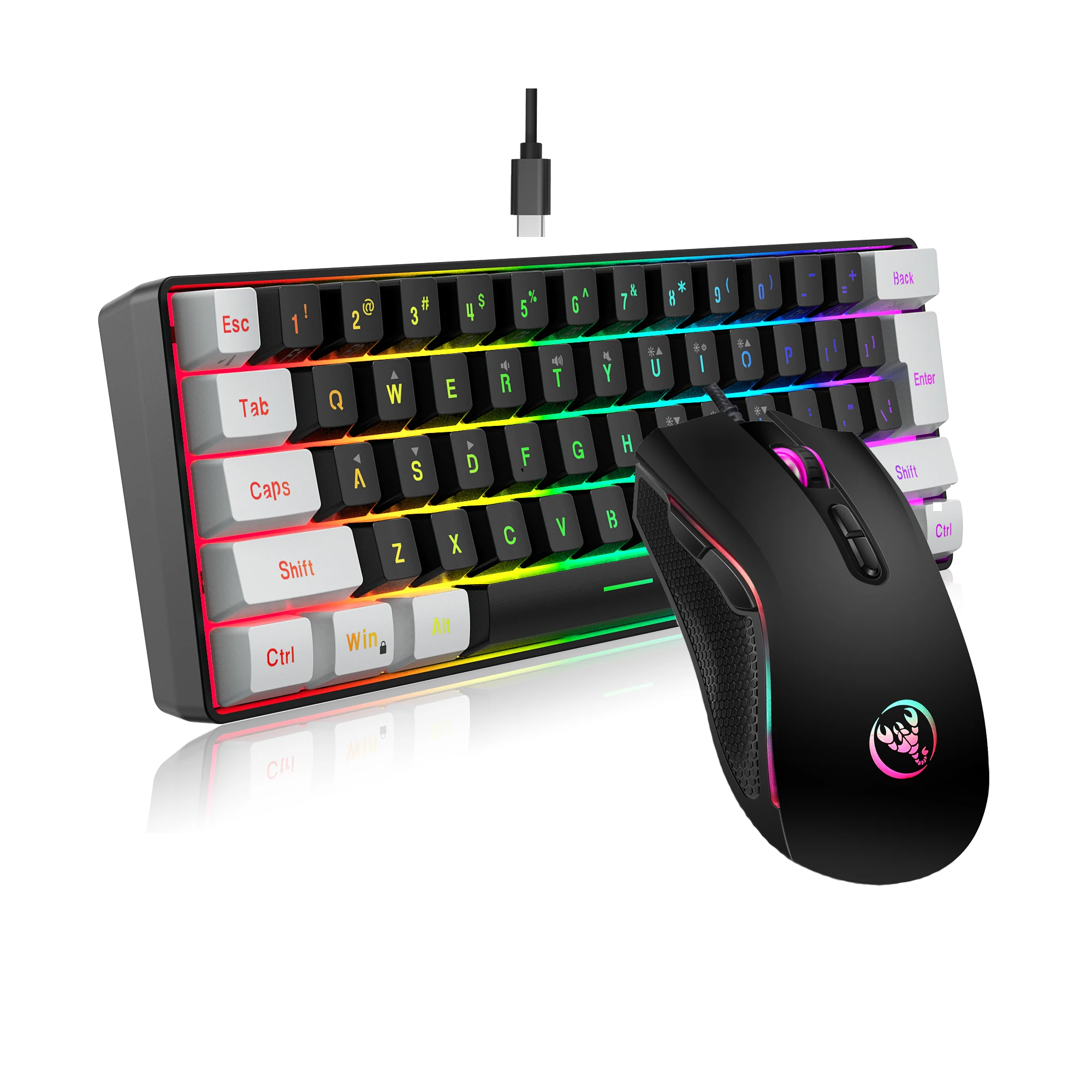

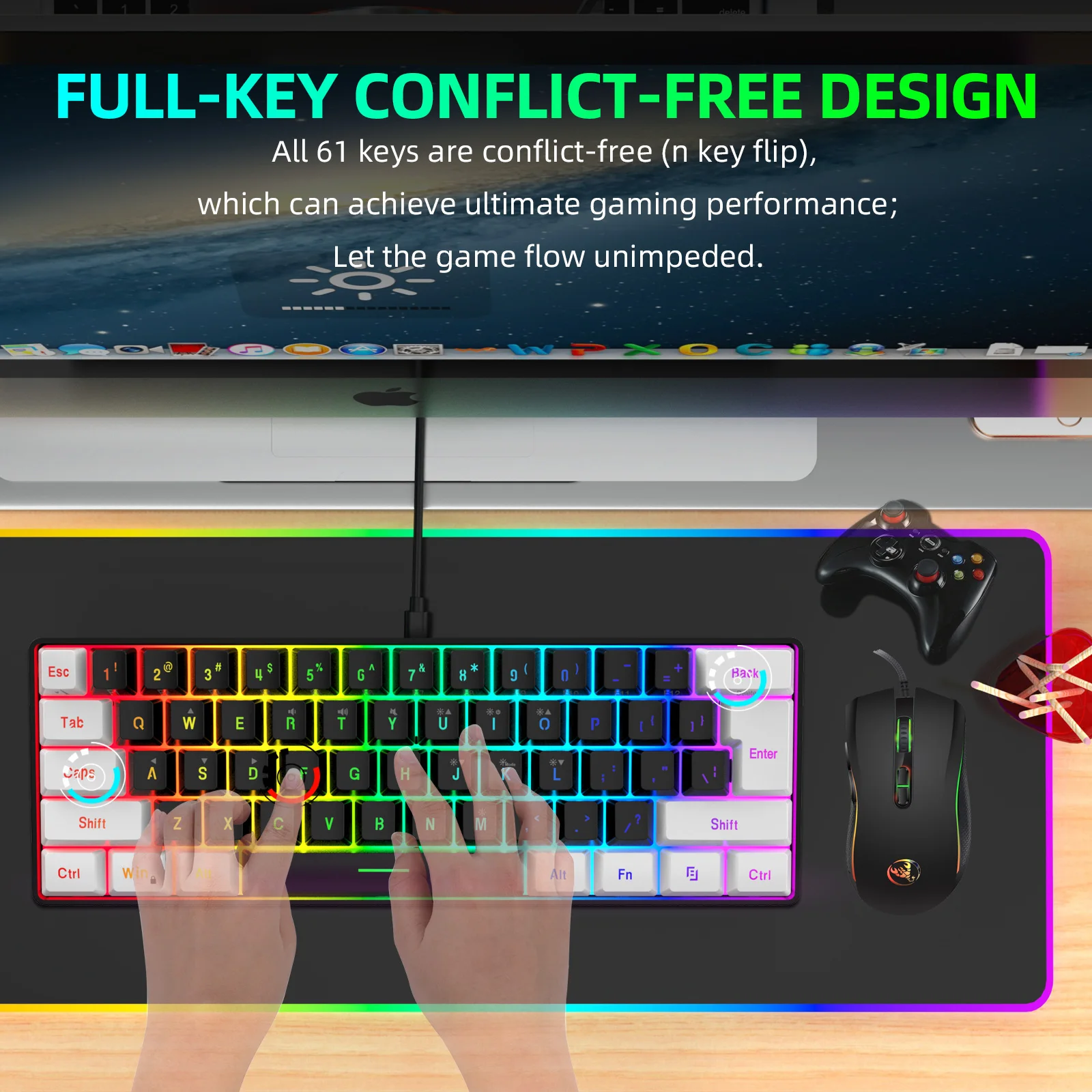
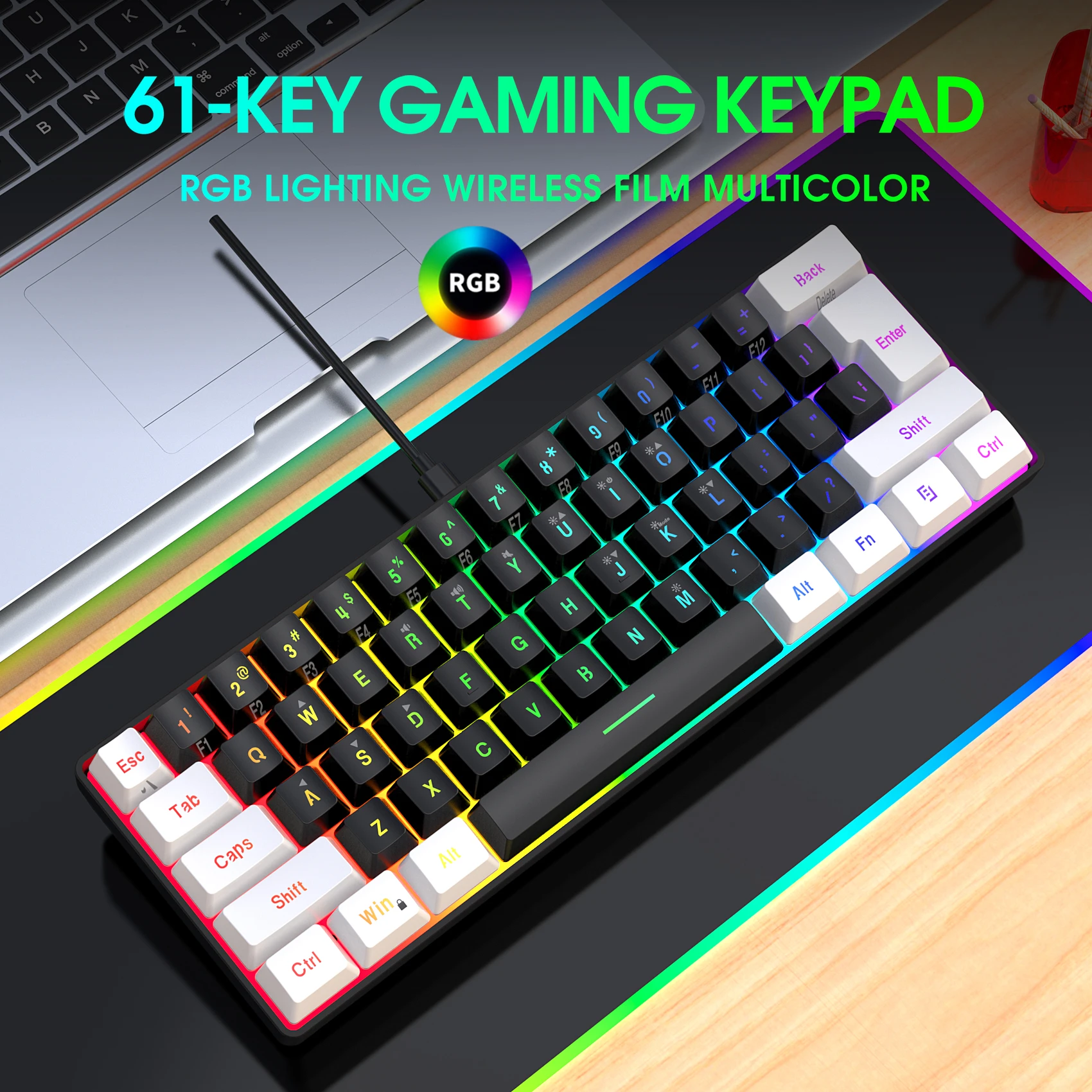


New 61keys Wired White Black Keyboard RGB Gaming Mouse Office Kit Backlight Keyboard and Mouse Combos for PUBG Gamer
<p class="MsoNormal"><strong><span class="15" style="background-color:rgb(255, 255, 255);color:rgb(51, 51, 51);font-size:9pt;font-family:宋体">Keyboard Specifications:</span></strong></p><p class="MsoNormal"><span class="15" style="background-color:rgb(255, 255, 255);color:rgb(51, 51, 51);font-size:9pt;font-family:宋体">Interface Type: USB</span></p><p class="MsoNormal"><span class="15" style="background-color:rgb(255, 255, 255);color:rgb(51, 51, 51);font-size:9pt;font-family:宋体">Product solutions:SK9708</span></p><p class="MsoNormal"><span class="15" style="background-color:rgb(255, 255, 255);color:rgb(51, 51, 51);font-size:9pt;font-family:宋体">Product type:One- key keyboard</span></p><p class="MsoNormal"><span class="15" style="background-color:rgb(255, 255, 255);color:rgb(51, 51, 51);font-size:9pt;font-family:宋体">Number of keys:61KEY</span></p><p class="MsoNormal"><span class="15" style="background-color:rgb(255, 255, 255);color:rgb(51, 51, 51);font-size:9pt;font-family:宋体">Multimedia:With multimedia (laser carving)</span></p><p class="MsoNormal"><span class="15" style="background-color:rgb(255, 255, 255);color:rgb(51, 51, 51);font-size:9pt;font-family:宋体">Button life:10 million times or more</span></p><p class="MsoNormal"><span class="15" style="background-color:rgb(255, 255, 255);color:rgb(51, 51, 51);font-size:9pt;font-family:宋体">Operating Voltage:5.0V+5% DC</span></p><p class="MsoNormal"><span class="15" style="background-color:rgb(255, 255, 255);color:rgb(51, 51, 51);font-size:9pt;font-family:宋体">Working current:150mA (MAX)</span></p><p class="MsoNormal"><span class="15" style="background-color:rgb(255, 255, 255);color:rgb(51, 51, 51);font-size:9pt;font-family:宋体">Keycap material:ABS two-color injection</span></p><p class="MsoNormal"><span class="15" style="background-color:rgb(255, 255, 255);color:rgb(51, 51, 51);font-size:9pt;font-family:宋体">Product line length:1.7M</span></p><p><br/></p><p class="MsoNormal"><strong><span style="font-size:9pt;font-family:宋体">Mouse </span></strong><strong><span class="15" style="background-color:rgb(255, 255, 255);color:rgb(51, 51, 51);font-size:9pt;font-family:宋体">Specifications:</span></strong></p><p class="MsoNormal"><span style="font-size:9pt;font-family:宋体">Rate of return: 125Hz</span></p><p class="MsoNormal"><span style="font-size:9pt;font-family:宋体">Movement speed: 30IPS</span></p><p class="MsoNormal"><span style="font-size:9pt;font-family:宋体">Refresh rate: 4000FPS</span></p><p class="MsoNormal"><span style="font-size:9pt;font-family:宋体">Acceleration: 8G</span></p><p class="MsoNormal"><span style="font-size:9pt;font-family:宋体">DPI: 1200/1600/2400/3600dpi.</span></p><p class="MsoNormal"><span style="font-size:9pt;font-family:宋体">Material: ABS</span></p><p class="MsoNormal"><span style="font-size:9pt;font-family:宋体">Tracking system: Optical </span></p><p class="MsoNormal"><span style="font-size:9pt;font-family:宋体">Voltage rating / electric current: DC 5V / 100mA </span></p><p class="MsoNormal"><span style="font-size:9pt;font-family:宋体">Connection: Wired</span></p><p class="MsoNormal"><span style="font-size:9pt;font-family:宋体">Cable length: Approx. 150cm</span></p><p class="MsoNormal"><span style="font-size:9pt;font-family:宋体">Port: USB 2.0 </span></p><p class="MsoNormal"><span style="font-size:9pt;font-family:宋体">Switch Life: 10 million cycle</span></p><p class="MsoNormal"><span style="font-size:9pt;font-family:宋体">Buttons: Left, Right, Scroll Wheel, DPI +,DPI -, Advance, Retreat</span></p><p class="MsoNormal"><span style="font-size:9pt;font-family:宋体">Light effect: colorful </span></p><p class="MsoNormal"><strong><span style="font-size:9pt;font-family:宋体">Product size and weight:</span></strong></p><p class="MsoNormal"><span style="font-size:9pt;font-family:宋体">Mousesize: 12.7 * 7* 4cm </span></p><p class="MsoNormal"><span style="font-size:9pt;font-family:宋体">Mouseweight: 131g </span></p><p class="MsoNormal"><span class="15" style="background-color:rgb(255, 255, 255);color:rgb(51, 51, 51);font-size:9pt;font-family:宋体">Keyboard Size:29.2*10.2*4.0cm</span></p><p class="MsoNormal"><span class="15" style="background-color:rgb(255, 255, 255);color:rgb(51, 51, 51);font-size:9pt;font-family:宋体">Keyboard weight:359.3g</span></p><p class="MsoNormal"><span class="15" style="background-color:rgb(255, 255, 255);color:rgb(51, 51, 51);font-size:9pt;font-family:宋体">Package weight:660g</span></p><p class="MsoNormal"><span class="15" style="background-color:rgb(255, 255, 255);color:rgb(51, 51, 51);font-size:9pt;font-family:宋体">Package Size: </span><span style="font-size:9pt;font-family:宋体">41*13*4.5cm</span></p><p class="MsoNormal"><strong><span class="15" style="background-color:rgb(255, 255, 255);color:rgb(51, 51, 51);font-size:9pt;font-family:宋体">Package included:</span></strong></p><p class="MsoNormal"><span class="15" style="background-color:rgb(255, 255, 255);color:rgb(51, 51, 51);font-size:9pt;font-family:宋体">1x GamingMouse</span></p><p class="MsoNormal"><span class="15" style="background-color:rgb(255, 255, 255);color:rgb(51, 51, 51);font-size:9pt;font-family:宋体">1x Gaming Keyboard</span></p><p class="MsoNormal"><span class="15" style="background-color:rgb(255, 255, 255);color:rgb(51, 51, 51);font-size:9pt;font-family:宋体">1x English User manual</span></p><p><br/></p><p class="MsoNormal"><strong><span class="15" style="background-color:rgb(255, 255, 255);color:rgb(51, 51, 51);font-size:9pt;font-family:宋体">System compatibility:</span></strong></p><p class="MsoNormal"><span class="15" style="background-color:rgb(255, 255, 255);color:rgb(51, 51, 51);font-size:9pt;font-family:宋体">Compatible with IBM PC Win98SE/Me/2000/XPMISTAWIN 7/WIN10</span></p><p><br/></p><p class="MsoNormal"><strong><span class="15" style="background-color:rgb(255, 255, 255);color:rgb(51, 51, 51);font-size:9pt;font-family:宋体">Installation steps:</span></strong></p><p class="MsoNormal"><span class="15" style="background-color:rgb(255, 255, 255);color:rgb(51, 51, 51);font-size:9pt;font-family:宋体">1:Plug the USB of keyboard and mouse into the USB of laptop or desktop computer.</span></p><p class="MsoNormal"><span class="15" style="background-color:rgb(255, 255, 255);color:rgb(51, 51, 51);font-size:9pt;font-family:宋体">2:The system will identify the keyboard and mouse and install the driver automatically.</span></p><p class="MsoNormal"><span class="15" style="background-color:rgb(255, 255, 255);color:rgb(51, 51, 51);font-size:9pt;font-family:宋体">3:After it finished, The keyboard and mouse will work normall</span></p><p class="MsoNormal"><span class="15" style="background-color:rgb(255, 255, 255);color:rgb(51, 51, 51);font-size:9pt;font-family:宋体">Notice:</span></p><p class="MsoNormal"><span class="15" style="background-color:rgb(255, 255, 255);color:rgb(51, 51, 51);font-size:9pt;font-family:宋体">It is not the real mechanical keyboard, but with the great similar touch feeling.</span></p><p><br/><br/></p><p class="MsoNormal"><strong><span class="15" style="background-color:rgb(255, 255, 255);color:rgb(51, 51, 51);font-size:9pt;font-family:宋体">Keyboard function introduction:</span></strong></p><p class="MsoNormal"><strong><span class="15" style="background-color:rgb(255, 255, 255);color:rgb(51, 51, 51);font-size:9pt;font-family:宋体">The keyboard compound key functions are controlled as follows:</span></strong></p><p class="MsoNormal"><strong><span class="15" style="background-color:rgb(255, 255, 255);color:rgb(51, 51, 51);font-size:9pt;font-family:宋体">1:Volume adjustment:</span></strong></p><p class="MsoNormal"><span class="15" style="background-color:rgb(255, 255, 255);color:rgb(51, 51, 51);font-size:9pt;font-family:宋体">FN+R key is volume reduction, FN+T key is volume increase, FN+Y key is mute;</span></p><p class="MsoNormal"><strong><span class="15" style="background-color:rgb(255, 255, 255);color:rgb(51, 51, 51);font-size:9pt;font-family:宋体">2:Backlight adjustment:</span></strong></p><p class="MsoNormal"><span class="15" style="background-color:rgb(255, 255, 255);color:rgb(51, 51, 51);font-size:9pt;font-family:宋体">FN + U key streamer speed accelerates, FN + J streamer speed slows down,</span></p><p class="MsoNormal"><span class="15" style="background-color:rgb(255, 255, 255);color:rgb(51, 51, 51);font-size:9pt;font-family:宋体">there are 5 speeds adjustable; always bright backlight cannot be adjusted;</span></p><p class="MsoNormal"><span class="15" style="background-color:rgb(255, 255, 255);color:rgb(51, 51, 51);font-size:9pt;font-family:宋体">FN +O and FN + L adjust the backlight brightness, 5 levels adjustable;</span></p><p class="MsoNormal"><span class="15" style="background-color:rgb(255, 255, 255);color:rgb(51, 51, 51);font-size:9pt;font-family:宋体">FN+ I: Backlight off/on, cyclic switching;</span></p><p class="MsoNormal"><span class="15" style="background-color:rgb(255, 255, 255);color:rgb(51, 51, 51);font-size:9pt;font-family:宋体">FN+K: streamer light switching mode;</span></p><p class="MsoNormal"><span class="15" style="background-color:rgb(255, 255, 255);color:rgb(51, 51, 51);font-size:9pt;font-family:宋体">FN+M: Monochrome light switching mode;</span></p><p class="MsoNormal"><strong><span class="15" style="background-color:rgb(255, 255, 255);color:rgb(51, 51, 51);font-size:9pt;font-family:宋体">3:Compound function key switch:</span></strong></p><p class="MsoNormal"><span class="15" style="background-color:rgb(255, 255, 255);color:rgb(51, 51, 51);font-size:9pt;font-family:宋体">FN+1! key: F1</span></p><p class="MsoNormal"><span class="15" style="background-color:rgb(255, 255, 255);color:rgb(51, 51, 51);font-size:9pt;font-family:宋体">FN+2@ key: F2</span></p><p class="MsoNormal"><span class="15" style="background-color:rgb(255, 255, 255);color:rgb(51, 51, 51);font-size:9pt;font-family:宋体">FN+3# key: F3</span></p><p class="MsoNormal"><span class="15" style="background-color:rgb(255, 255, 255);color:rgb(51, 51, 51);font-size:9pt;font-family:宋体">FN+4$ key: F4</span></p><p class="MsoNormal"><span class="15" style="background-color:rgb(255, 255, 255);color:rgb(51, 51, 51);font-size:9pt;font-family:宋体">FN+5% key: F5</span></p><p class="MsoNormal"><span class="15" style="background-color:rgb(255, 255, 255);color:rgb(51, 51, 51);font-size:9pt;font-family:宋体">FN+6^ key: F6</span></p><p class="MsoNormal"><span class="15" style="background-color:rgb(255, 255, 255);color:rgb(51, 51, 51);font-size:9pt;font-family:宋体">FN+7& key: F7</span></p><p class="MsoNormal"><span class="15" style="background-color:rgb(255, 255, 255);color:rgb(51, 51, 51);font-size:9pt;font-family:宋体">FN+8* key: F8</span></p><p class="MsoNormal"><span class="15" style="background-color:rgb(255, 255, 255);color:rgb(51, 51, 51);font-size:9pt;font-family:宋体">FN+9 (Key: F9</span></p><p class="MsoNormal"><span class="15" style="background-color:rgb(255, 255, 255);color:rgb(51, 51, 51);font-size:9pt;font-family:宋体">FN+0) key: F10</span></p><p class="MsoNormal"><span class="15" style="background-color:rgb(255, 255, 255);color:rgb(51, 51, 51);font-size:9pt;font-family:宋体">FN+- key: F11</span></p><p class="MsoNormal"><span class="15" style="background-color:rgb(255, 255, 255);color:rgb(51, 51, 51);font-size:9pt;font-family:宋体">FN+ =+ key: F12</span></p><p class="MsoNormal"><span class="15" style="background-color:rgb(255, 255, 255);color:rgb(51, 51, 51);font-size:9pt;font-family:宋体">FN+Back key: Delete</span></p><p class="MsoNormal"><span class="15" style="background-color:rgb(255, 255, 255);color:rgb(51, 51, 51);font-size:9pt;font-family:宋体">FN+`~ key: Esc</span></p><p><br/></p><p class="MsoNormal"></p>
$93.74
$46.04
- Category : Computer & Office
- Brand : factory_global_discount_store Factory Global Discount Store
Colors
Sizes
-
+

<p class="MsoNormal"><strong><span class="15" style="background-color:rgb(255, 255, 255);color:rgb(51, 51, 51);font-size:9pt;font-family:宋体">Keyboard Specifications:</span></strong></p><p class="MsoNormal"><span class="15" style="background-color:rgb(255, 255, 255);color:rgb(51, 51, 51);font-size:9pt;font-family:宋体">Interface Type: USB</span></p><p class="MsoNormal"><span class="15" style="background-color:rgb(255, 255, 255);color:rgb(51, 51, 51);font-size:9pt;font-family:宋体">Product solutions:SK9708</span></p><p class="MsoNormal"><span class="15" style="background-color:rgb(255, 255, 255);color:rgb(51, 51, 51);font-size:9pt;font-family:宋体">Product type:One- key keyboard</span></p><p class="MsoNormal"><span class="15" style="background-color:rgb(255, 255, 255);color:rgb(51, 51, 51);font-size:9pt;font-family:宋体">Number of keys:61KEY</span></p><p class="MsoNormal"><span class="15" style="background-color:rgb(255, 255, 255);color:rgb(51, 51, 51);font-size:9pt;font-family:宋体">Multimedia:With multimedia (laser carving)</span></p><p class="MsoNormal"><span class="15" style="background-color:rgb(255, 255, 255);color:rgb(51, 51, 51);font-size:9pt;font-family:宋体">Button life:10 million times or more</span></p><p class="MsoNormal"><span class="15" style="background-color:rgb(255, 255, 255);color:rgb(51, 51, 51);font-size:9pt;font-family:宋体">Operating Voltage:5.0V+5% DC</span></p><p class="MsoNormal"><span class="15" style="background-color:rgb(255, 255, 255);color:rgb(51, 51, 51);font-size:9pt;font-family:宋体">Working current:150mA (MAX)</span></p><p class="MsoNormal"><span class="15" style="background-color:rgb(255, 255, 255);color:rgb(51, 51, 51);font-size:9pt;font-family:宋体">Keycap material:ABS two-color injection</span></p><p class="MsoNormal"><span class="15" style="background-color:rgb(255, 255, 255);color:rgb(51, 51, 51);font-size:9pt;font-family:宋体">Product line length:1.7M</span></p><p><br/></p><p class="MsoNormal"><strong><span style="font-size:9pt;font-family:宋体">Mouse </span></strong><strong><span class="15" style="background-color:rgb(255, 255, 255);color:rgb(51, 51, 51);font-size:9pt;font-family:宋体">Specifications:</span></strong></p><p class="MsoNormal"><span style="font-size:9pt;font-family:宋体">Rate of return: 125Hz</span></p><p class="MsoNormal"><span style="font-size:9pt;font-family:宋体">Movement speed: 30IPS</span></p><p class="MsoNormal"><span style="font-size:9pt;font-family:宋体">Refresh rate: 4000FPS</span></p><p class="MsoNormal"><span style="font-size:9pt;font-family:宋体">Acceleration: 8G</span></p><p class="MsoNormal"><span style="font-size:9pt;font-family:宋体">DPI: 1200/1600/2400/3600dpi.</span></p><p class="MsoNormal"><span style="font-size:9pt;font-family:宋体">Material: ABS</span></p><p class="MsoNormal"><span style="font-size:9pt;font-family:宋体">Tracking system: Optical </span></p><p class="MsoNormal"><span style="font-size:9pt;font-family:宋体">Voltage rating / electric current: DC 5V / 100mA </span></p><p class="MsoNormal"><span style="font-size:9pt;font-family:宋体">Connection: Wired</span></p><p class="MsoNormal"><span style="font-size:9pt;font-family:宋体">Cable length: Approx. 150cm</span></p><p class="MsoNormal"><span style="font-size:9pt;font-family:宋体">Port: USB 2.0 </span></p><p class="MsoNormal"><span style="font-size:9pt;font-family:宋体">Switch Life: 10 million cycle</span></p><p class="MsoNormal"><span style="font-size:9pt;font-family:宋体">Buttons: Left, Right, Scroll Wheel, DPI +,DPI -, Advance, Retreat</span></p><p class="MsoNormal"><span style="font-size:9pt;font-family:宋体">Light effect: colorful </span></p><p class="MsoNormal"><strong><span style="font-size:9pt;font-family:宋体">Product size and weight:</span></strong></p><p class="MsoNormal"><span style="font-size:9pt;font-family:宋体">Mousesize: 12.7 * 7* 4cm </span></p><p class="MsoNormal"><span style="font-size:9pt;font-family:宋体">Mouseweight: 131g </span></p><p class="MsoNormal"><span class="15" style="background-color:rgb(255, 255, 255);color:rgb(51, 51, 51);font-size:9pt;font-family:宋体">Keyboard Size:29.2*10.2*4.0cm</span></p><p class="MsoNormal"><span class="15" style="background-color:rgb(255, 255, 255);color:rgb(51, 51, 51);font-size:9pt;font-family:宋体">Keyboard weight:359.3g</span></p><p class="MsoNormal"><span class="15" style="background-color:rgb(255, 255, 255);color:rgb(51, 51, 51);font-size:9pt;font-family:宋体">Package weight:660g</span></p><p class="MsoNormal"><span class="15" style="background-color:rgb(255, 255, 255);color:rgb(51, 51, 51);font-size:9pt;font-family:宋体">Package Size: </span><span style="font-size:9pt;font-family:宋体">41*13*4.5cm</span></p><p class="MsoNormal"><strong><span class="15" style="background-color:rgb(255, 255, 255);color:rgb(51, 51, 51);font-size:9pt;font-family:宋体">Package included:</span></strong></p><p class="MsoNormal"><span class="15" style="background-color:rgb(255, 255, 255);color:rgb(51, 51, 51);font-size:9pt;font-family:宋体">1x GamingMouse</span></p><p class="MsoNormal"><span class="15" style="background-color:rgb(255, 255, 255);color:rgb(51, 51, 51);font-size:9pt;font-family:宋体">1x Gaming Keyboard</span></p><p class="MsoNormal"><span class="15" style="background-color:rgb(255, 255, 255);color:rgb(51, 51, 51);font-size:9pt;font-family:宋体">1x English User manual</span></p><p><br/></p><p class="MsoNormal"><strong><span class="15" style="background-color:rgb(255, 255, 255);color:rgb(51, 51, 51);font-size:9pt;font-family:宋体">System compatibility:</span></strong></p><p class="MsoNormal"><span class="15" style="background-color:rgb(255, 255, 255);color:rgb(51, 51, 51);font-size:9pt;font-family:宋体">Compatible with IBM PC Win98SE/Me/2000/XPMISTAWIN 7/WIN10</span></p><p><br/></p><p class="MsoNormal"><strong><span class="15" style="background-color:rgb(255, 255, 255);color:rgb(51, 51, 51);font-size:9pt;font-family:宋体">Installation steps:</span></strong></p><p class="MsoNormal"><span class="15" style="background-color:rgb(255, 255, 255);color:rgb(51, 51, 51);font-size:9pt;font-family:宋体">1:Plug the USB of keyboard and mouse into the USB of laptop or desktop computer.</span></p><p class="MsoNormal"><span class="15" style="background-color:rgb(255, 255, 255);color:rgb(51, 51, 51);font-size:9pt;font-family:宋体">2:The system will identify the keyboard and mouse and install the driver automatically.</span></p><p class="MsoNormal"><span class="15" style="background-color:rgb(255, 255, 255);color:rgb(51, 51, 51);font-size:9pt;font-family:宋体">3:After it finished, The keyboard and mouse will work normall</span></p><p class="MsoNormal"><span class="15" style="background-color:rgb(255, 255, 255);color:rgb(51, 51, 51);font-size:9pt;font-family:宋体">Notice:</span></p><p class="MsoNormal"><span class="15" style="background-color:rgb(255, 255, 255);color:rgb(51, 51, 51);font-size:9pt;font-family:宋体">It is not the real mechanical keyboard, but with the great similar touch feeling.</span></p><p><br/><br/></p><p class="MsoNormal"><strong><span class="15" style="background-color:rgb(255, 255, 255);color:rgb(51, 51, 51);font-size:9pt;font-family:宋体">Keyboard function introduction:</span></strong></p><p class="MsoNormal"><strong><span class="15" style="background-color:rgb(255, 255, 255);color:rgb(51, 51, 51);font-size:9pt;font-family:宋体">The keyboard compound key functions are controlled as follows:</span></strong></p><p class="MsoNormal"><strong><span class="15" style="background-color:rgb(255, 255, 255);color:rgb(51, 51, 51);font-size:9pt;font-family:宋体">1:Volume adjustment:</span></strong></p><p class="MsoNormal"><span class="15" style="background-color:rgb(255, 255, 255);color:rgb(51, 51, 51);font-size:9pt;font-family:宋体">FN+R key is volume reduction, FN+T key is volume increase, FN+Y key is mute;</span></p><p class="MsoNormal"><strong><span class="15" style="background-color:rgb(255, 255, 255);color:rgb(51, 51, 51);font-size:9pt;font-family:宋体">2:Backlight adjustment:</span></strong></p><p class="MsoNormal"><span class="15" style="background-color:rgb(255, 255, 255);color:rgb(51, 51, 51);font-size:9pt;font-family:宋体">FN + U key streamer speed accelerates, FN + J streamer speed slows down,</span></p><p class="MsoNormal"><span class="15" style="background-color:rgb(255, 255, 255);color:rgb(51, 51, 51);font-size:9pt;font-family:宋体">there are 5 speeds adjustable; always bright backlight cannot be adjusted;</span></p><p class="MsoNormal"><span class="15" style="background-color:rgb(255, 255, 255);color:rgb(51, 51, 51);font-size:9pt;font-family:宋体">FN +O and FN + L adjust the backlight brightness, 5 levels adjustable;</span></p><p class="MsoNormal"><span class="15" style="background-color:rgb(255, 255, 255);color:rgb(51, 51, 51);font-size:9pt;font-family:宋体">FN+ I: Backlight off/on, cyclic switching;</span></p><p class="MsoNormal"><span class="15" style="background-color:rgb(255, 255, 255);color:rgb(51, 51, 51);font-size:9pt;font-family:宋体">FN+K: streamer light switching mode;</span></p><p class="MsoNormal"><span class="15" style="background-color:rgb(255, 255, 255);color:rgb(51, 51, 51);font-size:9pt;font-family:宋体">FN+M: Monochrome light switching mode;</span></p><p class="MsoNormal"><strong><span class="15" style="background-color:rgb(255, 255, 255);color:rgb(51, 51, 51);font-size:9pt;font-family:宋体">3:Compound function key switch:</span></strong></p><p class="MsoNormal"><span class="15" style="background-color:rgb(255, 255, 255);color:rgb(51, 51, 51);font-size:9pt;font-family:宋体">FN+1! key: F1</span></p><p class="MsoNormal"><span class="15" style="background-color:rgb(255, 255, 255);color:rgb(51, 51, 51);font-size:9pt;font-family:宋体">FN+2@ key: F2</span></p><p class="MsoNormal"><span class="15" style="background-color:rgb(255, 255, 255);color:rgb(51, 51, 51);font-size:9pt;font-family:宋体">FN+3# key: F3</span></p><p class="MsoNormal"><span class="15" style="background-color:rgb(255, 255, 255);color:rgb(51, 51, 51);font-size:9pt;font-family:宋体">FN+4$ key: F4</span></p><p class="MsoNormal"><span class="15" style="background-color:rgb(255, 255, 255);color:rgb(51, 51, 51);font-size:9pt;font-family:宋体">FN+5% key: F5</span></p><p class="MsoNormal"><span class="15" style="background-color:rgb(255, 255, 255);color:rgb(51, 51, 51);font-size:9pt;font-family:宋体">FN+6^ key: F6</span></p><p class="MsoNormal"><span class="15" style="background-color:rgb(255, 255, 255);color:rgb(51, 51, 51);font-size:9pt;font-family:宋体">FN+7& key: F7</span></p><p class="MsoNormal"><span class="15" style="background-color:rgb(255, 255, 255);color:rgb(51, 51, 51);font-size:9pt;font-family:宋体">FN+8* key: F8</span></p><p class="MsoNormal"><span class="15" style="background-color:rgb(255, 255, 255);color:rgb(51, 51, 51);font-size:9pt;font-family:宋体">FN+9 (Key: F9</span></p><p class="MsoNormal"><span class="15" style="background-color:rgb(255, 255, 255);color:rgb(51, 51, 51);font-size:9pt;font-family:宋体">FN+0) key: F10</span></p><p class="MsoNormal"><span class="15" style="background-color:rgb(255, 255, 255);color:rgb(51, 51, 51);font-size:9pt;font-family:宋体">FN+- key: F11</span></p><p class="MsoNormal"><span class="15" style="background-color:rgb(255, 255, 255);color:rgb(51, 51, 51);font-size:9pt;font-family:宋体">FN+ =+ key: F12</span></p><p class="MsoNormal"><span class="15" style="background-color:rgb(255, 255, 255);color:rgb(51, 51, 51);font-size:9pt;font-family:宋体">FN+Back key: Delete</span></p><p class="MsoNormal"><span class="15" style="background-color:rgb(255, 255, 255);color:rgb(51, 51, 51);font-size:9pt;font-family:宋体">FN+`~ key: Esc</span></p><p><br/></p><p class="MsoNormal"></p>
Related Product
Browse The Collection of Top Products.