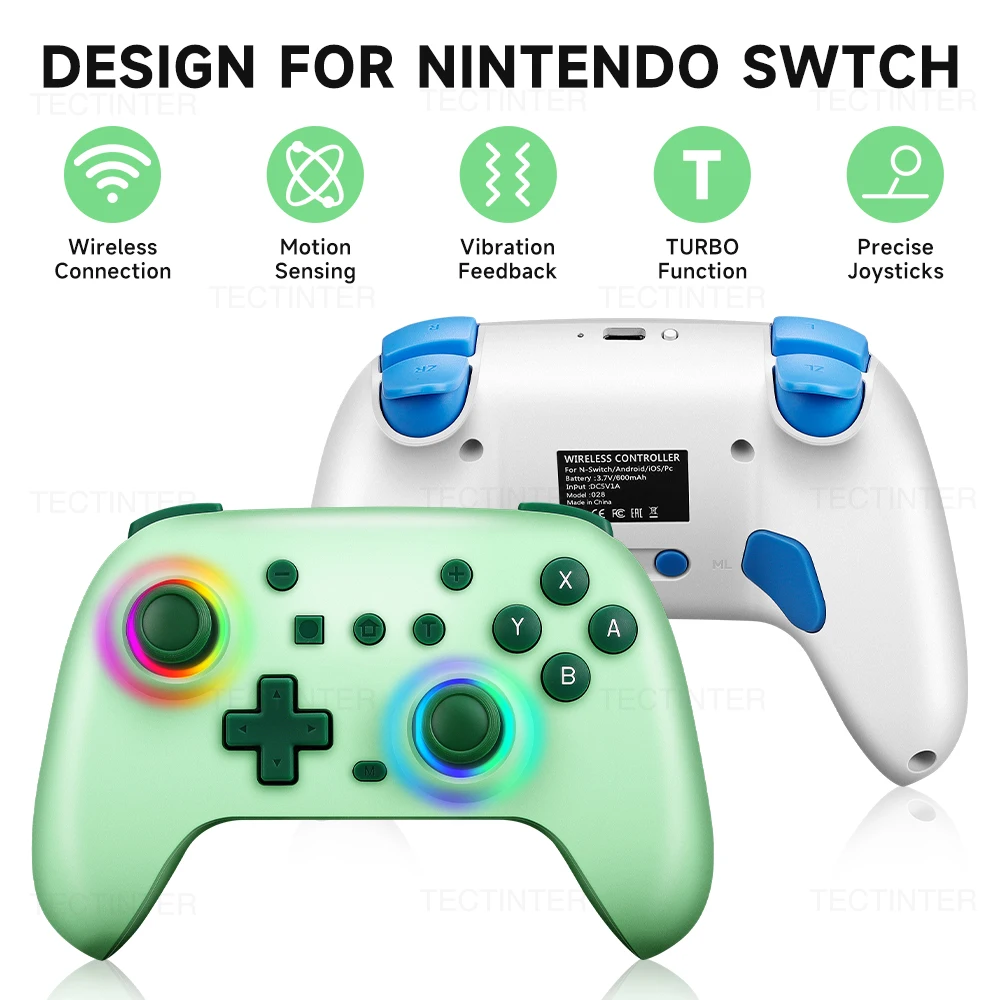

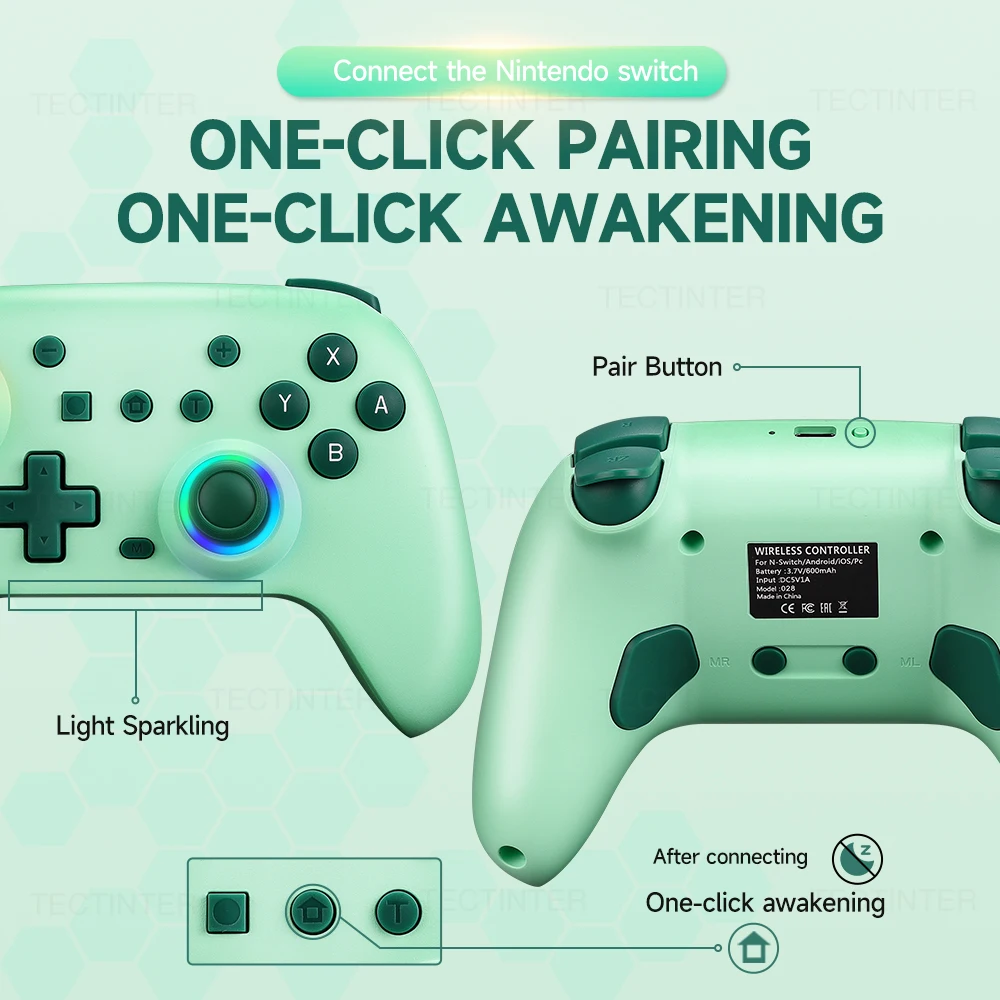
RGB Wireless BT Controller For Nintendo Switch2/OLED/Lite Gamepad For Android Phone/PC Hall Effect Joystick With Turbo Function
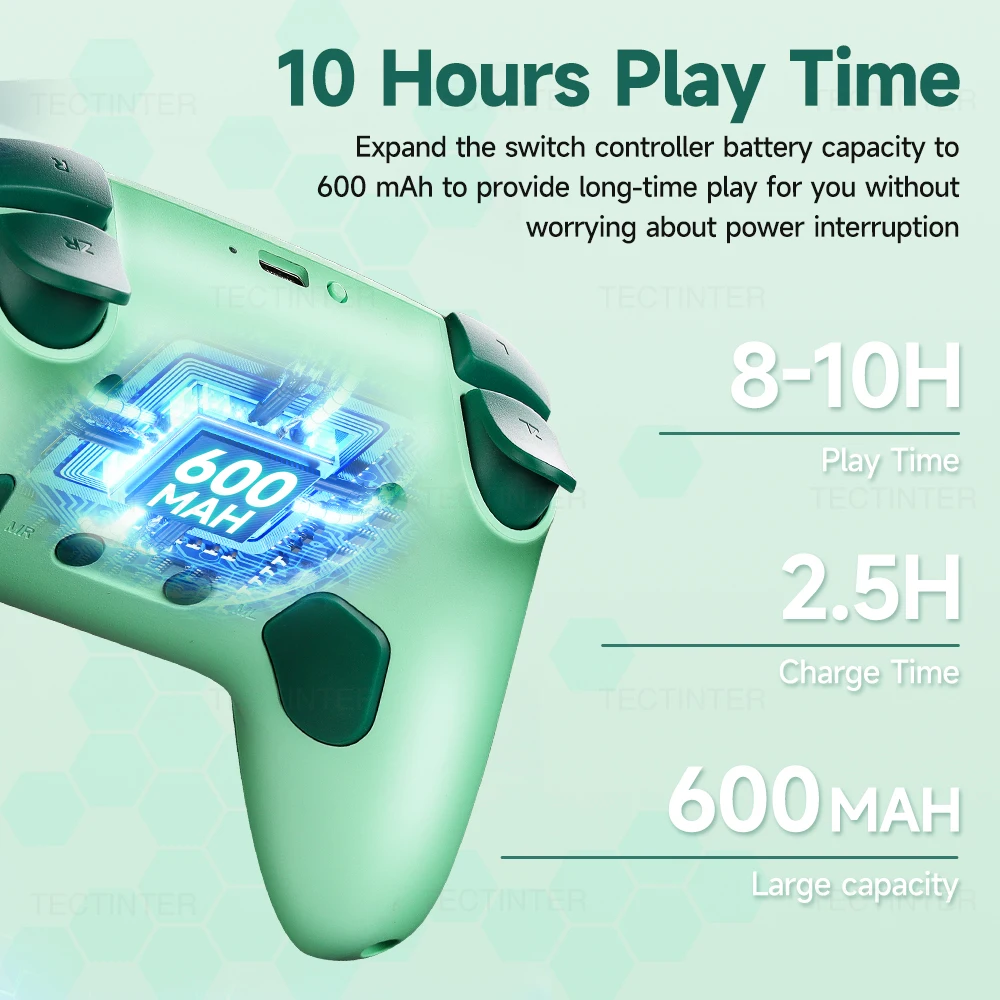
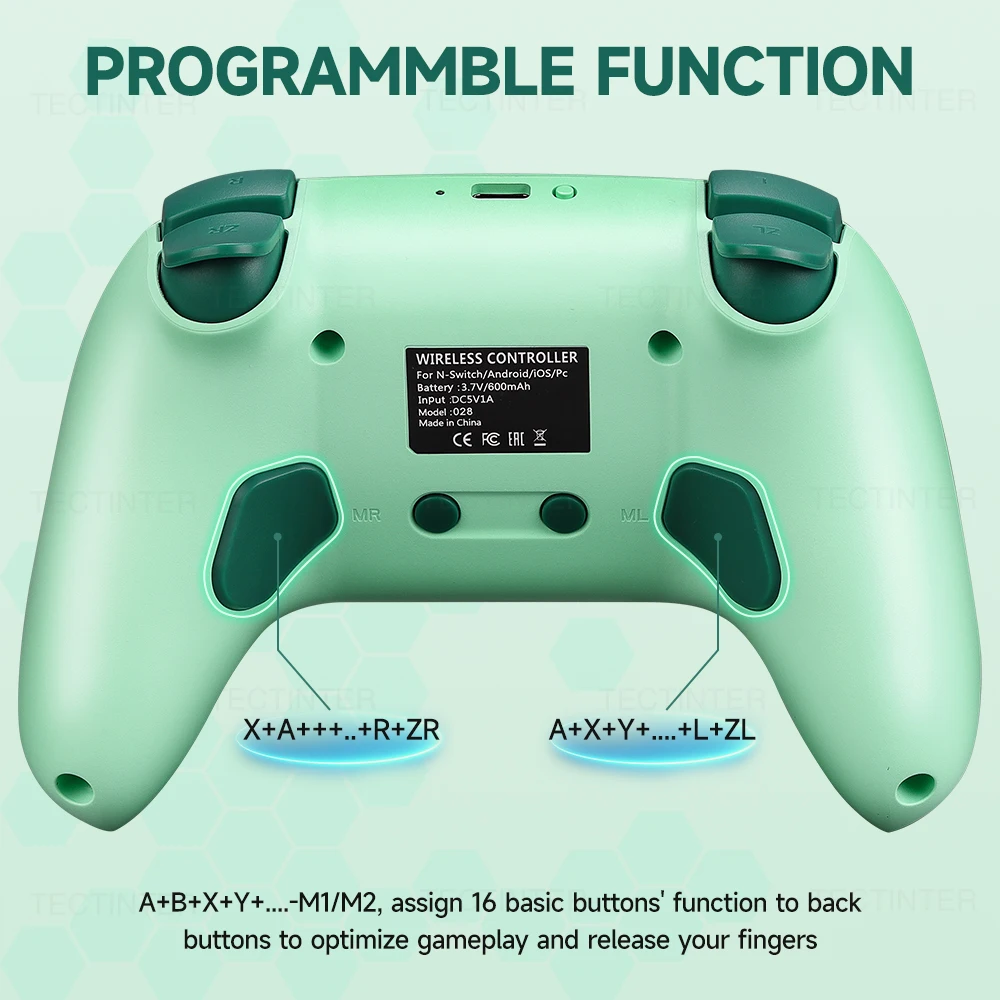
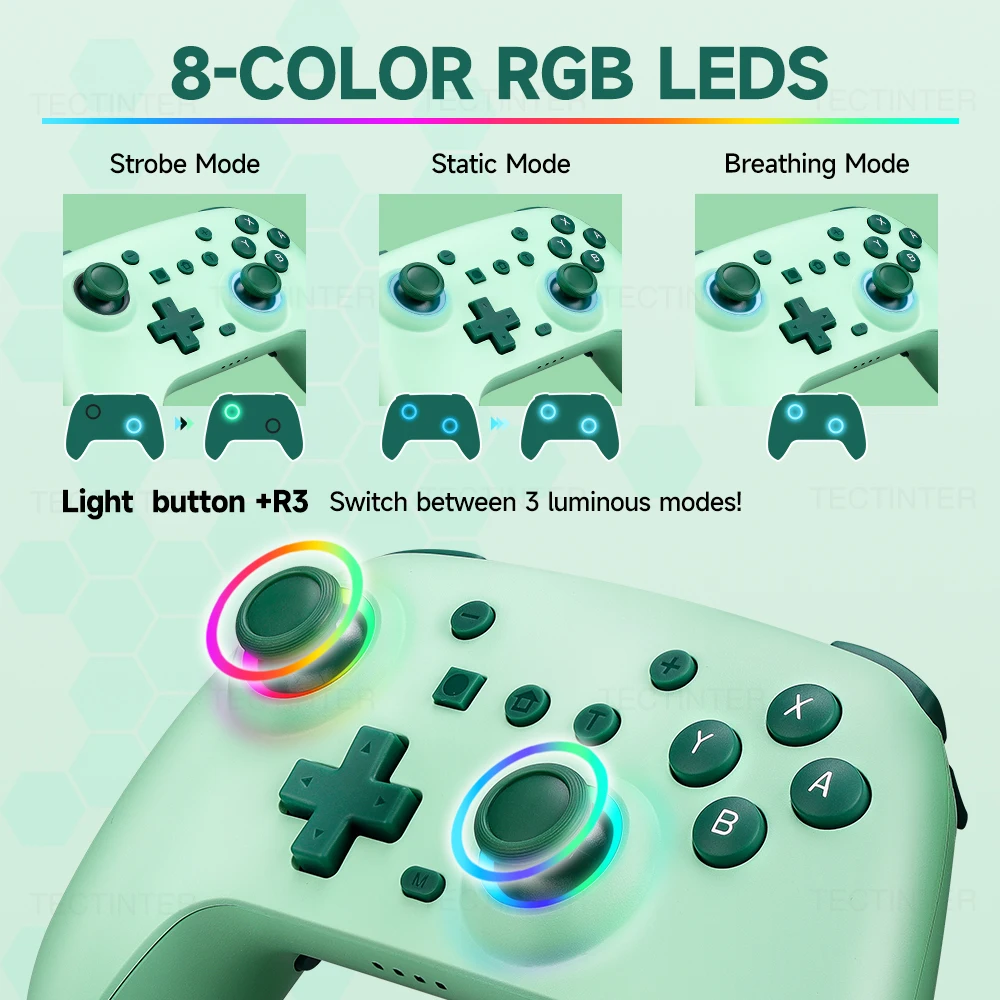
<div class="detailmodule_text-image"><p style="font-family:OpenSans;font-size:20px;font-weight:900;line-height:28px;white-space:pre-wrap;color:rgb(0, 0, 0);margin-bottom:12px" class="detail-desc-decorate-title">Q&A</p><p style="font-family:OpenSans;font-size:14px;font-weight:300;line-height:20px;white-space:pre-wrap;color:rgb(0, 0, 0);margin-bottom:12px" class="detail-desc-decorate-content">Q: Why are all the buttons unresponsive<br/>A: The controller is in "lock mode", all buttons cannot be turned on to wake up the controller. Use a USB data cable to charge the controller in order to exit the "lock mode" and restore its function to normal. (To avoid battery consumption caused by accidental touch of buttons during packaging and transportation, the product needs to be set to "lock mode" according to this operation before shipping)<br/>When you connect to the Switch 2 host, the “Search for Controllers” page may display no controller connected, even though the controller is actually connected. But in fact, You can click "Contrellers" on the main menu of the Switch host, will see that the controller was successfully connected, as shown the below picture.</p><div></div></div><div class="detailmodule_text-image"><p style="font-family:OpenSans;font-size:20px;font-weight:900;line-height:28px;white-space:pre-wrap;color:rgb(0, 0, 0);margin-bottom:12px" class="detail-desc-decorate-title">Support multi-platforms</p><p style="font-family:OpenSans;font-size:14px;font-weight:300;line-height:20px;white-space:pre-wrap;color:rgb(0, 0, 0);margin-bottom:12px" class="detail-desc-decorate-content">This controller is an unprecedented game controller that supports multi-platforms including Nintendo Switch, Steam, Android, iOS ,PC and Android TV BOX. Meet the needs of many players on multiple platforms.There are 2 connections. You can also connect with PC with usb cable .Just use this controller and start your games !</p><div></div></div><div class="detailmodule_text-image"><p style="font-family:OpenSans;font-size:20px;font-weight:900;line-height:28px;white-space:pre-wrap;color:rgb(0, 0, 0);margin-bottom:12px" class="detail-desc-decorate-title">Built in 600Mah Battery</p><p style="font-family:OpenSans;font-size:14px;font-weight:300;line-height:20px;white-space:pre-wrap;color:rgb(0, 0, 0);margin-bottom:12px" class="detail-desc-decorate-content">Featuring a 600Mah battery, this wireless controller ensures long-lasting gaming sessions without the hassle of frequent recharging.Charge 2.5 hours and can be used for about 8-10 hours .</p><div></div></div><div class="detailmodule_text-image"><p style="font-family:OpenSans;font-size:20px;font-weight:900;line-height:28px;white-space:pre-wrap;color:rgb(0, 0, 0);margin-bottom:12px" class="detail-desc-decorate-title">One-Click SCREENSHOT</p><p style="font-family:OpenSans;font-size:14px;font-weight:300;line-height:20px;white-space:pre-wrap;color:rgb(0, 0, 0);margin-bottom:12px" class="detail-desc-decorate-content">The switch controller with continuous screenshoting function helps you more enjoyable to play games. Note :This function is only for Switch !!</p><div></div></div><div class="detailmodule_text-image"><p style="font-family:OpenSans;font-size:20px;font-weight:900;line-height:28px;white-space:pre-wrap;color:rgb(0, 0, 0);margin-bottom:12px" class="detail-desc-decorate-title">One-Click Pairing and Awakening</p><p style="font-family:OpenSans;font-size:14px;font-weight:300;line-height:20px;white-space:pre-wrap;color:rgb(0, 0, 0);margin-bottom:12px" class="detail-desc-decorate-content">Steps<br/>1.When using the controller for the first time, you need to use a data cable to charge the controller, exit the "lock mode", and then press and hold the "Pairing" button for about 3 seconds until the LED1-4 light flashes when the controller is turned on. Release it, <br/>2.Open the Switch host to the pairing interface, and perform Bluetooth pairing. After successful pairing, all functions of the controller can be used normally,<br/>3.Press the HOME key to wake up the console.</p><div></div></div><div class="detailmodule_text-image"><p style="font-family:OpenSans;font-size:20px;font-weight:900;line-height:28px;white-space:pre-wrap;color:rgb(0, 0, 0);margin-bottom:12px" class="detail-desc-decorate-title">Programming Function</p><p style="font-family:OpenSans;font-size:14px;font-weight:300;line-height:20px;white-space:pre-wrap;color:rgb(0, 0, 0);margin-bottom:12px" class="detail-desc-decorate-content">1. Press and hold the M programming mode button for 2 seconds, and the left and right 3D aperture lights will flash slowly, indicating that the controller has entered programming mode;<br/>2. Press any of the following buttons that you want to program (map): A/B/X/Y/LB/RB/L3/R3/D-PAD, with the left and right 3D aperture lights flashing quickly;<br/>3. Press any of the left or right programmable keys (the programming key on the left or right), and the left and right 3D aperture lights will change from flashing fast to on, indicating successful button programming (mapping);<br/>Note: Up to 16 buttons can be programmed; If there is no button for more than 1 minute, the programming mode will automatically exit;<br/>Clean up programming (mapping) function:<br/>1. Press and hold the M programming button for 2 seconds, and the left and right 3D aperture lights will flash slowly, indicating that the handle has entered programming mode;<br/>2. Press the programming key that needs to be cleared for ML and MR, and the left and right 3D aperture lights will flash and become longer, indicating that all programming (mapping) functions are cleared.</p><div></div></div><div class="detailmodule_text-image"><p style="font-family:OpenSans;font-size:20px;font-weight:900;line-height:28px;white-space:pre-wrap;color:rgb(0, 0, 0);margin-bottom:12px" class="detail-desc-decorate-title">6-Axis Gyroscope For Nintendo Switch</p><p style="font-family:OpenSans;font-size:14px;font-weight:300;line-height:20px;white-space:pre-wrap;color:rgb(0, 0, 0);margin-bottom:12px" class="detail-desc-decorate-content">The controller has built-in independent 6-axis high-precision gyroscope chip. (Only can use in the Switch !!!)Compared with ordinary controller, it has higher precision and response speed. It can accurately capture small hand movements and quickly complete the operation</p><div></div></div><div class="detailmodule_text-image"><p style="font-family:OpenSans;font-size:20px;font-weight:900;line-height:28px;white-space:pre-wrap;color:rgb(0, 0, 0);margin-bottom:12px" class="detail-desc-decorate-title">Turbo Function</p><p style="font-family:OpenSans;font-size:14px;font-weight:300;line-height:20px;white-space:pre-wrap;color:rgb(0, 0, 0);margin-bottom:12px" class="detail-desc-decorate-content">Equipped with a programmable turbo function, this gamepad allows you to customize your gaming experience by enhancing your gameplay speed and efficiency.</p><div></div></div><div class="detailmodule_text-image"><p style="font-family:OpenSans;font-size:20px;font-weight:900;line-height:28px;white-space:pre-wrap;color:rgb(0, 0, 0);margin-bottom:12px" class="detail-desc-decorate-title">4-Gear Dual-Motor Vibration</p><p style="font-family:OpenSans;font-size:14px;font-weight:300;line-height:20px;white-space:pre-wrap;color:rgb(0, 0, 0);margin-bottom:12px" class="detail-desc-decorate-content">This game controller has two vibration motors, which can enhance the immersion of the game and provide a real-time and realistic game experience. That is to say, when a player shoots, hits a target or is hit in the game, its asymmetric design can provide corresponding real-time feedback based on these different game scenarios.</p><div></div></div><div class="detailmodule_text-image"><p style="font-family:OpenSans;font-size:20px;font-weight:900;line-height:28px;white-space:pre-wrap;color:rgb(0, 0, 0);margin-bottom:12px" class="detail-desc-decorate-title">8-Color RGB Led</p><p style="font-family:OpenSans;font-size:14px;font-weight:300;line-height:20px;white-space:pre-wrap;color:rgb(0, 0, 0);margin-bottom:12px" class="detail-desc-decorate-content">There are three modes.<br/>(1) Strobe Mode: Press the "LED" and "R3" button to change the mode from . Static Mode to Strobe Mode and Breathing Mode.<br/>(2) Breathing Mode: Simultaneously press and hold the 3D joystick L3+R3. The 1-second motor vibration prompt allows setting the color of the RGB aperture; short press the L3 key can switch the RGB light . Short press the L3 key can confirm the color you need .<br/>(3) Static Mode: Press the ''LED' and "L3" ' button to enter static mode.</p><div></div></div><div class="detailmodule_text-image"><p style="font-family:OpenSans;font-size:20px;font-weight:900;line-height:28px;white-space:pre-wrap;color:rgb(0, 0, 0);margin-bottom:12px" class="detail-desc-decorate-title">Super Compatibility</p><p style="font-family:OpenSans;font-size:14px;font-weight:300;line-height:20px;white-space:pre-wrap;color:rgb(0, 0, 0);margin-bottom:12px" class="detail-desc-decorate-content">Compatible with all Switch systems, the handle is compatible with Switch, Switch 2 For PS3/PS4 . The gamepad is also compatible with IOS, Android phones ,PC . No need to install any driver.<br/>(Note: For PC using, works need connect with adapter.For PS3/PS4 Console using need first time connect need USB cable)</p><div></div></div><div class="detailmodule_text-image"><p style="font-family:OpenSans;font-size:20px;font-weight:900;line-height:28px;white-space:pre-wrap;color:rgb(0, 0, 0);margin-bottom:12px" class="detail-desc-decorate-title">Vibrate Function & Gyro Sensor</p><p style="font-family:OpenSans;font-size:14px;font-weight:300;line-height:20px;white-space:pre-wrap;color:rgb(0, 0, 0);margin-bottom:12px" class="detail-desc-decorate-content">The controller for switch have dual vibration motors with 3-level precise vibration: weak, moderate and strong that provide you excellent vibration feedback to enhance the game immersion. With the 6-axis gyro sensor, this controller can detect the inclination of the controller and make a quick response, give you more fun while playing motion sensing games.</p><div></div></div><div class="detailmodule_text-image"><p style="font-family:OpenSans;font-size:20px;font-weight:900;line-height:28px;white-space:pre-wrap;color:rgb(0, 0, 0);margin-bottom:12px" class="detail-desc-decorate-title">800mAh Battery&Long Playing Time</p><p style="font-family:OpenSans;font-size:14px;font-weight:300;line-height:20px;white-space:pre-wrap;color:rgb(0, 0, 0);margin-bottom:12px" class="detail-desc-decorate-content">Built in 800mAh rechargeable battery, provides 10 hours of play time with only 2-3 hours of charging time. 3.5 hours of charging can provide up to 10 hours of gaming time that make sure you can enjoy games longer without interruption.</p><div></div></div><div class="detailmodule_text-image"><p style="font-family:OpenSans;font-size:20px;font-weight:900;line-height:28px;white-space:pre-wrap;color:rgb(0, 0, 0);margin-bottom:12px" class="detail-desc-decorate-title">Programming Function</p><p style="font-family:OpenSans;font-size:14px;font-weight:300;line-height:20px;white-space:pre-wrap;color:rgb(0, 0, 0);margin-bottom:12px" class="detail-desc-decorate-content">Controller with 2 back programming buttons, there are two modes, which are single programming or multi-programming. M1/M2= A+B+Y+L+ZL+R+ZR+D-pad, then you can use other fingers to operate more comfortably. Pro controller switch with programmable buttons help to minimize button abuse and stick clicking it can last more than several years with heavy use.</p><div></div></div><div class="detailmodule_text"><p style="font-family:OpenSans;font-size:20px;font-weight:900;line-height:28px;white-space:pre-wrap;color:rgb(0, 0, 0);margin-bottom:12px" class="detail-desc-decorate-title">RGB COLORFUL BREATHING LED WITH CONTROL BUTTON</p><p style="font-family:OpenSans;font-size:14px;font-weight:300;line-height:20px;white-space:pre-wrap;color:rgb(0, 0, 0);margin-bottom:12px" class="detail-desc-decorate-content">The switch remote joystick has 7 colors of light that can be adjusted via the LED light control button of the switch pro controller, You can switch the color of gamepad pc according to different games to immerse yourself deeply in the world of the game.</p></div><div class="detailmodule_image"></div><div class="detailmodule_text"><p style="font-family:OpenSans;font-size:20px;font-weight:900;line-height:28px;white-space:pre-wrap;color:rgb(0, 0, 0);margin-bottom:12px" class="detail-desc-decorate-title">Ergonomic & Non-Slip Design</p><p style="font-family:OpenSans;font-size:14px;font-weight:300;line-height:20px;white-space:pre-wrap;color:rgb(0, 0, 0);margin-bottom:12px" class="detail-desc-decorate-content">The wireless controller adopts an ergonomic structure, which is suitable for both hands and is comfortable even for long hours of continuous gaming. The handle has a non-slip design, allowing you to control the game stably without worrying about sweat on your hands.</p></div><div class="detailmodule_image"></div><div class="detailmodule_text"><p style="font-family:OpenSans;font-size:20px;font-weight:900;line-height:28px;white-space:pre-wrap;color:rgb(0, 0, 0);margin-bottom:12px" class="detail-desc-decorate-title">Pairing method</p></div><div class="detailmodule_image"></div><div class="detailmodule_text-image"><p style="font-family:OpenSans;font-size:20px;font-weight:900;line-height:28px;white-space:pre-wrap;color:rgb(0, 0, 0);margin-bottom:12px" class="detail-desc-decorate-title">Packing list</p><p style="font-family:OpenSans;font-size:14px;font-weight:300;line-height:20px;white-space:pre-wrap;color:rgb(0, 0, 0);margin-bottom:12px" class="detail-desc-decorate-content">Controller x 1<br/>USB Cable x1<br/>Packing Box x1<br/>Instruction Manual x1<br/><br/>or<br/><br/>1x Wireless Controller<br/>1x USB cable<br/>1x Instruction<br/>1x Clip(optional)</p><div></div></div><div class="detailmodule_image"></div><p><br/></p>
$33.82
$30.79
- Category : Consumer Electronics
- Brand : yecktegj_online_store_store YECKTEGJ Online Store Store
Colors
-
+

<div class="detailmodule_text-image"><p style="font-family:OpenSans;font-size:20px;font-weight:900;line-height:28px;white-space:pre-wrap;color:rgb(0, 0, 0);margin-bottom:12px" class="detail-desc-decorate-title">Q&A</p><p style="font-family:OpenSans;font-size:14px;font-weight:300;line-height:20px;white-space:pre-wrap;color:rgb(0, 0, 0);margin-bottom:12px" class="detail-desc-decorate-content">Q: Why are all the buttons unresponsive<br/>A: The controller is in "lock mode", all buttons cannot be turned on to wake up the controller. Use a USB data cable to charge the controller in order to exit the "lock mode" and restore its function to normal. (To avoid battery consumption caused by accidental touch of buttons during packaging and transportation, the product needs to be set to "lock mode" according to this operation before shipping)<br/>When you connect to the Switch 2 host, the “Search for Controllers” page may display no controller connected, even though the controller is actually connected. But in fact, You can click "Contrellers" on the main menu of the Switch host, will see that the controller was successfully connected, as shown the below picture.</p><div></div></div><div class="detailmodule_text-image"><p style="font-family:OpenSans;font-size:20px;font-weight:900;line-height:28px;white-space:pre-wrap;color:rgb(0, 0, 0);margin-bottom:12px" class="detail-desc-decorate-title">Support multi-platforms</p><p style="font-family:OpenSans;font-size:14px;font-weight:300;line-height:20px;white-space:pre-wrap;color:rgb(0, 0, 0);margin-bottom:12px" class="detail-desc-decorate-content">This controller is an unprecedented game controller that supports multi-platforms including Nintendo Switch, Steam, Android, iOS ,PC and Android TV BOX. Meet the needs of many players on multiple platforms.There are 2 connections. You can also connect with PC with usb cable .Just use this controller and start your games !</p><div></div></div><div class="detailmodule_text-image"><p style="font-family:OpenSans;font-size:20px;font-weight:900;line-height:28px;white-space:pre-wrap;color:rgb(0, 0, 0);margin-bottom:12px" class="detail-desc-decorate-title">Built in 600Mah Battery</p><p style="font-family:OpenSans;font-size:14px;font-weight:300;line-height:20px;white-space:pre-wrap;color:rgb(0, 0, 0);margin-bottom:12px" class="detail-desc-decorate-content">Featuring a 600Mah battery, this wireless controller ensures long-lasting gaming sessions without the hassle of frequent recharging.Charge 2.5 hours and can be used for about 8-10 hours .</p><div></div></div><div class="detailmodule_text-image"><p style="font-family:OpenSans;font-size:20px;font-weight:900;line-height:28px;white-space:pre-wrap;color:rgb(0, 0, 0);margin-bottom:12px" class="detail-desc-decorate-title">One-Click SCREENSHOT</p><p style="font-family:OpenSans;font-size:14px;font-weight:300;line-height:20px;white-space:pre-wrap;color:rgb(0, 0, 0);margin-bottom:12px" class="detail-desc-decorate-content">The switch controller with continuous screenshoting function helps you more enjoyable to play games. Note :This function is only for Switch !!</p><div></div></div><div class="detailmodule_text-image"><p style="font-family:OpenSans;font-size:20px;font-weight:900;line-height:28px;white-space:pre-wrap;color:rgb(0, 0, 0);margin-bottom:12px" class="detail-desc-decorate-title">One-Click Pairing and Awakening</p><p style="font-family:OpenSans;font-size:14px;font-weight:300;line-height:20px;white-space:pre-wrap;color:rgb(0, 0, 0);margin-bottom:12px" class="detail-desc-decorate-content">Steps<br/>1.When using the controller for the first time, you need to use a data cable to charge the controller, exit the "lock mode", and then press and hold the "Pairing" button for about 3 seconds until the LED1-4 light flashes when the controller is turned on. Release it, <br/>2.Open the Switch host to the pairing interface, and perform Bluetooth pairing. After successful pairing, all functions of the controller can be used normally,<br/>3.Press the HOME key to wake up the console.</p><div></div></div><div class="detailmodule_text-image"><p style="font-family:OpenSans;font-size:20px;font-weight:900;line-height:28px;white-space:pre-wrap;color:rgb(0, 0, 0);margin-bottom:12px" class="detail-desc-decorate-title">Programming Function</p><p style="font-family:OpenSans;font-size:14px;font-weight:300;line-height:20px;white-space:pre-wrap;color:rgb(0, 0, 0);margin-bottom:12px" class="detail-desc-decorate-content">1. Press and hold the M programming mode button for 2 seconds, and the left and right 3D aperture lights will flash slowly, indicating that the controller has entered programming mode;<br/>2. Press any of the following buttons that you want to program (map): A/B/X/Y/LB/RB/L3/R3/D-PAD, with the left and right 3D aperture lights flashing quickly;<br/>3. Press any of the left or right programmable keys (the programming key on the left or right), and the left and right 3D aperture lights will change from flashing fast to on, indicating successful button programming (mapping);<br/>Note: Up to 16 buttons can be programmed; If there is no button for more than 1 minute, the programming mode will automatically exit;<br/>Clean up programming (mapping) function:<br/>1. Press and hold the M programming button for 2 seconds, and the left and right 3D aperture lights will flash slowly, indicating that the handle has entered programming mode;<br/>2. Press the programming key that needs to be cleared for ML and MR, and the left and right 3D aperture lights will flash and become longer, indicating that all programming (mapping) functions are cleared.</p><div></div></div><div class="detailmodule_text-image"><p style="font-family:OpenSans;font-size:20px;font-weight:900;line-height:28px;white-space:pre-wrap;color:rgb(0, 0, 0);margin-bottom:12px" class="detail-desc-decorate-title">6-Axis Gyroscope For Nintendo Switch</p><p style="font-family:OpenSans;font-size:14px;font-weight:300;line-height:20px;white-space:pre-wrap;color:rgb(0, 0, 0);margin-bottom:12px" class="detail-desc-decorate-content">The controller has built-in independent 6-axis high-precision gyroscope chip. (Only can use in the Switch !!!)Compared with ordinary controller, it has higher precision and response speed. It can accurately capture small hand movements and quickly complete the operation</p><div></div></div><div class="detailmodule_text-image"><p style="font-family:OpenSans;font-size:20px;font-weight:900;line-height:28px;white-space:pre-wrap;color:rgb(0, 0, 0);margin-bottom:12px" class="detail-desc-decorate-title">Turbo Function</p><p style="font-family:OpenSans;font-size:14px;font-weight:300;line-height:20px;white-space:pre-wrap;color:rgb(0, 0, 0);margin-bottom:12px" class="detail-desc-decorate-content">Equipped with a programmable turbo function, this gamepad allows you to customize your gaming experience by enhancing your gameplay speed and efficiency.</p><div></div></div><div class="detailmodule_text-image"><p style="font-family:OpenSans;font-size:20px;font-weight:900;line-height:28px;white-space:pre-wrap;color:rgb(0, 0, 0);margin-bottom:12px" class="detail-desc-decorate-title">4-Gear Dual-Motor Vibration</p><p style="font-family:OpenSans;font-size:14px;font-weight:300;line-height:20px;white-space:pre-wrap;color:rgb(0, 0, 0);margin-bottom:12px" class="detail-desc-decorate-content">This game controller has two vibration motors, which can enhance the immersion of the game and provide a real-time and realistic game experience. That is to say, when a player shoots, hits a target or is hit in the game, its asymmetric design can provide corresponding real-time feedback based on these different game scenarios.</p><div></div></div><div class="detailmodule_text-image"><p style="font-family:OpenSans;font-size:20px;font-weight:900;line-height:28px;white-space:pre-wrap;color:rgb(0, 0, 0);margin-bottom:12px" class="detail-desc-decorate-title">8-Color RGB Led</p><p style="font-family:OpenSans;font-size:14px;font-weight:300;line-height:20px;white-space:pre-wrap;color:rgb(0, 0, 0);margin-bottom:12px" class="detail-desc-decorate-content">There are three modes.<br/>(1) Strobe Mode: Press the "LED" and "R3" button to change the mode from . Static Mode to Strobe Mode and Breathing Mode.<br/>(2) Breathing Mode: Simultaneously press and hold the 3D joystick L3+R3. The 1-second motor vibration prompt allows setting the color of the RGB aperture; short press the L3 key can switch the RGB light . Short press the L3 key can confirm the color you need .<br/>(3) Static Mode: Press the ''LED' and "L3" ' button to enter static mode.</p><div></div></div><div class="detailmodule_text-image"><p style="font-family:OpenSans;font-size:20px;font-weight:900;line-height:28px;white-space:pre-wrap;color:rgb(0, 0, 0);margin-bottom:12px" class="detail-desc-decorate-title">Super Compatibility</p><p style="font-family:OpenSans;font-size:14px;font-weight:300;line-height:20px;white-space:pre-wrap;color:rgb(0, 0, 0);margin-bottom:12px" class="detail-desc-decorate-content">Compatible with all Switch systems, the handle is compatible with Switch, Switch 2 For PS3/PS4 . The gamepad is also compatible with IOS, Android phones ,PC . No need to install any driver.<br/>(Note: For PC using, works need connect with adapter.For PS3/PS4 Console using need first time connect need USB cable)</p><div></div></div><div class="detailmodule_text-image"><p style="font-family:OpenSans;font-size:20px;font-weight:900;line-height:28px;white-space:pre-wrap;color:rgb(0, 0, 0);margin-bottom:12px" class="detail-desc-decorate-title">Vibrate Function & Gyro Sensor</p><p style="font-family:OpenSans;font-size:14px;font-weight:300;line-height:20px;white-space:pre-wrap;color:rgb(0, 0, 0);margin-bottom:12px" class="detail-desc-decorate-content">The controller for switch have dual vibration motors with 3-level precise vibration: weak, moderate and strong that provide you excellent vibration feedback to enhance the game immersion. With the 6-axis gyro sensor, this controller can detect the inclination of the controller and make a quick response, give you more fun while playing motion sensing games.</p><div></div></div><div class="detailmodule_text-image"><p style="font-family:OpenSans;font-size:20px;font-weight:900;line-height:28px;white-space:pre-wrap;color:rgb(0, 0, 0);margin-bottom:12px" class="detail-desc-decorate-title">800mAh Battery&Long Playing Time</p><p style="font-family:OpenSans;font-size:14px;font-weight:300;line-height:20px;white-space:pre-wrap;color:rgb(0, 0, 0);margin-bottom:12px" class="detail-desc-decorate-content">Built in 800mAh rechargeable battery, provides 10 hours of play time with only 2-3 hours of charging time. 3.5 hours of charging can provide up to 10 hours of gaming time that make sure you can enjoy games longer without interruption.</p><div></div></div><div class="detailmodule_text-image"><p style="font-family:OpenSans;font-size:20px;font-weight:900;line-height:28px;white-space:pre-wrap;color:rgb(0, 0, 0);margin-bottom:12px" class="detail-desc-decorate-title">Programming Function</p><p style="font-family:OpenSans;font-size:14px;font-weight:300;line-height:20px;white-space:pre-wrap;color:rgb(0, 0, 0);margin-bottom:12px" class="detail-desc-decorate-content">Controller with 2 back programming buttons, there are two modes, which are single programming or multi-programming. M1/M2= A+B+Y+L+ZL+R+ZR+D-pad, then you can use other fingers to operate more comfortably. Pro controller switch with programmable buttons help to minimize button abuse and stick clicking it can last more than several years with heavy use.</p><div></div></div><div class="detailmodule_text"><p style="font-family:OpenSans;font-size:20px;font-weight:900;line-height:28px;white-space:pre-wrap;color:rgb(0, 0, 0);margin-bottom:12px" class="detail-desc-decorate-title">RGB COLORFUL BREATHING LED WITH CONTROL BUTTON</p><p style="font-family:OpenSans;font-size:14px;font-weight:300;line-height:20px;white-space:pre-wrap;color:rgb(0, 0, 0);margin-bottom:12px" class="detail-desc-decorate-content">The switch remote joystick has 7 colors of light that can be adjusted via the LED light control button of the switch pro controller, You can switch the color of gamepad pc according to different games to immerse yourself deeply in the world of the game.</p></div><div class="detailmodule_image"></div><div class="detailmodule_text"><p style="font-family:OpenSans;font-size:20px;font-weight:900;line-height:28px;white-space:pre-wrap;color:rgb(0, 0, 0);margin-bottom:12px" class="detail-desc-decorate-title">Ergonomic & Non-Slip Design</p><p style="font-family:OpenSans;font-size:14px;font-weight:300;line-height:20px;white-space:pre-wrap;color:rgb(0, 0, 0);margin-bottom:12px" class="detail-desc-decorate-content">The wireless controller adopts an ergonomic structure, which is suitable for both hands and is comfortable even for long hours of continuous gaming. The handle has a non-slip design, allowing you to control the game stably without worrying about sweat on your hands.</p></div><div class="detailmodule_image"></div><div class="detailmodule_text"><p style="font-family:OpenSans;font-size:20px;font-weight:900;line-height:28px;white-space:pre-wrap;color:rgb(0, 0, 0);margin-bottom:12px" class="detail-desc-decorate-title">Pairing method</p></div><div class="detailmodule_image"></div><div class="detailmodule_text-image"><p style="font-family:OpenSans;font-size:20px;font-weight:900;line-height:28px;white-space:pre-wrap;color:rgb(0, 0, 0);margin-bottom:12px" class="detail-desc-decorate-title">Packing list</p><p style="font-family:OpenSans;font-size:14px;font-weight:300;line-height:20px;white-space:pre-wrap;color:rgb(0, 0, 0);margin-bottom:12px" class="detail-desc-decorate-content">Controller x 1<br/>USB Cable x1<br/>Packing Box x1<br/>Instruction Manual x1<br/><br/>or<br/><br/>1x Wireless Controller<br/>1x USB cable<br/>1x Instruction<br/>1x Clip(optional)</p><div></div></div><div class="detailmodule_image"></div><p><br/></p>
Related Product
Browse The Collection of Top Products.


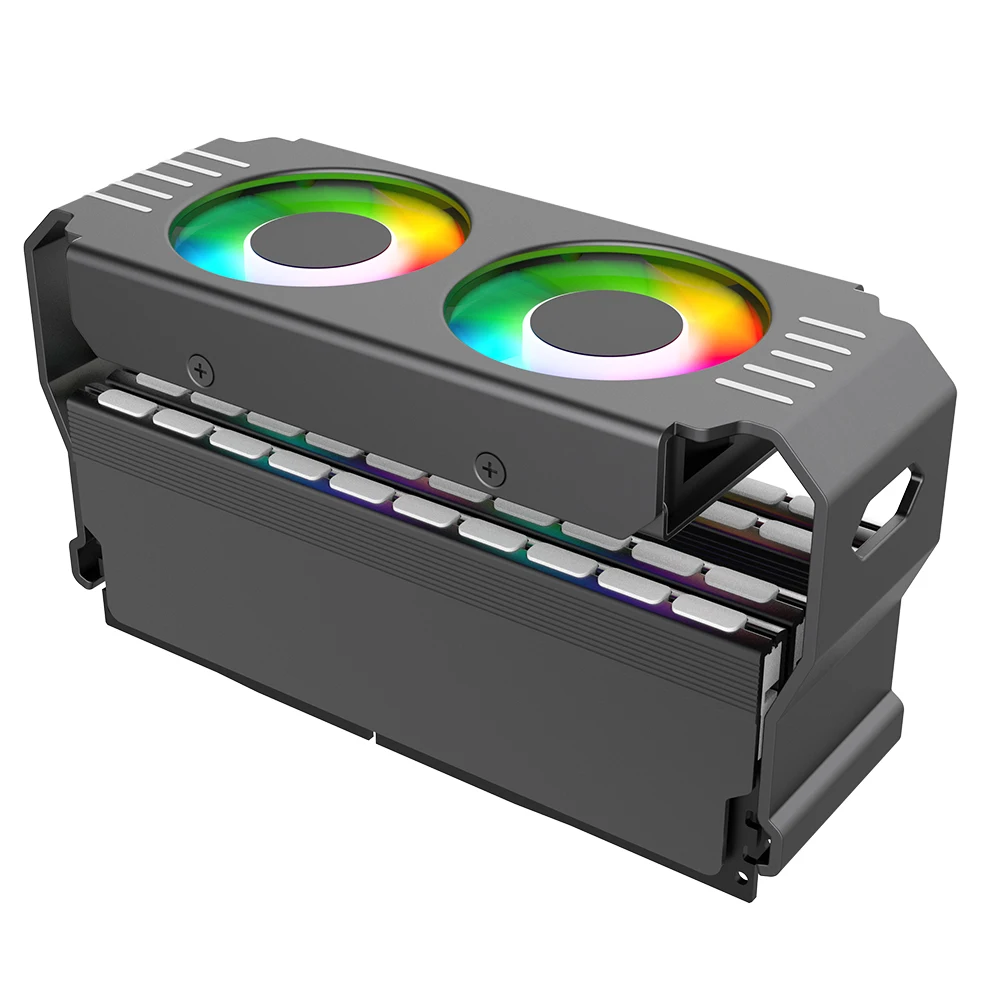


Aluminum RAM Cooling Fan for DDR4 DDR5 Memory
$34.73
$98.3


NFC Smart Simulator Card with LCD Screen for Gaming
$29.49
$56.99
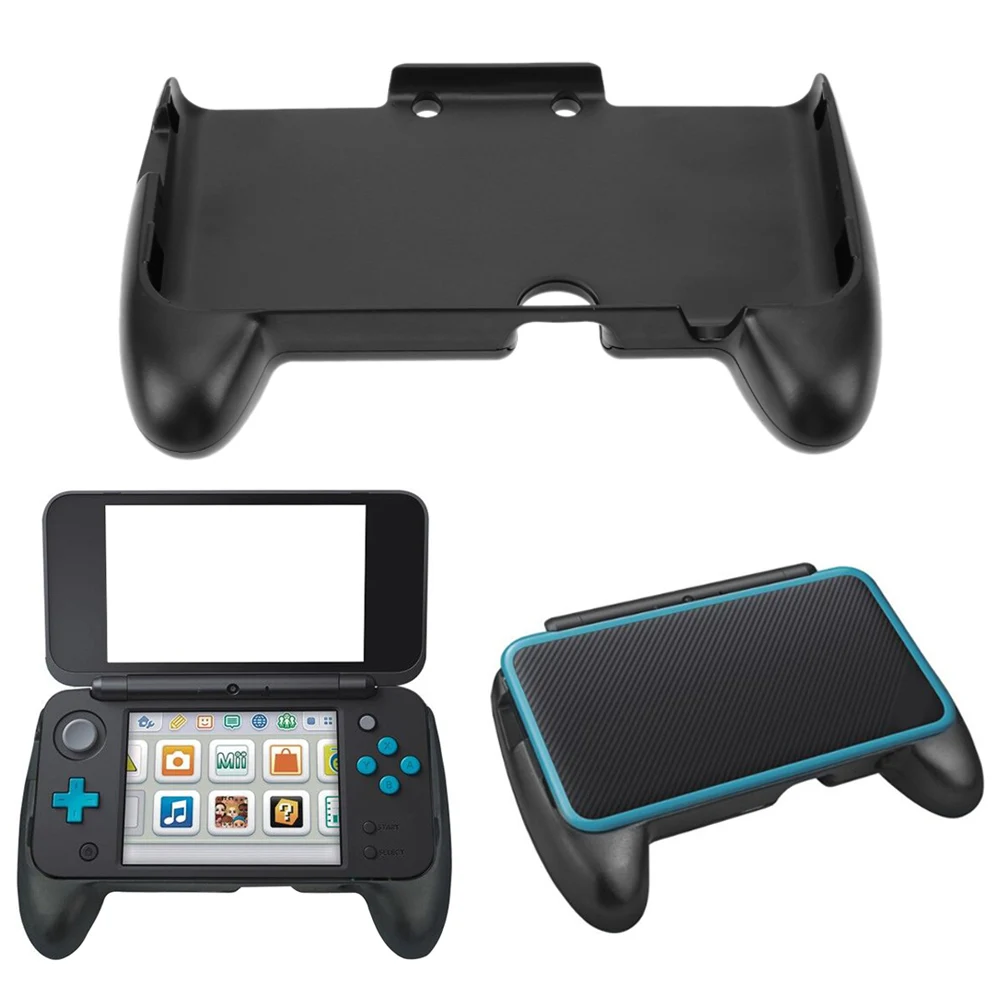


ABS Plastic Hand Grip for Nintendo 2DS XL Console
$8.38
$14.77



Resin Boxing Glove Mug for Coffee and Tea Lovers
$19.37
$37.46


Sweatproof Gaming Finger Sleeves for Mobile Players
$6.01
$10.36


PS2 Memory Card 64MB for Game Console
$24.23
$49.31


PS4 Game Mod Kit with Type C Cable for PS4 Pro and Slim
$32.92
$63.85


