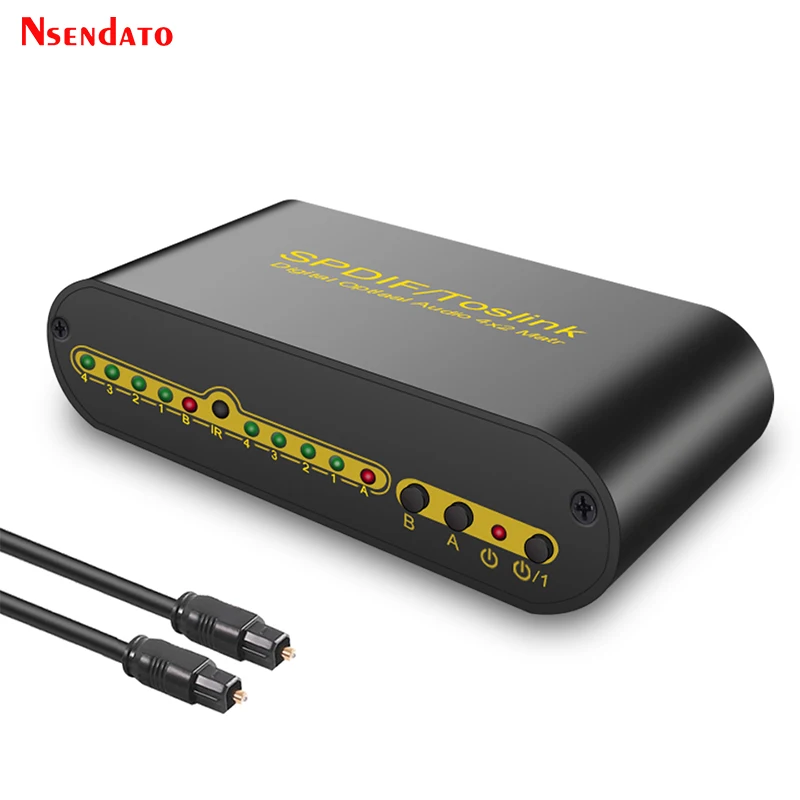
Spdif Toslink Digital Optical Audio True Matrix 4x2 Switch Switcher Splitter 4 In 2 Out Video Converter For Dolby/LPCM2.0/DTS
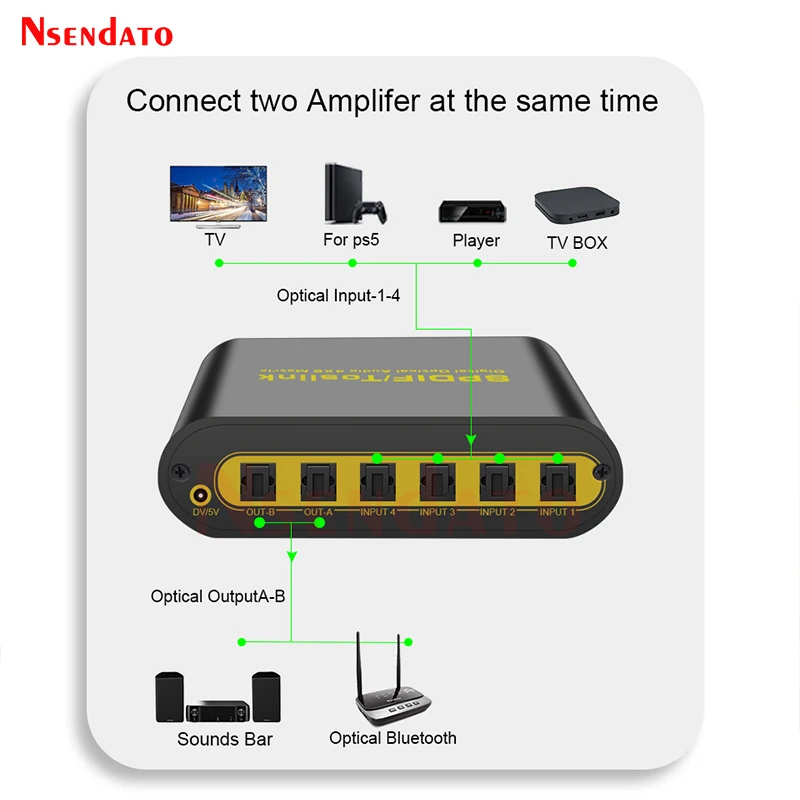
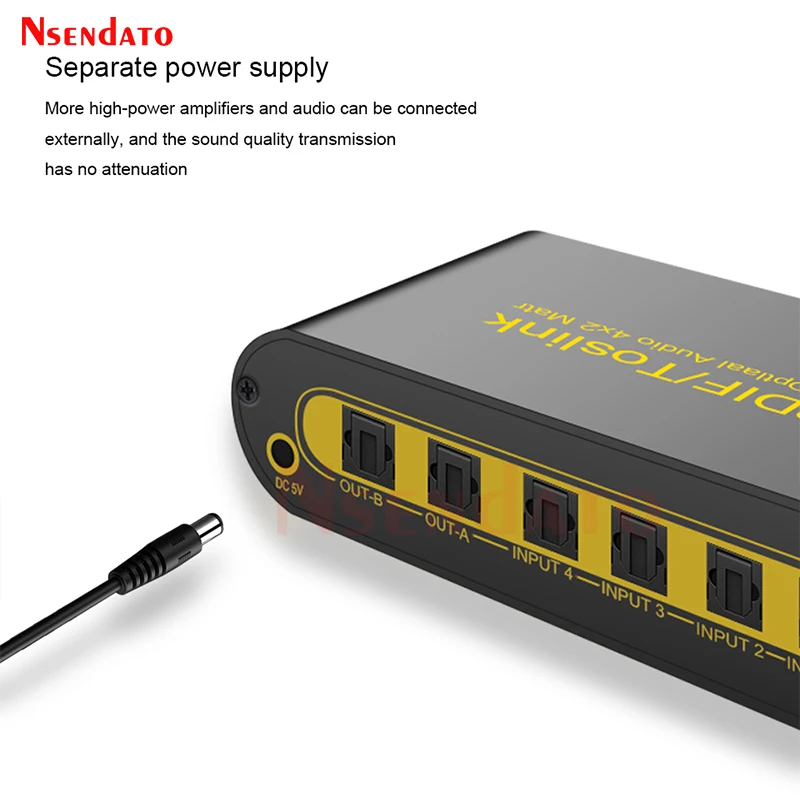
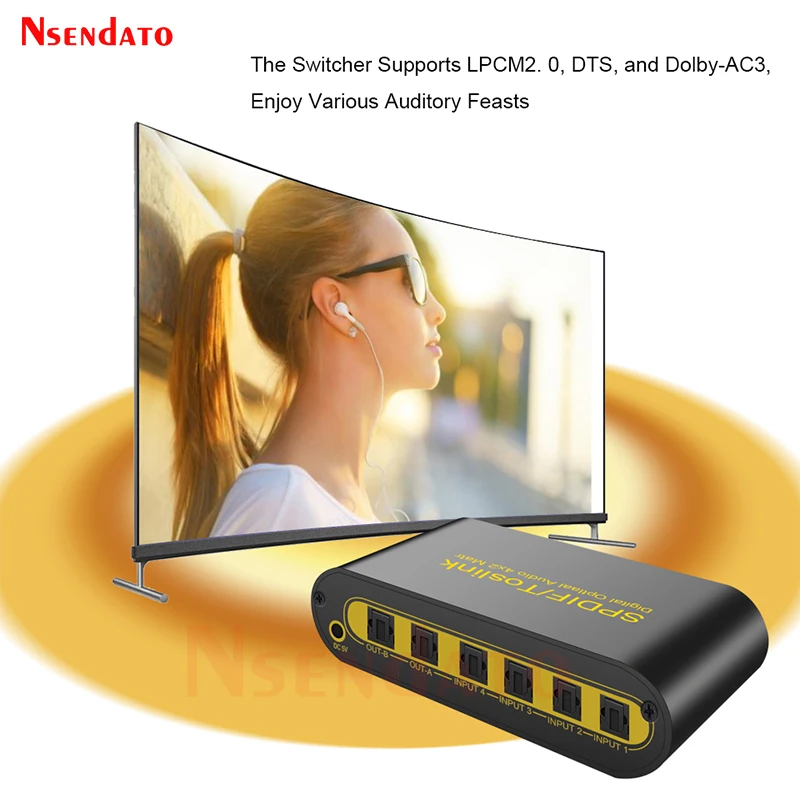
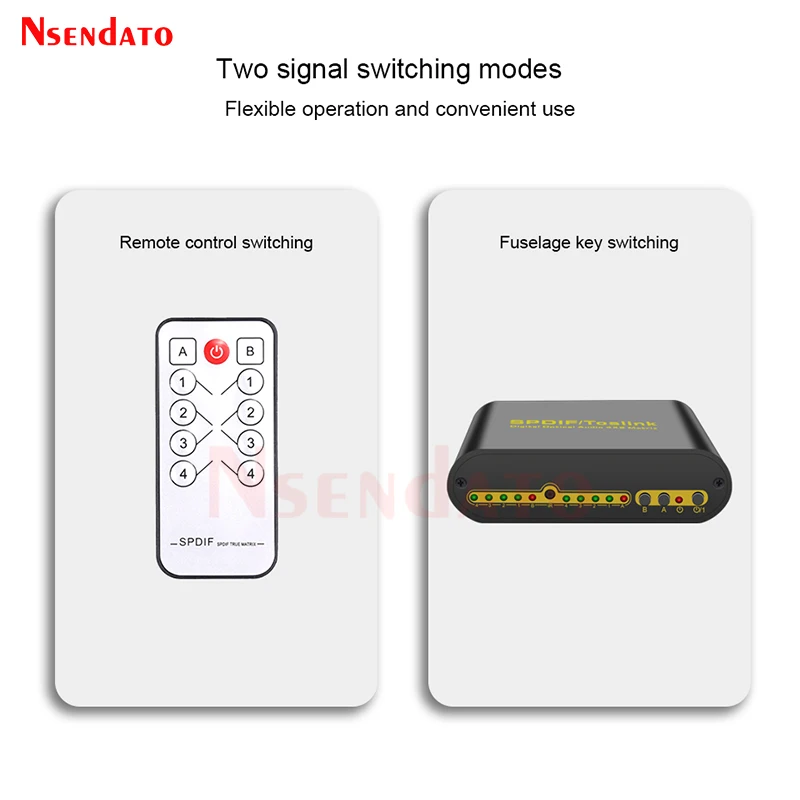
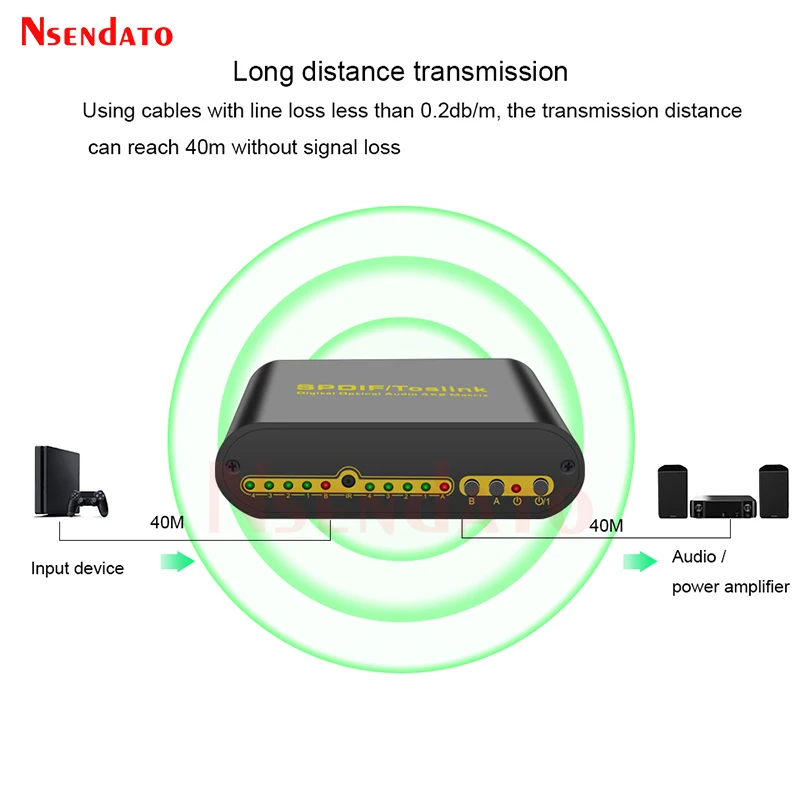
<br/><p><br/><br/></p><p><br/></p><br/><p><div class="detailmodule_media"><div class="video-container-1100053921871"><div class="detail-video" id="1100053921871" data-previewurl="https://ae01.alicdn.com/kf/Sdffa98bc07fa4a898fc12e38079f36c4j.jpg"></div></div></div></p><br/><p><br/></p><p><br/></p><p><br/></p><p><kse:widget data-widget-type="customText" id="22569421" type="custom"></kse:widget></p><p><span style="font-family:arial, helvetica, sans-serif"><span style="font-size:16px">Spdif Toslink Optical Digital Audio True Matrix 4x2 Switch 4 In 2 Out Switcher with Optical Cable Remote Control For PS4 HDTV</span></span></p><p></p><div><span style="font-family:arial, helvetica, sans-serif"><span style="font-size:16px">Specifications:</span></span></div><div><span style="font-family:arial, helvetica, sans-serif"><span style="font-size:16px">Supporting audio format: for DTS-HD/Dolby-trueHD/LPCM2.0/DTS/Dolby-AC3/DSD</span></span></div><div><span style="font-family:arial, helvetica, sans-serif"><span style="font-size:16px">Max baud rate: 16Mbps</span></span></div><div><span style="font-family:arial, helvetica, sans-serif"><span style="font-size:16px">Output cable distance: up to 40m(Use the optical fiber cable loss less the 0.2Db/m )</span></span></div><div><span style="font-family:arial, helvetica, sans-serif"><span style="font-size:16px">Max working current: 100mA</span></span></div><div><span style="font-family:arial, helvetica, sans-serif"><span style="font-size:16px">Input:AC (50HZ, 60HZ) 100V-240V</span></span></div><div><span style="font-family:arial, helvetica, sans-serif"><span style="font-size:16px">Output:DC5V/500mA</span></span></div><div><span style="font-family:arial, helvetica, sans-serif"><span style="font-size:16px">Operating Temperature range: 0 to 40 degrees Celsius</span></span></div><div><span style="font-family:arial, helvetica, sans-serif"><span style="font-size:16px">Operating Humidity range: 5 to 90%RH (No Condensation)</span></span></div><div><span style="font-family:arial, helvetica, sans-serif"><span style="font-size:16px">Dimension: 68 * 128 * 34mm/ 2.68 * 5.04 * 1.34inch (L x W x H)</span></span></div><div><span style="font-family:arial, helvetica, sans-serif"><span style="font-size:16px">Weight: 185g/ 0.41lb</span></span></div><div><span style="font-family:arial, helvetica, sans-serif"><span style="font-size:16px">Feature:</span></span></div><div><span style="font-family:arial, helvetica, sans-serif"><span style="font-size:16px">Four ways of optical fiber signal input split or switch to two sets of SPDIF signal receiving the device.</span></span></div><div><span style="font-family:arial, helvetica, sans-serif"><span style="font-size:16px">Support signal retiming.</span></span></div><div><span style="font-family:arial, helvetica, sans-serif"><span style="font-size:16px">Used optical fiber cable loss less the 0.2Db/m, Output distance is up to 40m.</span></span></div><div><span style="font-family:arial, helvetica, sans-serif"><span style="font-size:16px">The input control can through R/M and also can directly press the button.</span></span></div><div><span style="font-family:arial, helvetica, sans-serif"><span style="font-size:16px">Support last time working state memory when power off Nsendato</span></span><span style="font-size:16px;font-family:arial, helvetica, sans-serif">Audio Switch box</span></div><div><span style="font-family:arial, helvetica, sans-serif"><span style="font-size:16px">Over-voltage protection can prevent the damage caused by connecting the unmatched power adapter to the machine if the light for standby indication flashed, it shows that the output voltage from the power adaptor is too high and the adaptor needs to be changed.</span></span></div><div><span style="font-family:arial, helvetica, sans-serif"><span style="font-size:16px">LED status indication, it can tell us the working state of the device very easily.</span></span></div><div><span style="font-family:arial, helvetica, sans-serif"><span style="font-size:16px">Installs in minutes</span></span></div><div><span style="font-family:arial, helvetica, sans-serif"><span style="font-size:16px">Operating and Connecting:</span></span></div><div><span style="font-family:arial, helvetica, sans-serif"><span style="font-size:16px">1. To use the optical fiber cable to connect the optical fiber signal source (such as blue-ray player, the computer and so on) with the matrix input</span></span></div><div><span style="font-family:arial, helvetica, sans-serif"><span style="font-size:16px">2. To let the matrix output port connect to the optical fiber signal receiver (such as an amplifier, home theater and so on) by using the optical cable</span></span></div><div><span style="font-family:arial, helvetica, sans-serif"><span style="font-size:16px">3. Connect the 5V power supply to the matrix DC input port</span></span></div><div><span style="font-family:arial, helvetica, sans-serif"><span style="font-size:16px">4. Through the remote or button to switch the input source freely Switch only, other devices not included.</span></span></div><div><span style="font-family:arial, helvetica, sans-serif"><span style="font-size:16px">Note:</span></span></div><div><span style="font-family:arial, helvetica, sans-serif"><span style="font-size:16px">1.Pls hold the power adaptor head and do not pull the power cord when cut off from the socket.</span></span></div><div><span style="font-family:arial, helvetica, sans-serif"><span style="font-size:16px">2.Pls turn the power off when the machine is not used for long time.</span></span></div><div><span style="font-family:arial, helvetica, sans-serif"><span style="font-size:16px">3.Pls do not open the cover and do not touch the inside parts.</span></span></div><div><span style="font-family:arial, helvetica, sans-serif"><span style="font-size:16px">4.Pls use the original factory power adaptor.</span></span></div><div><span style="font-family:arial, helvetica, sans-serif"><span style="font-size:16px">5.For optimum performance and safety, please read these instructions carefully before connecting, operating or adjusting this product. Please keep this manual for future reference.</span></span></div><div><span style="font-family:arial, helvetica, sans-serif"><span style="font-size:16px">Package:</span></span></div><div><span style="font-family:arial, helvetica, sans-serif"><span style="font-size:16px">1 x Audio Switch Box 4X2</span></span></div><div><span style="font-family:arial, helvetica, sans-serif"><span style="font-size:16px">1 x Remote Control</span></span></div><div><span style="font-family:arial, helvetica, sans-serif"><span style="font-size:16px">1 x Power Adapter</span></span></div><div><div></div></div><p></p><p><br/></p><div style="font-family:"Open Sans", Roboto, Arial, Helvetica, sans-serif, SimSun;font-size:14px;font-weight:400;letter-spacing:normal;text-align:start;white-space:normal;color:rgb(0, 0, 0);background-color:rgb(255, 255, 255);margin:0px;margin-bottom:0px;margin-top:0px;margin-left:0px;margin-right:0px;padding:0px;padding-bottom:0px;padding-top:0px;padding-left:0px;padding-right:0px;box-sizing:content-box" align="start"><div style="margin:0px;margin-bottom:0px;margin-top:0px;margin-left:0px;margin-right:0px;padding:0px;padding-bottom:0px;padding-top:0px;padding-left:0px;padding-right:0px;box-sizing:content-box"></div></div><div style="font-family:"Open Sans", Roboto, Arial, Helvetica, sans-serif, SimSun;font-size:14px;font-weight:400;letter-spacing:normal;text-align:start;white-space:normal;color:rgb(0, 0, 0);background-color:rgb(255, 255, 255);margin:0px;margin-bottom:0px;margin-top:0px;margin-left:0px;margin-right:0px;padding:0px 0px 0px 0em;padding-bottom:0px;padding-top:0px;padding-right:0px;box-sizing:content-box" align="start"><div style="margin:0px;margin-bottom:0px;margin-top:0px;margin-left:0px;margin-right:0px;padding:0px;padding-bottom:0px;padding-top:0px;padding-left:0px;padding-right:0px;box-sizing:content-box"></div><div style="margin:0px;margin-bottom:0px;margin-top:0px;margin-left:0px;margin-right:0px;padding:0px;padding-bottom:0px;padding-top:0px;padding-left:0px;padding-right:0px;box-sizing:content-box"></div><div style="margin:0px;margin-bottom:0px;margin-top:0px;margin-left:0px;margin-right:0px;padding:0px;padding-bottom:0px;padding-top:0px;padding-left:0px;padding-right:0px;box-sizing:content-box"></div><div style="margin:0px;margin-bottom:0px;margin-top:0px;margin-left:0px;margin-right:0px;padding:0px;padding-bottom:0px;padding-top:0px;padding-left:0px;padding-right:0px;box-sizing:content-box"></div><div style="margin:0px;margin-bottom:0px;margin-top:0px;margin-left:0px;margin-right:0px;padding:0px;padding-bottom:0px;padding-top:0px;padding-left:0px;padding-right:0px;box-sizing:content-box"></div><div style="margin:0px;margin-bottom:0px;margin-top:0px;margin-left:0px;margin-right:0px;padding:0px;padding-bottom:0px;padding-top:0px;padding-left:0px;padding-right:0px;box-sizing:content-box"></div><div style="margin:0px;margin-bottom:0px;margin-top:0px;margin-left:0px;margin-right:0px;padding:0px;padding-bottom:0px;padding-top:0px;padding-left:0px;padding-right:0px;box-sizing:content-box"></div><div style="margin:0px;margin-bottom:0px;margin-top:0px;margin-left:0px;margin-right:0px;padding:0px;padding-bottom:0px;padding-top:0px;padding-left:0px;padding-right:0px;box-sizing:content-box"></div><div style="margin:0px;margin-bottom:0px;margin-top:0px;margin-left:0px;margin-right:0px;padding:0px;padding-bottom:0px;padding-top:0px;padding-left:0px;padding-right:0px;box-sizing:content-box"></div><div style="margin:0px;margin-bottom:0px;margin-top:0px;margin-left:0px;margin-right:0px;padding:0px;padding-bottom:0px;padding-top:0px;padding-left:0px;padding-right:0px;box-sizing:content-box"></div><div style="margin:0px;margin-bottom:0px;margin-top:0px;margin-left:0px;margin-right:0px;padding:0px;padding-bottom:0px;padding-top:0px;padding-left:0px;padding-right:0px;box-sizing:content-box"></div><div style="margin:0px;margin-bottom:0px;margin-top:0px;margin-left:0px;margin-right:0px;padding:0px;padding-bottom:0px;padding-top:0px;padding-left:0px;padding-right:0px;box-sizing:content-box"></div><div style="margin:0px;margin-bottom:0px;margin-top:0px;margin-left:0px;margin-right:0px;padding:0px;padding-bottom:0px;padding-top:0px;padding-left:0px;padding-right:0px;box-sizing:content-box"></div><div style="margin:0px;margin-bottom:0px;margin-top:0px;margin-left:0px;margin-right:0px;padding:0px;padding-bottom:0px;padding-top:0px;padding-left:0px;padding-right:0px;box-sizing:content-box"></div></div><p><br/></p><p><br/></p><p><br/></p><br/>
$57.155
$42.815
- Category : Consumer Electronics
- Brand : nsendato_office_store_store Nsendato Office Store Store
Colors
Sizes
-
+

<br/><p><br/><br/></p><p><br/></p><br/><p><div class="detailmodule_media"><div class="video-container-1100053921871"><div class="detail-video" id="1100053921871" data-previewurl="https://ae01.alicdn.com/kf/Sdffa98bc07fa4a898fc12e38079f36c4j.jpg"></div></div></div></p><br/><p><br/></p><p><br/></p><p><br/></p><p><kse:widget data-widget-type="customText" id="22569421" type="custom"></kse:widget></p><p><span style="font-family:arial, helvetica, sans-serif"><span style="font-size:16px">Spdif Toslink Optical Digital Audio True Matrix 4x2 Switch 4 In 2 Out Switcher with Optical Cable Remote Control For PS4 HDTV</span></span></p><p></p><div><span style="font-family:arial, helvetica, sans-serif"><span style="font-size:16px">Specifications:</span></span></div><div><span style="font-family:arial, helvetica, sans-serif"><span style="font-size:16px">Supporting audio format: for DTS-HD/Dolby-trueHD/LPCM2.0/DTS/Dolby-AC3/DSD</span></span></div><div><span style="font-family:arial, helvetica, sans-serif"><span style="font-size:16px">Max baud rate: 16Mbps</span></span></div><div><span style="font-family:arial, helvetica, sans-serif"><span style="font-size:16px">Output cable distance: up to 40m(Use the optical fiber cable loss less the 0.2Db/m )</span></span></div><div><span style="font-family:arial, helvetica, sans-serif"><span style="font-size:16px">Max working current: 100mA</span></span></div><div><span style="font-family:arial, helvetica, sans-serif"><span style="font-size:16px">Input:AC (50HZ, 60HZ) 100V-240V</span></span></div><div><span style="font-family:arial, helvetica, sans-serif"><span style="font-size:16px">Output:DC5V/500mA</span></span></div><div><span style="font-family:arial, helvetica, sans-serif"><span style="font-size:16px">Operating Temperature range: 0 to 40 degrees Celsius</span></span></div><div><span style="font-family:arial, helvetica, sans-serif"><span style="font-size:16px">Operating Humidity range: 5 to 90%RH (No Condensation)</span></span></div><div><span style="font-family:arial, helvetica, sans-serif"><span style="font-size:16px">Dimension: 68 * 128 * 34mm/ 2.68 * 5.04 * 1.34inch (L x W x H)</span></span></div><div><span style="font-family:arial, helvetica, sans-serif"><span style="font-size:16px">Weight: 185g/ 0.41lb</span></span></div><div><span style="font-family:arial, helvetica, sans-serif"><span style="font-size:16px">Feature:</span></span></div><div><span style="font-family:arial, helvetica, sans-serif"><span style="font-size:16px">Four ways of optical fiber signal input split or switch to two sets of SPDIF signal receiving the device.</span></span></div><div><span style="font-family:arial, helvetica, sans-serif"><span style="font-size:16px">Support signal retiming.</span></span></div><div><span style="font-family:arial, helvetica, sans-serif"><span style="font-size:16px">Used optical fiber cable loss less the 0.2Db/m, Output distance is up to 40m.</span></span></div><div><span style="font-family:arial, helvetica, sans-serif"><span style="font-size:16px">The input control can through R/M and also can directly press the button.</span></span></div><div><span style="font-family:arial, helvetica, sans-serif"><span style="font-size:16px">Support last time working state memory when power off Nsendato</span></span><span style="font-size:16px;font-family:arial, helvetica, sans-serif">Audio Switch box</span></div><div><span style="font-family:arial, helvetica, sans-serif"><span style="font-size:16px">Over-voltage protection can prevent the damage caused by connecting the unmatched power adapter to the machine if the light for standby indication flashed, it shows that the output voltage from the power adaptor is too high and the adaptor needs to be changed.</span></span></div><div><span style="font-family:arial, helvetica, sans-serif"><span style="font-size:16px">LED status indication, it can tell us the working state of the device very easily.</span></span></div><div><span style="font-family:arial, helvetica, sans-serif"><span style="font-size:16px">Installs in minutes</span></span></div><div><span style="font-family:arial, helvetica, sans-serif"><span style="font-size:16px">Operating and Connecting:</span></span></div><div><span style="font-family:arial, helvetica, sans-serif"><span style="font-size:16px">1. To use the optical fiber cable to connect the optical fiber signal source (such as blue-ray player, the computer and so on) with the matrix input</span></span></div><div><span style="font-family:arial, helvetica, sans-serif"><span style="font-size:16px">2. To let the matrix output port connect to the optical fiber signal receiver (such as an amplifier, home theater and so on) by using the optical cable</span></span></div><div><span style="font-family:arial, helvetica, sans-serif"><span style="font-size:16px">3. Connect the 5V power supply to the matrix DC input port</span></span></div><div><span style="font-family:arial, helvetica, sans-serif"><span style="font-size:16px">4. Through the remote or button to switch the input source freely Switch only, other devices not included.</span></span></div><div><span style="font-family:arial, helvetica, sans-serif"><span style="font-size:16px">Note:</span></span></div><div><span style="font-family:arial, helvetica, sans-serif"><span style="font-size:16px">1.Pls hold the power adaptor head and do not pull the power cord when cut off from the socket.</span></span></div><div><span style="font-family:arial, helvetica, sans-serif"><span style="font-size:16px">2.Pls turn the power off when the machine is not used for long time.</span></span></div><div><span style="font-family:arial, helvetica, sans-serif"><span style="font-size:16px">3.Pls do not open the cover and do not touch the inside parts.</span></span></div><div><span style="font-family:arial, helvetica, sans-serif"><span style="font-size:16px">4.Pls use the original factory power adaptor.</span></span></div><div><span style="font-family:arial, helvetica, sans-serif"><span style="font-size:16px">5.For optimum performance and safety, please read these instructions carefully before connecting, operating or adjusting this product. Please keep this manual for future reference.</span></span></div><div><span style="font-family:arial, helvetica, sans-serif"><span style="font-size:16px">Package:</span></span></div><div><span style="font-family:arial, helvetica, sans-serif"><span style="font-size:16px">1 x Audio Switch Box 4X2</span></span></div><div><span style="font-family:arial, helvetica, sans-serif"><span style="font-size:16px">1 x Remote Control</span></span></div><div><span style="font-family:arial, helvetica, sans-serif"><span style="font-size:16px">1 x Power Adapter</span></span></div><div><div></div></div><p></p><p><br/></p><div style="font-family:"Open Sans", Roboto, Arial, Helvetica, sans-serif, SimSun;font-size:14px;font-weight:400;letter-spacing:normal;text-align:start;white-space:normal;color:rgb(0, 0, 0);background-color:rgb(255, 255, 255);margin:0px;margin-bottom:0px;margin-top:0px;margin-left:0px;margin-right:0px;padding:0px;padding-bottom:0px;padding-top:0px;padding-left:0px;padding-right:0px;box-sizing:content-box" align="start"><div style="margin:0px;margin-bottom:0px;margin-top:0px;margin-left:0px;margin-right:0px;padding:0px;padding-bottom:0px;padding-top:0px;padding-left:0px;padding-right:0px;box-sizing:content-box"></div></div><div style="font-family:"Open Sans", Roboto, Arial, Helvetica, sans-serif, SimSun;font-size:14px;font-weight:400;letter-spacing:normal;text-align:start;white-space:normal;color:rgb(0, 0, 0);background-color:rgb(255, 255, 255);margin:0px;margin-bottom:0px;margin-top:0px;margin-left:0px;margin-right:0px;padding:0px 0px 0px 0em;padding-bottom:0px;padding-top:0px;padding-right:0px;box-sizing:content-box" align="start"><div style="margin:0px;margin-bottom:0px;margin-top:0px;margin-left:0px;margin-right:0px;padding:0px;padding-bottom:0px;padding-top:0px;padding-left:0px;padding-right:0px;box-sizing:content-box"></div><div style="margin:0px;margin-bottom:0px;margin-top:0px;margin-left:0px;margin-right:0px;padding:0px;padding-bottom:0px;padding-top:0px;padding-left:0px;padding-right:0px;box-sizing:content-box"></div><div style="margin:0px;margin-bottom:0px;margin-top:0px;margin-left:0px;margin-right:0px;padding:0px;padding-bottom:0px;padding-top:0px;padding-left:0px;padding-right:0px;box-sizing:content-box"></div><div style="margin:0px;margin-bottom:0px;margin-top:0px;margin-left:0px;margin-right:0px;padding:0px;padding-bottom:0px;padding-top:0px;padding-left:0px;padding-right:0px;box-sizing:content-box"></div><div style="margin:0px;margin-bottom:0px;margin-top:0px;margin-left:0px;margin-right:0px;padding:0px;padding-bottom:0px;padding-top:0px;padding-left:0px;padding-right:0px;box-sizing:content-box"></div><div style="margin:0px;margin-bottom:0px;margin-top:0px;margin-left:0px;margin-right:0px;padding:0px;padding-bottom:0px;padding-top:0px;padding-left:0px;padding-right:0px;box-sizing:content-box"></div><div style="margin:0px;margin-bottom:0px;margin-top:0px;margin-left:0px;margin-right:0px;padding:0px;padding-bottom:0px;padding-top:0px;padding-left:0px;padding-right:0px;box-sizing:content-box"></div><div style="margin:0px;margin-bottom:0px;margin-top:0px;margin-left:0px;margin-right:0px;padding:0px;padding-bottom:0px;padding-top:0px;padding-left:0px;padding-right:0px;box-sizing:content-box"></div><div style="margin:0px;margin-bottom:0px;margin-top:0px;margin-left:0px;margin-right:0px;padding:0px;padding-bottom:0px;padding-top:0px;padding-left:0px;padding-right:0px;box-sizing:content-box"></div><div style="margin:0px;margin-bottom:0px;margin-top:0px;margin-left:0px;margin-right:0px;padding:0px;padding-bottom:0px;padding-top:0px;padding-left:0px;padding-right:0px;box-sizing:content-box"></div><div style="margin:0px;margin-bottom:0px;margin-top:0px;margin-left:0px;margin-right:0px;padding:0px;padding-bottom:0px;padding-top:0px;padding-left:0px;padding-right:0px;box-sizing:content-box"></div><div style="margin:0px;margin-bottom:0px;margin-top:0px;margin-left:0px;margin-right:0px;padding:0px;padding-bottom:0px;padding-top:0px;padding-left:0px;padding-right:0px;box-sizing:content-box"></div><div style="margin:0px;margin-bottom:0px;margin-top:0px;margin-left:0px;margin-right:0px;padding:0px;padding-bottom:0px;padding-top:0px;padding-left:0px;padding-right:0px;box-sizing:content-box"></div><div style="margin:0px;margin-bottom:0px;margin-top:0px;margin-left:0px;margin-right:0px;padding:0px;padding-bottom:0px;padding-top:0px;padding-left:0px;padding-right:0px;box-sizing:content-box"></div></div><p><br/></p><p><br/></p><p><br/></p><br/>
Related Product
Browse The Collection of Top Products.