Wireless HDMI Video Transmitter and Receiver Kit 200M 1080P 60Hz HDMI Wireless Audio Video Extender adapter For TV PC Monitor
<div class="detailmodule_html"><div class="detail-desc-decorate-richtext"><div class="detailmodule_dynamic">
<kse:widget data-widget-type="customText" id="22569421" title="undefined" type="custom"></kse:widget>
</div><div class="detailmodule_dynamic">
<span style="font-family:'arial, helvetica, sans-serif';"><span style="font-size:16px;">Wireless HDMI Video Transmitter and Receiver Kit 200M 1080P 60Hz HDMI Wireless Audio Video Extender adapter For TV PC Monitor</span></span>
</div><div class="detailmodule_dynamic">
<span style="font-size:16px;font-family:arial, helvetica, sans-serif;">etailed installation steps </span>
</div><div>
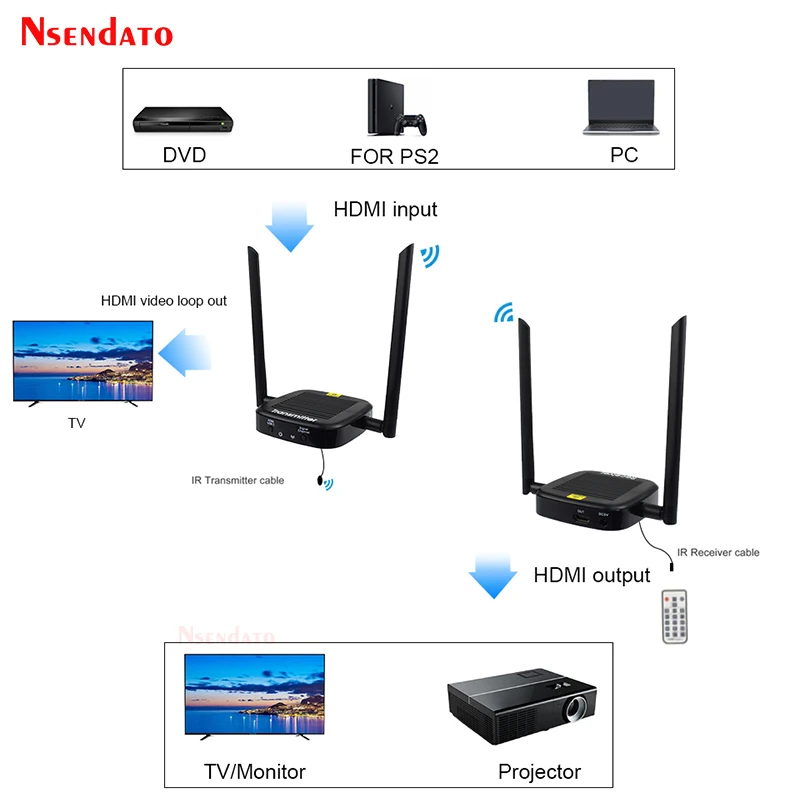
<span style="font-size:16px;font-family:arial, helvetica, sans-serif;">1. Connect the Transmitter to signal source devices via HDMI cable→Then Connect the Receiver to display devices via HDMI cable → After connect the Transmitter and Receiver to power adapter and turn it on ,the red light on →Waiting for the system started → The blue light of Transmitter and Receiver flash simultaneously → The system started successfully .The whole process takes about 30 seconds without any operations. Please be patient! </span>
</div><div>
<span style="font-size:16px;font-family:arial, helvetica, sans-serif;"> 2. If the blue light of Transmitter and Receiver are not blinking, you can try the following rematch methods</span>
</div><div>
<span style="font-size:16px;font-family:arial, helvetica, sans-serif;"> ① Use the HDMI cable to connect the IN of Transmitter to the OUT of Receiver. </span>
</div><div>
<span style="font-size:16px;font-family:arial, helvetica, sans-serif;">② Then power on Transmitter and Receiver and wait for the blue lights of Transmitter and Receiver on </span>
</div><div>
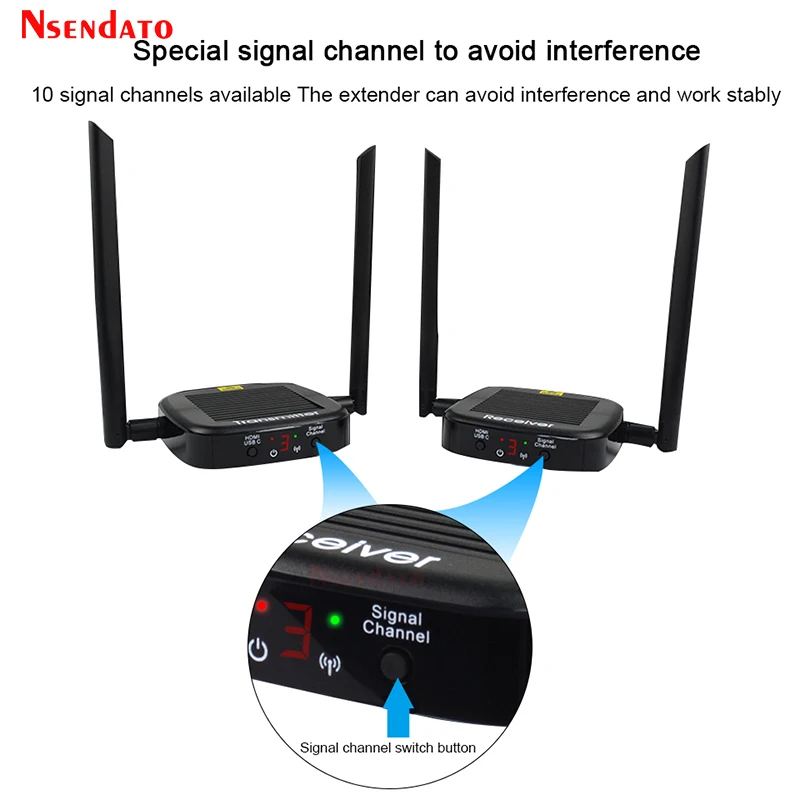
<span style="font-size:16px;font-family:arial, helvetica, sans-serif;">③Firstly hold on the “Signal Channel”button of the Receiver for 3 seconds then release , then hold on the “Signal Channel”of the Transmitter for 3 seconds then release. </span>
</div><div>
<span style="font-size:16px;font-family:arial, helvetica, sans-serif;">④ Unplug the power adapter of Transmitter and Receiver (but don’t unplug the HDMI cable of Transmitter and Receiver),then reconnect the power adapter of Transmitter and Receiver ,wait for the system started, after the blue light of Transmitter and Receiver flash simultaneously, it means that start successfully. </span>
</div><div>
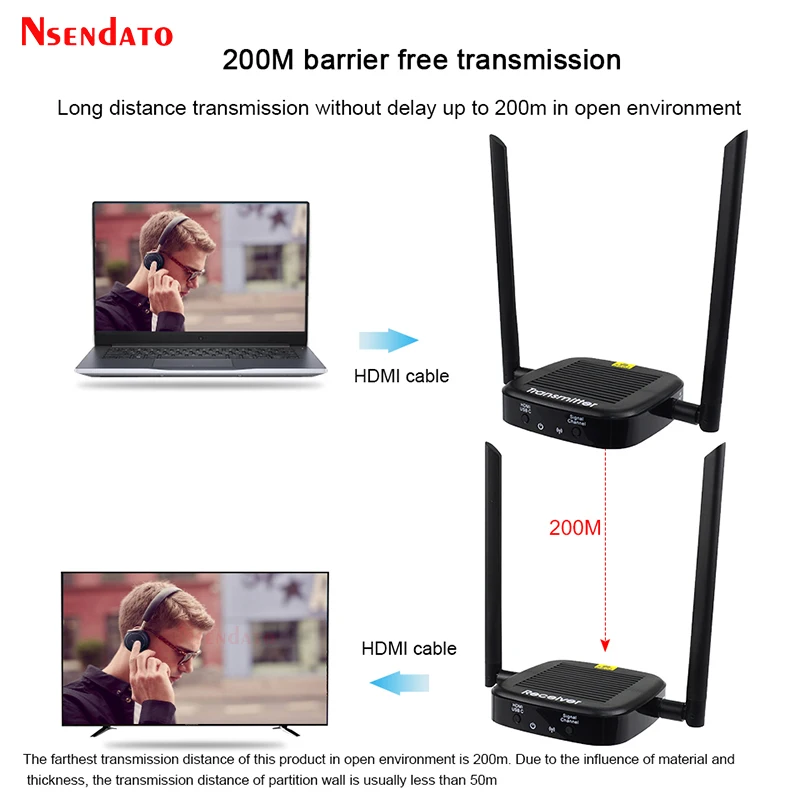
<span style="font-size:16px;font-family:arial, helvetica, sans-serif;">3. This product can transmit up to 200 meters in an open environment. Due to the material and thickness, the partition wall transmission is usually less than 50 meters </span>
</div><div>
<span style="font-size:16px;font-family:arial, helvetica, sans-serif;"> </span>
</div><div>
<span style="font-size:16px;font-family:arial, helvetica, sans-serif;">Product Introductions: </span>
</div><div>
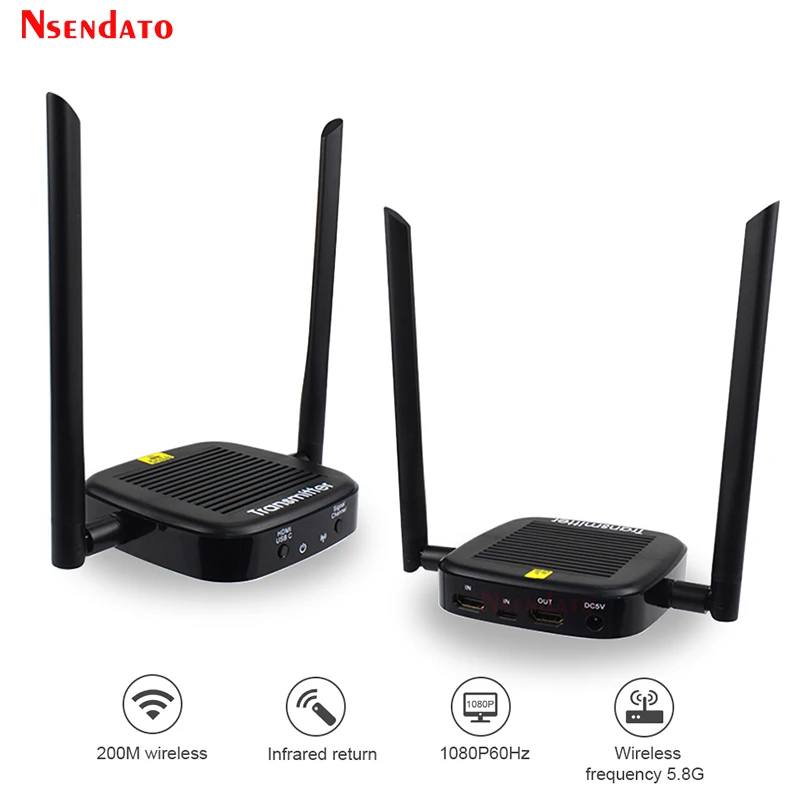
<span style="font-size:16px;font-family:arial, helvetica, sans-serif;">This HDMI wireless extender uses a 5.8G wireless module, which transmits high-definition audio and video signals through the H.264 compression coding standard. It can transmit up to 200 meters in an open environment. The device has excellent image processing and transmission capabilities, making signal transmission smoother and more stable. It is a cost-effective way to wireless extender HDMI signals. It is widely used in office presentations, lectures, education, conference halls, home entertainment, etc. </span>
</div><div>
<span style="font-size:16px;font-family:arial, helvetica, sans-serif;"> </span>
</div><div>
<span style="font-size:16px;font-family:arial, helvetica, sans-serif;">Product Features </span>
</div><div>
<span style="font-size:16px;font-family:arial, helvetica, sans-serif;">Transmission of HDMI Video and Audio signals through a 5.8G wireless module </span>
</div><div>
<span style="font-size:16px;font-family:arial, helvetica, sans-serif;">Transmission distance in the open environment up to 200 meters. </span>
</div><div>
<span style="font-size:16px;font-family:arial, helvetica, sans-serif;">Support infrared return control </span>
</div><div>
<span style="font-size:16px;font-family:arial, helvetica, sans-serif;">Support TYPE-C input interface </span>
</div><div>
<span style="font-size:16px;font-family:arial, helvetica, sans-serif;">Support HDMI input interface </span>
</div><div>
<span style="font-size:16px;font-family:arial, helvetica, sans-serif;">Support transmitter loop output </span>
</div><div>
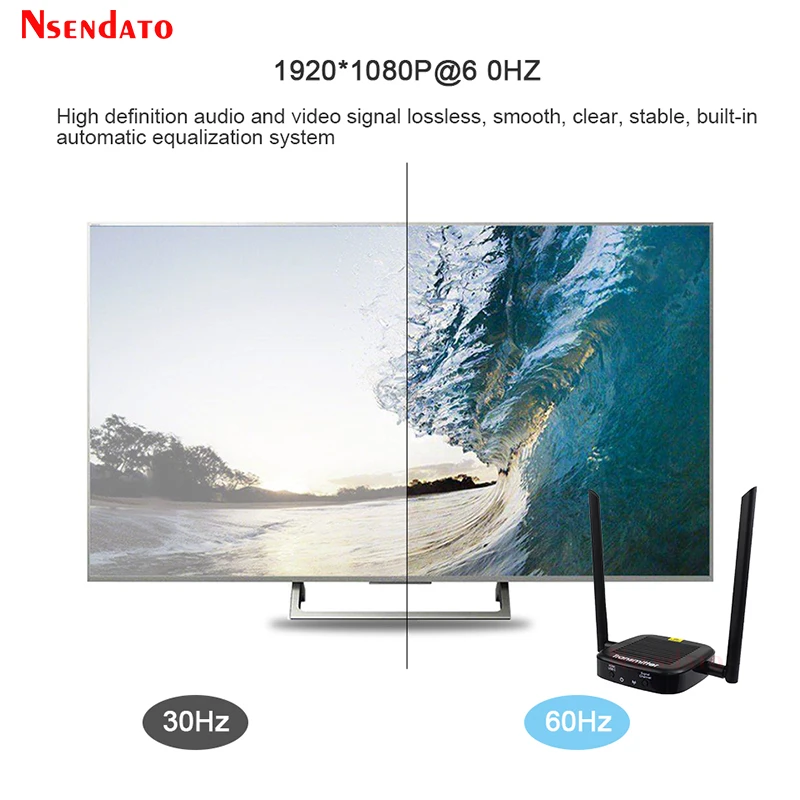
<span style="font-size:16px;font-family:arial, helvetica, sans-serif;">HD video signal resolution up to 1920*1080P@60Hz </span>
</div><div>
<span style="font-size:16px;font-family:arial, helvetica, sans-serif;">Compatible with HDMI 1.3 </span>
</div><div>
<span style="font-size:16px;font-family:arial, helvetica, sans-serif;">Use international standard H.264 format to compress and decompress video, effectively improve transmission efficiency and ensure smooth playback. </span>
</div><div>
<span style="font-size:16px;font-family:arial, helvetica, sans-serif;">HDCP 1.2 compliant – high bandwidth digital content protection technology. </span>
</div><div>
<span style="font-size:16px;font-family:arial, helvetica, sans-serif;">Ability to automatically identify and configure various display modes. </span>
</div><div>
<span style="font-size:16px;font-family:arial, helvetica, sans-serif;">Built-in automatic equalization system, the picture is smooth, clear and stable </span>
</div><div>
<span style="font-size:16px;font-family:arial, helvetica, sans-serif;">Easy to install, plug and play, no need to set.</span>
</div><div style="font-size:13.3333px;margin:0px;padding:0px 0px 0px 0em;margin:0px;padding-top:0px;padding-right:0px;padding-bottom:0px;">
<div>
</div>
<div>
</div>
<div>
</div>
<div>
</div>
<div>
</div>
<div>
</div>
<div>
</div>
<div>
</div>
<div>
</div>
<div>
</div>
<div>
</div>
<div>
</div>
<div>
</div>
<div>
<br />
</div>
</div><br /></div></div>
$261.245
$206.81
- Category : Consumer Electronics
- Brand : nsendato_office_store_store Nsendato Office Store Store
Colors
Sizes
-
+

<div class="detailmodule_html"><div class="detail-desc-decorate-richtext"><div class="detailmodule_dynamic">
<kse:widget data-widget-type="customText" id="22569421" title="undefined" type="custom"></kse:widget>
</div><div class="detailmodule_dynamic">
<span style="font-family:'arial, helvetica, sans-serif';"><span style="font-size:16px;">Wireless HDMI Video Transmitter and Receiver Kit 200M 1080P 60Hz HDMI Wireless Audio Video Extender adapter For TV PC Monitor</span></span>
</div><div class="detailmodule_dynamic">
<span style="font-size:16px;font-family:arial, helvetica, sans-serif;">etailed installation steps </span>
</div><div>
<span style="font-size:16px;font-family:arial, helvetica, sans-serif;">1. Connect the Transmitter to signal source devices via HDMI cable→Then Connect the Receiver to display devices via HDMI cable → After connect the Transmitter and Receiver to power adapter and turn it on ,the red light on →Waiting for the system started → The blue light of Transmitter and Receiver flash simultaneously → The system started successfully .The whole process takes about 30 seconds without any operations. Please be patient! </span>
</div><div>
<span style="font-size:16px;font-family:arial, helvetica, sans-serif;"> 2. If the blue light of Transmitter and Receiver are not blinking, you can try the following rematch methods</span>
</div><div>
<span style="font-size:16px;font-family:arial, helvetica, sans-serif;"> ① Use the HDMI cable to connect the IN of Transmitter to the OUT of Receiver. </span>
</div><div>
<span style="font-size:16px;font-family:arial, helvetica, sans-serif;">② Then power on Transmitter and Receiver and wait for the blue lights of Transmitter and Receiver on </span>
</div><div>
<span style="font-size:16px;font-family:arial, helvetica, sans-serif;">③Firstly hold on the “Signal Channel”button of the Receiver for 3 seconds then release , then hold on the “Signal Channel”of the Transmitter for 3 seconds then release. </span>
</div><div>
<span style="font-size:16px;font-family:arial, helvetica, sans-serif;">④ Unplug the power adapter of Transmitter and Receiver (but don’t unplug the HDMI cable of Transmitter and Receiver),then reconnect the power adapter of Transmitter and Receiver ,wait for the system started, after the blue light of Transmitter and Receiver flash simultaneously, it means that start successfully. </span>
</div><div>
<span style="font-size:16px;font-family:arial, helvetica, sans-serif;">3. This product can transmit up to 200 meters in an open environment. Due to the material and thickness, the partition wall transmission is usually less than 50 meters </span>
</div><div>
<span style="font-size:16px;font-family:arial, helvetica, sans-serif;"> </span>
</div><div>
<span style="font-size:16px;font-family:arial, helvetica, sans-serif;">Product Introductions: </span>
</div><div>
<span style="font-size:16px;font-family:arial, helvetica, sans-serif;">This HDMI wireless extender uses a 5.8G wireless module, which transmits high-definition audio and video signals through the H.264 compression coding standard. It can transmit up to 200 meters in an open environment. The device has excellent image processing and transmission capabilities, making signal transmission smoother and more stable. It is a cost-effective way to wireless extender HDMI signals. It is widely used in office presentations, lectures, education, conference halls, home entertainment, etc. </span>
</div><div>
<span style="font-size:16px;font-family:arial, helvetica, sans-serif;"> </span>
</div><div>
<span style="font-size:16px;font-family:arial, helvetica, sans-serif;">Product Features </span>
</div><div>
<span style="font-size:16px;font-family:arial, helvetica, sans-serif;">Transmission of HDMI Video and Audio signals through a 5.8G wireless module </span>
</div><div>
<span style="font-size:16px;font-family:arial, helvetica, sans-serif;">Transmission distance in the open environment up to 200 meters. </span>
</div><div>
<span style="font-size:16px;font-family:arial, helvetica, sans-serif;">Support infrared return control </span>
</div><div>
<span style="font-size:16px;font-family:arial, helvetica, sans-serif;">Support TYPE-C input interface </span>
</div><div>
<span style="font-size:16px;font-family:arial, helvetica, sans-serif;">Support HDMI input interface </span>
</div><div>
<span style="font-size:16px;font-family:arial, helvetica, sans-serif;">Support transmitter loop output </span>
</div><div>
<span style="font-size:16px;font-family:arial, helvetica, sans-serif;">HD video signal resolution up to 1920*1080P@60Hz </span>
</div><div>
<span style="font-size:16px;font-family:arial, helvetica, sans-serif;">Compatible with HDMI 1.3 </span>
</div><div>
<span style="font-size:16px;font-family:arial, helvetica, sans-serif;">Use international standard H.264 format to compress and decompress video, effectively improve transmission efficiency and ensure smooth playback. </span>
</div><div>
<span style="font-size:16px;font-family:arial, helvetica, sans-serif;">HDCP 1.2 compliant – high bandwidth digital content protection technology. </span>
</div><div>
<span style="font-size:16px;font-family:arial, helvetica, sans-serif;">Ability to automatically identify and configure various display modes. </span>
</div><div>
<span style="font-size:16px;font-family:arial, helvetica, sans-serif;">Built-in automatic equalization system, the picture is smooth, clear and stable </span>
</div><div>
<span style="font-size:16px;font-family:arial, helvetica, sans-serif;">Easy to install, plug and play, no need to set.</span>
</div><div style="font-size:13.3333px;margin:0px;padding:0px 0px 0px 0em;margin:0px;padding-top:0px;padding-right:0px;padding-bottom:0px;">
<div>
</div>
<div>
</div>
<div>
</div>
<div>
</div>
<div>
</div>
<div>
</div>
<div>
</div>
<div>
</div>
<div>
</div>
<div>
</div>
<div>
</div>
<div>
</div>
<div>
</div>
<div>
<br />
</div>
</div><br /></div></div>
Related Product
Browse The Collection of Top Products.