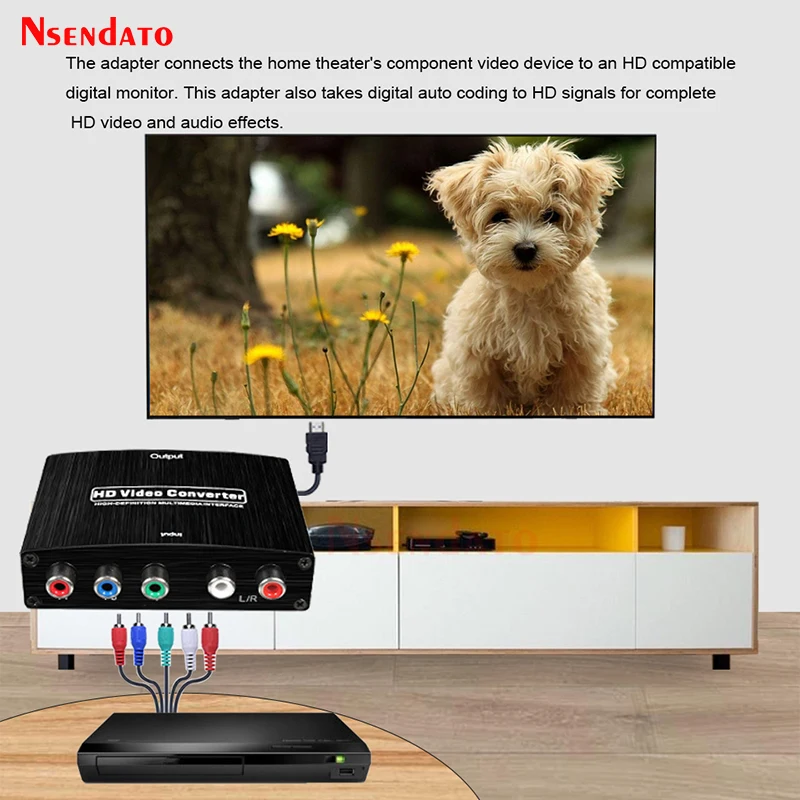
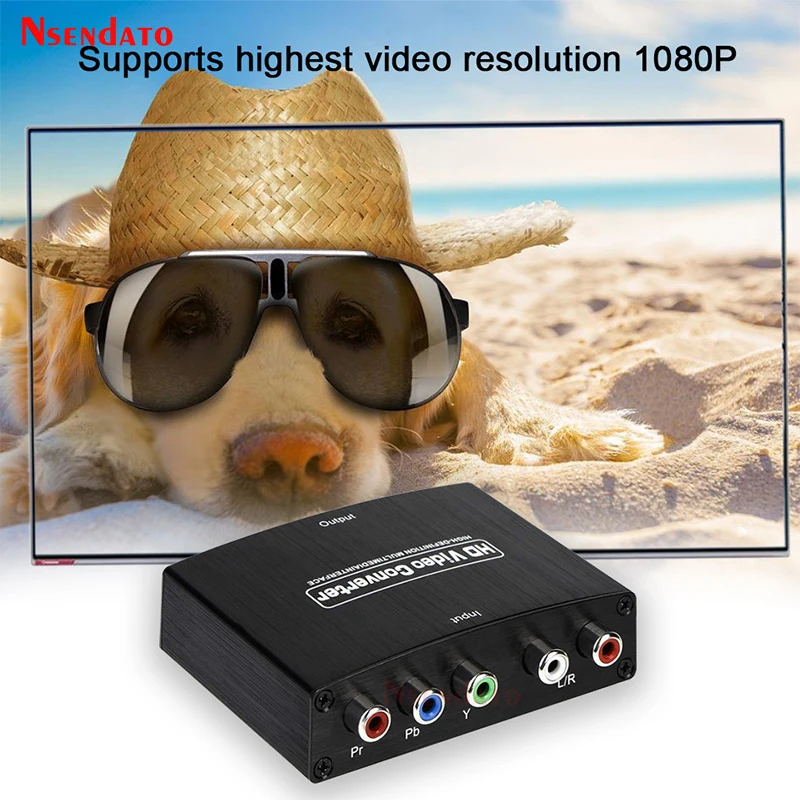
YPbPr To HDMI-compatible 1080P Video Audio Converter Adapter RCA to HD Connector Converters Adapters For PS2 DVD PSP Xbox HDTV
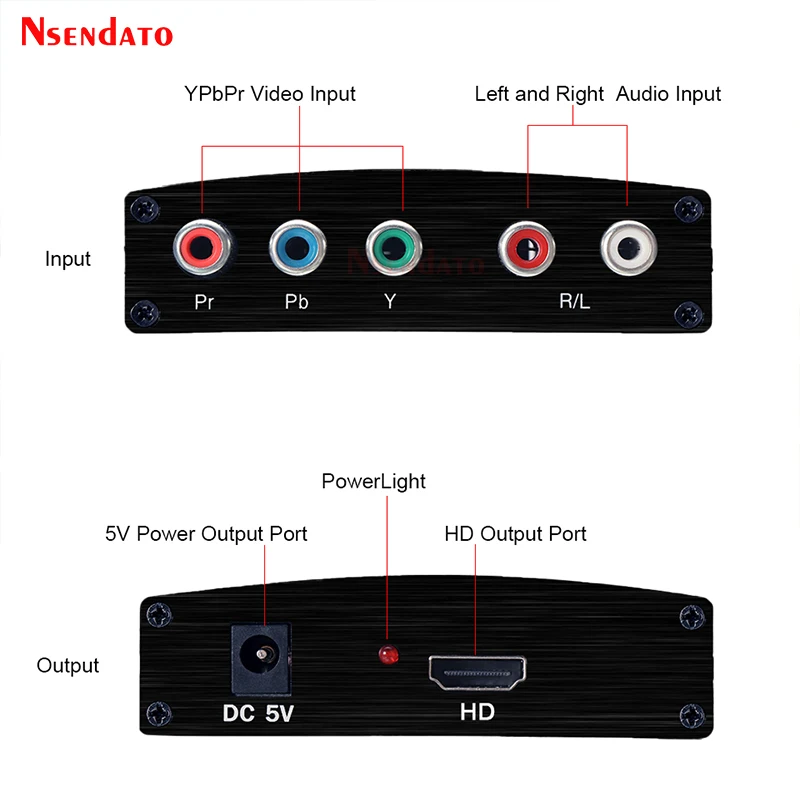
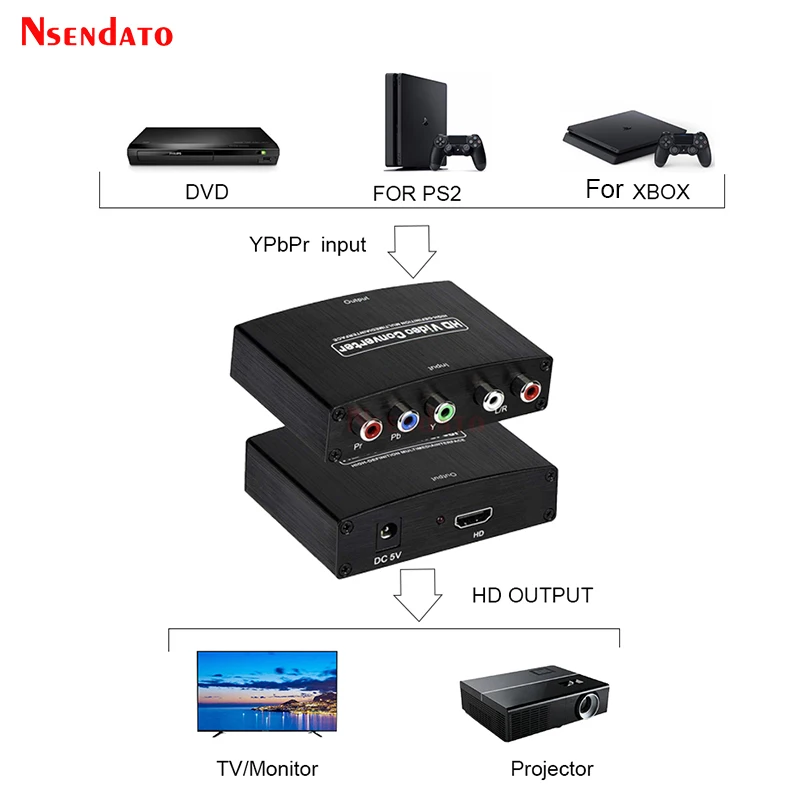
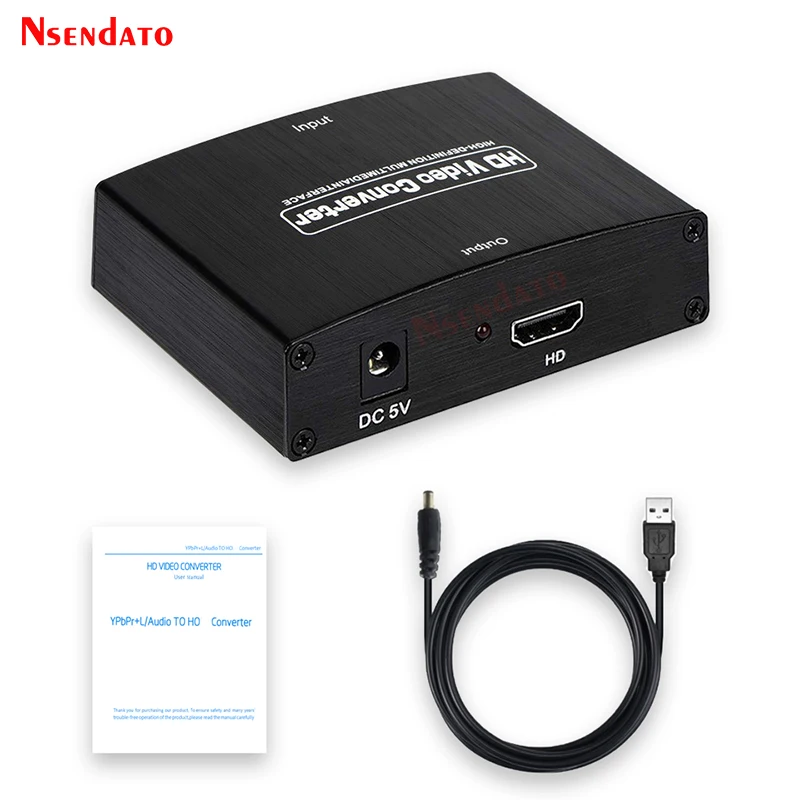
<div class="detailmodule_dynamic"><kse:widget data-widget-type="customText" id="22569421" type="custom"></kse:widget></div><div class="detailmodule_html"><div class="detail-desc-decorate-richtext"><div style="font-size:13.3333px"><div style="font-size:13.3333px"><div style="font-size:13.3333px;margin:0px;margin-bottom:0px;margin-top:0px;margin-left:0px;margin-right:0px;padding:0px 0px 0px 0em;padding-bottom:0px;padding-top:0px;padding-right:0px"><div style="font-size:13.3333px"><div style="font-size:13.3333px"><div style="font-size:13.3333px;margin:0px;margin-bottom:0px;margin-top:0px;margin-left:0px;margin-right:0px;padding:0px 0px 0px 0em;padding-bottom:0px;padding-top:0px;padding-right:0px"><div><span style="font-size:18px"><span style="font-family:arial, helvetica, sans-serif">YPbPr To HDMI-compatible 1080P Video Audio Converter Adapter RCA to HD Connector Converters Adapters For PS2 DVD PSP Xbox HDTV</span></span></div></div></div></div><div style="font-size:13.3333px"><div style="font-size:13.3333px"><p style="font-size:13.3333px"></p><div style="font-size:13.3333px"><div><span style="font-family:arial, helvetica, sans-serif"><span style="font-size:18px">Description:</span></span></div><div><span style="font-family:arial, helvetica, sans-serif"><span style="font-size:18px">【Component (input) to HD (output) Converter】 YPbPr to HD adapter converts analog component video and R/L audio signal to digital HD signal, enables your old DVD player, cable box and gaming consoles to work with your fancy new television, display and projector. (NOTE: This is a Component to HD Converter, not an HD to Component Converter, can not be used reversely.)</span></span></div><div><span style="font-family:arial, helvetica, sans-serif"><span style="font-size:18px">【1080P High-Quality Supported】This YPbPr video converter enables you to play some older consoles on newer monitors and HDTVs. Supports component video resolutions: 480i/p(60Hz), 576i/p(50Hz), 720p(50/60Hz), 1080i/p(50/60Hz).Supports HD Output: 480P, 576P, 720P/60Hz, 1080P/60Hz.</span></span></div><div><span style="font-family:arial, helvetica, sans-serif"><span style="font-size:18px">【HD Audio】Supports uncompressed audio such as DTS Digital, for Dolby Digital (Including DTS-HD and Dolby True HD). Supports PCM stereo.</span></span></div><div><span style="font-family:arial, helvetica, sans-serif"><span style="font-size:18px">【Plug and Play】YPbPr Component 5RCA RGB to HD Converter, no need to install drivers, works well with your old Blu-ray DVD Player,for Wii, for original Xbox One, for SKY HD box, for PS3, for PS2, for n64.</span></span></div><div> </div><div><span style="font-family:arial, helvetica, sans-serif"><span style="font-size:18px">Specifications:</span></span></div><div><span style="font-family:arial, helvetica, sans-serif"><span style="font-size:18px">YPbPr/RGB + R/L to HD converter</span></span></div><div><span style="font-family:arial, helvetica, sans-serif"><span style="font-size:18px">Video Input: Component YPbPr/RGB</span></span></div><div><span style="font-family:arial, helvetica, sans-serif"><span style="font-size:18px">Audio Input format: 2 channel LPCM</span></span></div><div><span style="font-family:arial, helvetica, sans-serif"><span style="font-size:18px">Video Output: HD</span></span></div><div><span style="font-family:arial, helvetica, sans-serif"><span style="font-size:18px">Input Video Amplifier Bandwidth: 1.65Gbps/165MHz</span></span></div><div><span style="font-family:arial, helvetica, sans-serif"><span style="font-size:18px">Input Video Signal: 0.5-1.0 volts P-P</span></span></div><div><span style="font-family:arial, helvetica, sans-serif"><span style="font-size:18px">Output port: HD</span></span></div><div><span style="font-family:arial, helvetica, sans-serif"><span style="font-size:18px">Composite input resolutions: 480i@60Hz, 480p@60Hz, 576i@50Hz, 576p@50Hz, 720P@50/60Hz, 1080i@50/60Hz, 1080p@50/60Hz</span></span></div><div><span style="font-family:arial, helvetica, sans-serif"><span style="font-size:18px">HD output format: 480p@60Hz, 720p@60Hz, 1080i@60Hz, 1080p@60Hz</span></span></div><div><span style="font-family:arial, helvetica, sans-serif"><span style="font-size:18px">Power: 5V/1A Power Supply</span></span></div><div><span style="font-family:arial, helvetica, sans-serif"><span style="font-size:18px">Color: Black</span></span></div><div> </div><div><span style="font-family:arial, helvetica, sans-serif"><span style="font-size:18px">Package Included:</span></span></div><div><span style="font-family:arial, helvetica, sans-serif"><span style="font-size:18px">1 x YPbPr to HDMI-compatible adapter</span></span></div><div><span style="font-family:arial, helvetica, sans-serif"><span style="font-size:18px">1 x user manual</span></span></div><div><span style="font-family:arial, helvetica, sans-serif"><span style="font-size:18px">1 x power cable</span></span></div><div> </div><div><span style="font-family:arial, helvetica, sans-serif"><span style="font-size:18px">Note:</span></span></div><div><span style="font-family:arial, helvetica, sans-serif"><span style="font-size:18px">1. Please kindly check your input signal. This is a Component(input) to HD(output) Converter, not an HD(input) to Component(output) Converter, can not be used reversely.</span></span></div><div><span style="font-family:arial, helvetica, sans-serif"><span style="font-size:18px">2. We recommend using a short than 6.5ft HD Cable.</span></span></div><div><span style="font-family:arial, helvetica, sans-serif"><span style="font-size:18px">3. The resolution of your display devices(TVs, monitors, etc) must be higher or the same with the signal source, otherwise it would not work for you.</span></span></div><div><span style="font-family:arial, helvetica, sans-serif"><span style="font-size:18px">4. To get it to work perfectly, we recommend to get all your devices connected and powered firstly, then power the component to HD converter with the adapter it comes with.</span></span></div></div><p style="font-size:13.3333px"></p><div style="font-size:13.3333px;margin:0px;margin-bottom:0px;margin-top:0px;margin-left:0px;margin-right:0px;padding:0px 0px 0px 0em;padding-bottom:0px;padding-top:0px;padding-right:0px"><div></div><div></div><div></div><div></div><div></div><div></div><div></div><div></div><div></div><div></div><div></div><div></div><div></div><div></div></div></div></div></div></div></div><p><br/></p></div></div><p><br/></p>
$38.045
$30.47
- Category : Consumer Electronics
- Brand : nsendato_office_store_store Nsendato Office Store Store
Colors
Sizes
-
+

<div class="detailmodule_dynamic"><kse:widget data-widget-type="customText" id="22569421" type="custom"></kse:widget></div><div class="detailmodule_html"><div class="detail-desc-decorate-richtext"><div style="font-size:13.3333px"><div style="font-size:13.3333px"><div style="font-size:13.3333px;margin:0px;margin-bottom:0px;margin-top:0px;margin-left:0px;margin-right:0px;padding:0px 0px 0px 0em;padding-bottom:0px;padding-top:0px;padding-right:0px"><div style="font-size:13.3333px"><div style="font-size:13.3333px"><div style="font-size:13.3333px;margin:0px;margin-bottom:0px;margin-top:0px;margin-left:0px;margin-right:0px;padding:0px 0px 0px 0em;padding-bottom:0px;padding-top:0px;padding-right:0px"><div><span style="font-size:18px"><span style="font-family:arial, helvetica, sans-serif">YPbPr To HDMI-compatible 1080P Video Audio Converter Adapter RCA to HD Connector Converters Adapters For PS2 DVD PSP Xbox HDTV</span></span></div></div></div></div><div style="font-size:13.3333px"><div style="font-size:13.3333px"><p style="font-size:13.3333px"></p><div style="font-size:13.3333px"><div><span style="font-family:arial, helvetica, sans-serif"><span style="font-size:18px">Description:</span></span></div><div><span style="font-family:arial, helvetica, sans-serif"><span style="font-size:18px">【Component (input) to HD (output) Converter】 YPbPr to HD adapter converts analog component video and R/L audio signal to digital HD signal, enables your old DVD player, cable box and gaming consoles to work with your fancy new television, display and projector. (NOTE: This is a Component to HD Converter, not an HD to Component Converter, can not be used reversely.)</span></span></div><div><span style="font-family:arial, helvetica, sans-serif"><span style="font-size:18px">【1080P High-Quality Supported】This YPbPr video converter enables you to play some older consoles on newer monitors and HDTVs. Supports component video resolutions: 480i/p(60Hz), 576i/p(50Hz), 720p(50/60Hz), 1080i/p(50/60Hz).Supports HD Output: 480P, 576P, 720P/60Hz, 1080P/60Hz.</span></span></div><div><span style="font-family:arial, helvetica, sans-serif"><span style="font-size:18px">【HD Audio】Supports uncompressed audio such as DTS Digital, for Dolby Digital (Including DTS-HD and Dolby True HD). Supports PCM stereo.</span></span></div><div><span style="font-family:arial, helvetica, sans-serif"><span style="font-size:18px">【Plug and Play】YPbPr Component 5RCA RGB to HD Converter, no need to install drivers, works well with your old Blu-ray DVD Player,for Wii, for original Xbox One, for SKY HD box, for PS3, for PS2, for n64.</span></span></div><div> </div><div><span style="font-family:arial, helvetica, sans-serif"><span style="font-size:18px">Specifications:</span></span></div><div><span style="font-family:arial, helvetica, sans-serif"><span style="font-size:18px">YPbPr/RGB + R/L to HD converter</span></span></div><div><span style="font-family:arial, helvetica, sans-serif"><span style="font-size:18px">Video Input: Component YPbPr/RGB</span></span></div><div><span style="font-family:arial, helvetica, sans-serif"><span style="font-size:18px">Audio Input format: 2 channel LPCM</span></span></div><div><span style="font-family:arial, helvetica, sans-serif"><span style="font-size:18px">Video Output: HD</span></span></div><div><span style="font-family:arial, helvetica, sans-serif"><span style="font-size:18px">Input Video Amplifier Bandwidth: 1.65Gbps/165MHz</span></span></div><div><span style="font-family:arial, helvetica, sans-serif"><span style="font-size:18px">Input Video Signal: 0.5-1.0 volts P-P</span></span></div><div><span style="font-family:arial, helvetica, sans-serif"><span style="font-size:18px">Output port: HD</span></span></div><div><span style="font-family:arial, helvetica, sans-serif"><span style="font-size:18px">Composite input resolutions: 480i@60Hz, 480p@60Hz, 576i@50Hz, 576p@50Hz, 720P@50/60Hz, 1080i@50/60Hz, 1080p@50/60Hz</span></span></div><div><span style="font-family:arial, helvetica, sans-serif"><span style="font-size:18px">HD output format: 480p@60Hz, 720p@60Hz, 1080i@60Hz, 1080p@60Hz</span></span></div><div><span style="font-family:arial, helvetica, sans-serif"><span style="font-size:18px">Power: 5V/1A Power Supply</span></span></div><div><span style="font-family:arial, helvetica, sans-serif"><span style="font-size:18px">Color: Black</span></span></div><div> </div><div><span style="font-family:arial, helvetica, sans-serif"><span style="font-size:18px">Package Included:</span></span></div><div><span style="font-family:arial, helvetica, sans-serif"><span style="font-size:18px">1 x YPbPr to HDMI-compatible adapter</span></span></div><div><span style="font-family:arial, helvetica, sans-serif"><span style="font-size:18px">1 x user manual</span></span></div><div><span style="font-family:arial, helvetica, sans-serif"><span style="font-size:18px">1 x power cable</span></span></div><div> </div><div><span style="font-family:arial, helvetica, sans-serif"><span style="font-size:18px">Note:</span></span></div><div><span style="font-family:arial, helvetica, sans-serif"><span style="font-size:18px">1. Please kindly check your input signal. This is a Component(input) to HD(output) Converter, not an HD(input) to Component(output) Converter, can not be used reversely.</span></span></div><div><span style="font-family:arial, helvetica, sans-serif"><span style="font-size:18px">2. We recommend using a short than 6.5ft HD Cable.</span></span></div><div><span style="font-family:arial, helvetica, sans-serif"><span style="font-size:18px">3. The resolution of your display devices(TVs, monitors, etc) must be higher or the same with the signal source, otherwise it would not work for you.</span></span></div><div><span style="font-family:arial, helvetica, sans-serif"><span style="font-size:18px">4. To get it to work perfectly, we recommend to get all your devices connected and powered firstly, then power the component to HD converter with the adapter it comes with.</span></span></div></div><p style="font-size:13.3333px"></p><div style="font-size:13.3333px;margin:0px;margin-bottom:0px;margin-top:0px;margin-left:0px;margin-right:0px;padding:0px 0px 0px 0em;padding-bottom:0px;padding-top:0px;padding-right:0px"><div></div><div></div><div></div><div></div><div></div><div></div><div></div><div></div><div></div><div></div><div></div><div></div><div></div><div></div></div></div></div></div></div></div><p><br/></p></div></div><p><br/></p>
Related Product
Browse The Collection of Top Products.